EasyManua.ls Logo

Sony EV-S7000 - Setting up VCR Plus+ (continued)

Sony EV-S7000
84 pages
Print Icon
To Next Page IconTo Next Page
To Previous Page IconTo Previous Page
Loading...
Number
buttons
PAGE!
1
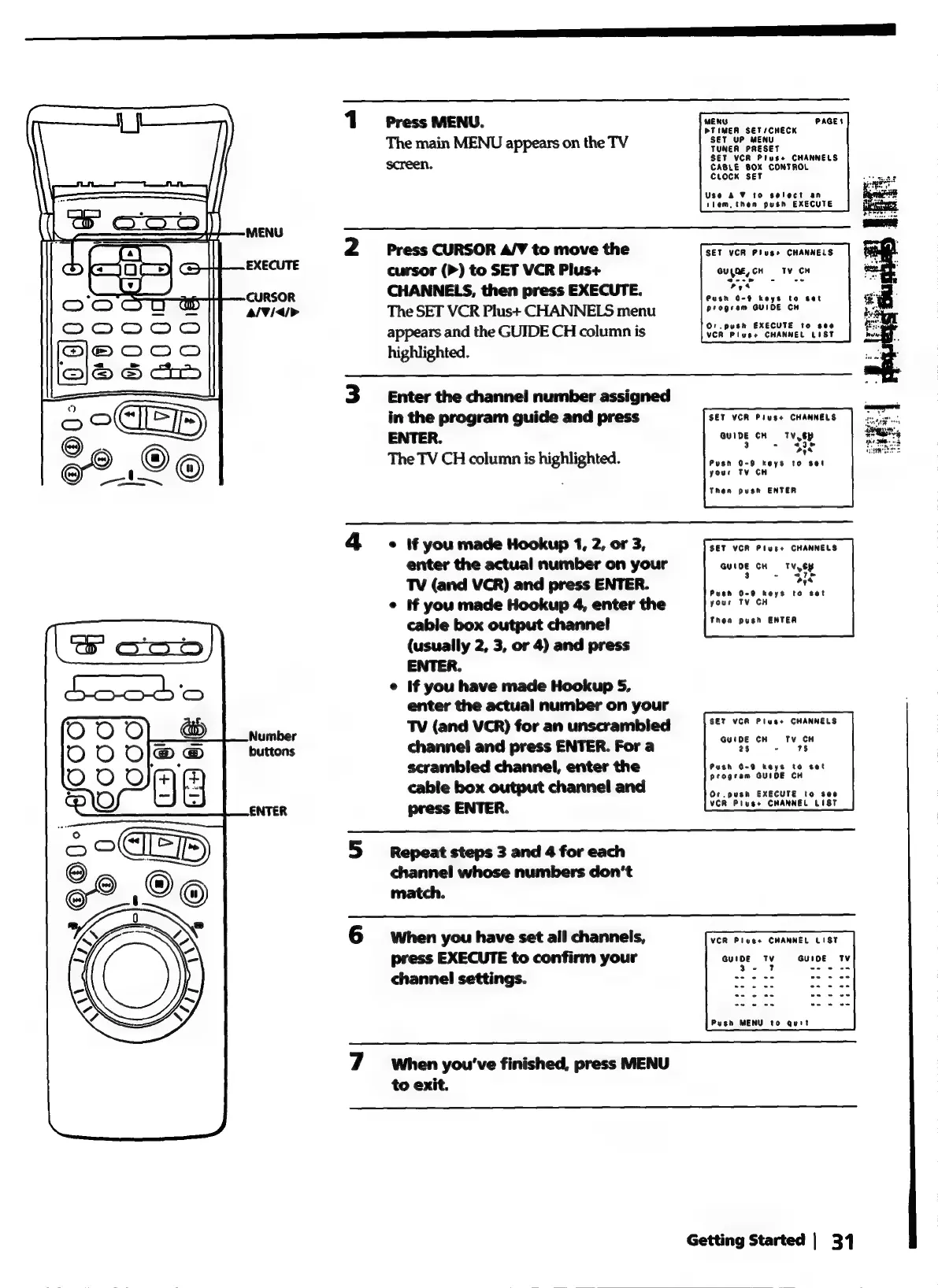
Press
MENU.
DTIMER
SET/CHECK
The
main
MENU
appears
on
the
TV
TUNcacenece
TUNER
PRESET
SET
VCR
Plus+
CHANNELS
screen.
CABLE
BOX
CONTROL
CLOCK
SET
Use
a
¥
to
select
an
tlem,
then
push
EXECUTE
2
Press
CURSOR
A/V
to
move
the
SET
VCR
Pluss
CHANNELS
cursor
(P)
to
SET
VCR
Plus+
Quyae,cH
Tv
CH
CHANNELS,
then
press
EXECUTE.
ues
Push
0-9
keys
to
set
progeam
GUIDE
CH
The
SET
VCR
Plus+
CHANNELS
menu
appears
and
the
GUIDE
CH
column
is
highlighted.
Or.
push
EXECUTE
to
see
VCR
Pluse
CHANNEL
LIST
3
Enter
the
channel
number
assigned
in
the
program
guide
and
press
SET
VCR
Pluss
CHANNELS
ENTER.
auiDe
cu
T8y
The
TV
CH
column
is
highlighted.
Secaieneen
your
TV
CH
Then
push
ENTER
4
.
If
you
made
Hookup
1,
2,
or
3,
SET
VCR
Plus+
CHANNELS
enter
the
actual
number
on
your
GUIDE
CH
TV,
ey
TV
(and
VCR)
and
press
ENTER.
pene
¢
If
you
made
Hookup
4,
enter
the
your
TV
CH
cable
box
output
channel
Theo:
-pesn
ENTER
(usually
2, 3,
or
4)
and
press
ENTER.
e
If
you
have
made
Hookup
5,
enter
the
actual
number
on
your
TV
(and
VCR)
for
an
unscrambied
SET
VCR
Plus+
CHANNELS
channel
and
press
ENTER.
For
a
ag
as
tS
scrambled
channel,
enter
the
pesh
On9
neze
te
set
cable
box
output
channel
and
Or
.push
EXECUTE
to
see
press
ENTER.
VCR
Pluss
CHANNEL
LIST
5
Repeat
steps
3
and
4
for
each
channel
whose
numbers
don’t
match.
6
when
you
have
set
all
channels,
press
EXECUTE
to
confirm
your
auioe
ty
channel
settings.
ap
nies
VCR
Pluss
CHANNEL
LIST
Push
MENU
to
quit
7
When
you've
finished,
press
MENU
to
exit.
Getting
Started
|
31