EasyManua.ls Logo

Sony EV-S7000 - Adjusting the picture (continued); Adjusting the tracking

Sony EV-S7000
84 pages
Print Icon
To Next Page IconTo Next Page
To Previous Page IconTo Previous Page
Loading...
a
ie
Adjusting
the
picture
(continued)
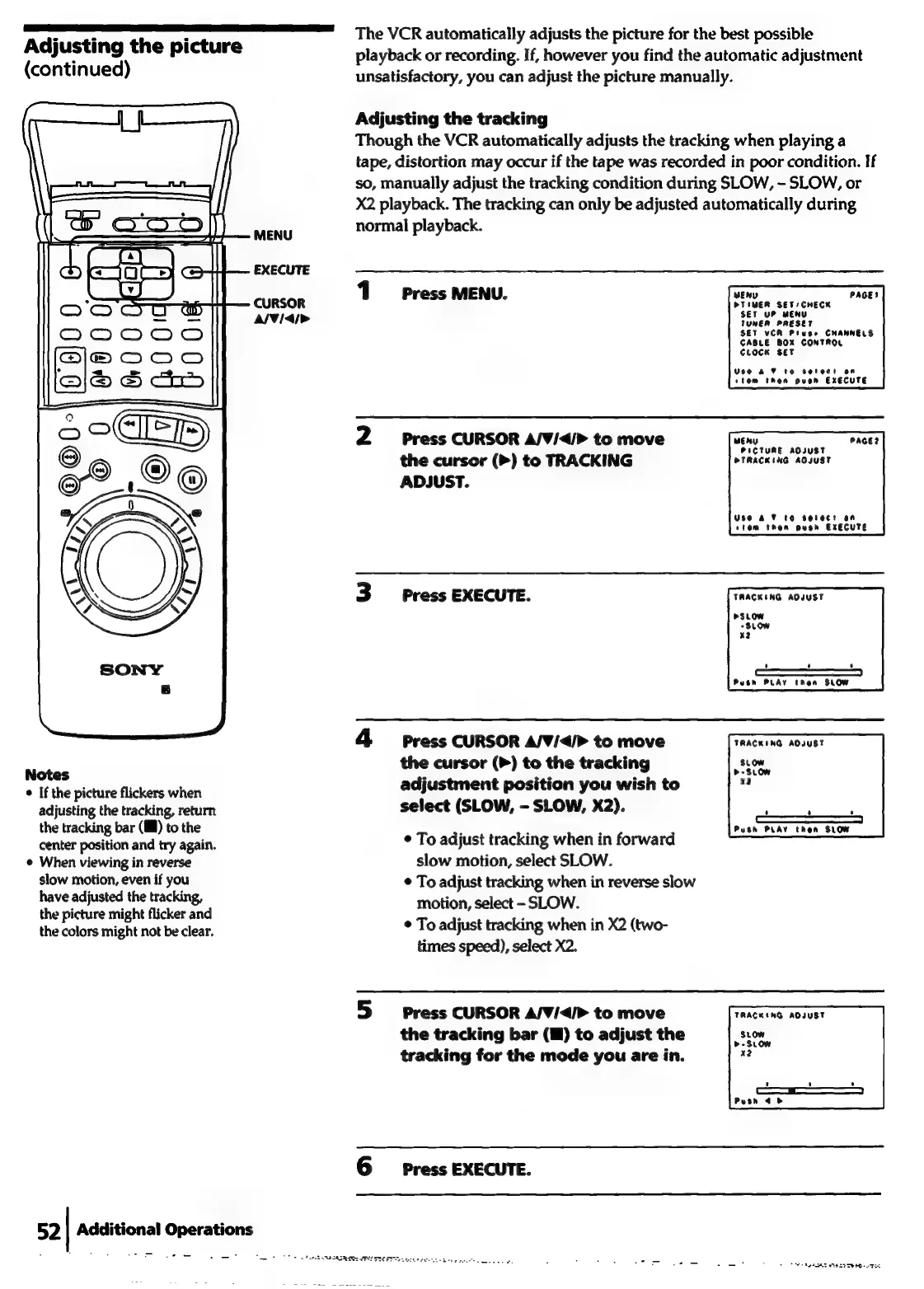
The
VCR
automatically
adjusts
the
picture
for
the
best
possible
playback
or
recording.
If,
however
you
find
the
automatic
adjustment
unsatisfactory,
you
can
adjust
the
picture
manually.
Adjusting
the
tracking
Though
the
VCR
automatically
adjusts
the
tracking
when
playing
a
tape,
distortion
may
occur
if
the
tape
was
recorded
in
poor
condition.
If
so,
manually
adjust
the
tracking
condition
during
SLOW,
-
SLOW,
or
X2
playback.
The
tracking
can
only
be
adjusted
automatically
during
MENU
normal
playback.
EXECUTE
1
Press
MENU
MEWD
PAGES
CURSOR
.
PTIMER
SET
/CHECK
SET
uP
MENU
A/V/4i>
TUNER
PRESET
SET
VCR
Pluses
CHANNELS
CABLE
BOX
CONTROL
Cuoce
set
Use
AF
to
serect
on
stem
then
oven
EXECUTE
2
Press
CURSOR
A/V/<4/>
to
move
PAGE?
MEANY
PICTURE
ADJUST
the
cursor
(>)
to
TRACKING
PTRACKING
ADJUST
ADJUST.
Use
oF
tO
Select
an
stem
then
push
EXECUTE
3
Press
EXECUTE.
TRACKING
AOJUST
>SLOW
-SLOW
x2
Push PLAY
then
SLOW
4
Press
CURSOR
A/V/</>
to
move
TRACKING
ADJUST
Notes
the
cursor
(P)
to
the
tracking
stom
©
If
the
picture
flickers
when
adjustment
position
you
wish
to
oe
adjusting
the
tracking,
return
select
(SLOW,
-
SLOW,
X2).
,
the
tracking
bar
(MM)
to
the
:
.
:
Push PLAY
then
SLOW
center
position
and
try
again.
¢
To
adjust
tracking
when
in
forward
©
When
viewing
in
reverse
slow
motion,
select
SLOW.
slow
motion,
even
if
you
¢
To
adjust
tracking
when
in
reverse
slow
have
adjusted
the
tracking,
motion,
select
-
SLOW.
the
picture
might
flicker
and
:
.
:
the
colors
might
not
be
clear.
*
To
adjust
tracking
when
in
X2
(two-
times
speed),
select
X2.
5
press
CURSOR
A/¥/</>
to
move
TaAGRinG
AOTUET
the
tracking
bar
(HM)
to
adjust
the
Ree
tracking
for
the
mode
you
are
in.
a2
6
Press
EXECUTE.
52
|
Additional
Operations
a
ee
_=—-
Tm
ts
Pere
aaa
FREE
TREE
etre
berets
ob:
Pos
Ss
tes
essks
ese
Tee
ete

Related product manuals