EasyManua.ls Logo

Sony EV-S7000 - Setting the LANC mode

Sony EV-S7000
84 pages
Print Icon
To Next Page IconTo Next Page
To Previous Page IconTo Previous Page
Loading...
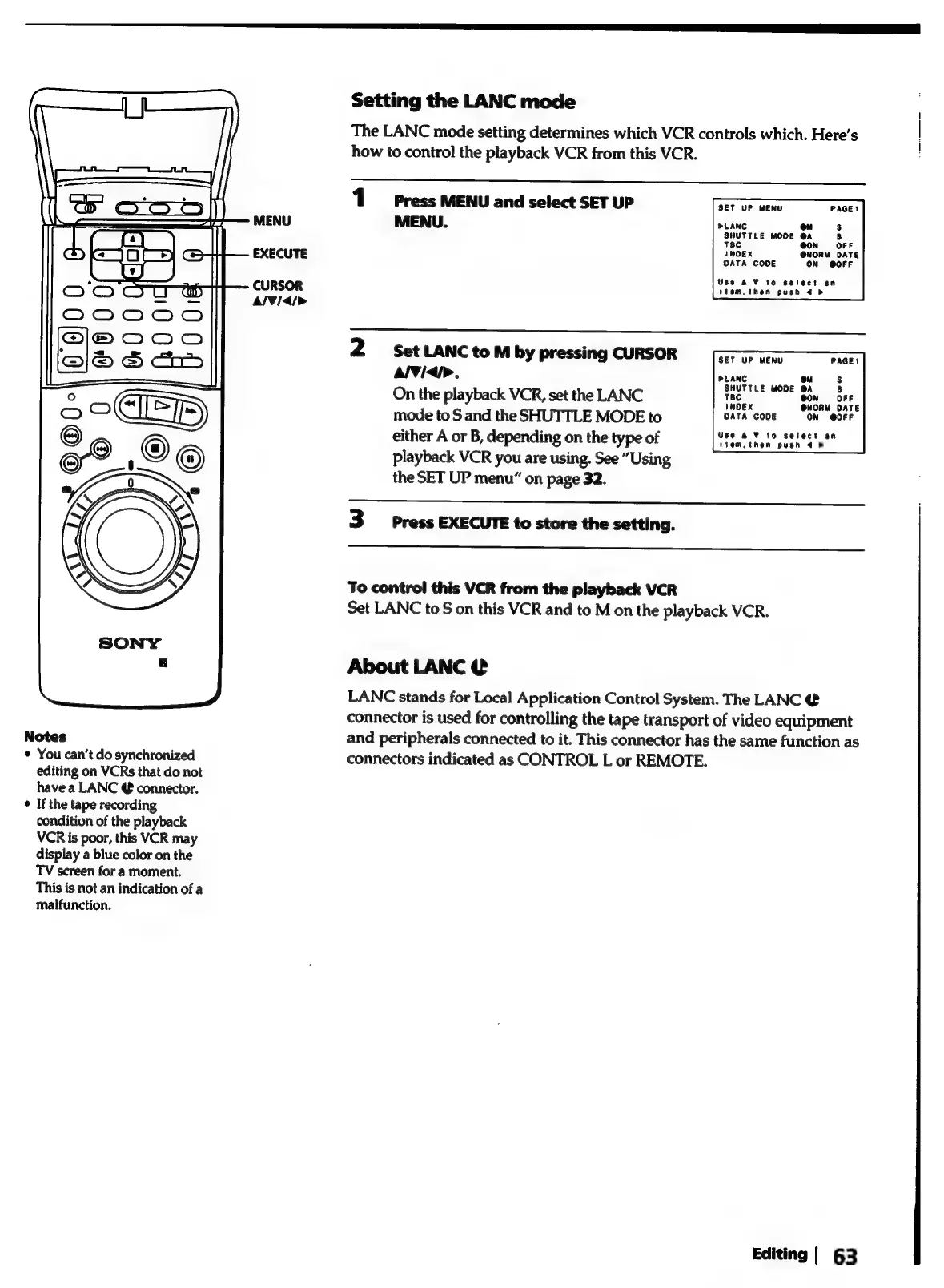
MENU
EXECUTE
CURSOR
A/¥/<4/>
Notes
¢
You
can’t
do
synchronized
editing
on
VCRs
that
do
not
have
a
LANC
@
connector.
°
If
the
tape
recording
condition
of
the
playback
VCR
is
poor,
this
VCR
may
display
a
blue
color
on
the
TV
screen
for
a
moment.
This
is
not
an
indication
of
a
malfunction.
Setting
the
LANC
mode
The
LANC
mode
setting
determines
which
VCR
controls
which.
Here's
how
to
control
the
playback
VCR
from
this
VCR.
1
Press
MENU
and
select
SET
UP
MENU.
SET
UP
MENU
PAGE!
>LANC
ou
s
SHUTTLE
MODE
@A
8
T8c
OFF
INDEX
@NORM
DATE
OATA
CODE
ON
@OFF
Use
4
¥
to
select
an
stom.
then
push
4
&
2
Set
LANC
to
M
by
pressing
CURSOR
AlVidi>.
On
the
playback
VCR,
set
the
LANC
mode
to
S
and
the
SHUTTLE
MODE
to
either
A
or
B,
depending
on
the
type
of
playback
VCR
you
are
using.
See
“Using
the
SET
UP
menu”
on
page
32.
SET
UP
MENU
PAGE!
PLANC
ou
$s
SHUTTLE
MODE
@A
8
TBC
@On
OFF
INDEX
@NORM
DATE
DATA
CODE
ON
@OFF
Use
& ¥
to
select
an
item.
then
push
4 >
3
press
EXECUTE
to
store
the
setting.
To
control
this
VCR
from
the
playback
VCR
Set
LANC
to
S
on
this
VCR
and
to
M
on
the
playback
VCR.
About
LANC
@
LANC
stands
for
Local
Application
Control
System.
The
LANC
@
connector
is
used
for
controlling
the
tape
transport
of
video
equipment
and
peripherals
connected
to
it.
This
connector
has
the
same
function
as
connectors
indicated
as
CONTROL
L
or
REMOTE.
Editing
|
63

Related product manuals