EasyManua.ls Logo

Sony EV-S7000 - Page 9

Sony EV-S7000
84 pages
Print Icon
To Next Page IconTo Next Page
To Previous Page IconTo Previous Page
Loading...
Notes
©
If
the
TV
uses
a
different
remote
control
system
from
the
one
programmed
to
work
with
the
VCR,
you
cannot
control
your
TV
with
the
remote
commander.
If
you
enter
a
new
code
number,
the
code
number
previously
entered
will
be
erased.
¢
When
you
replace
the
batteries
in
the
remote
commander,
the
code
number
automatically
resets
to
1
(Sony).
Reset
the
appropriate
code
number.
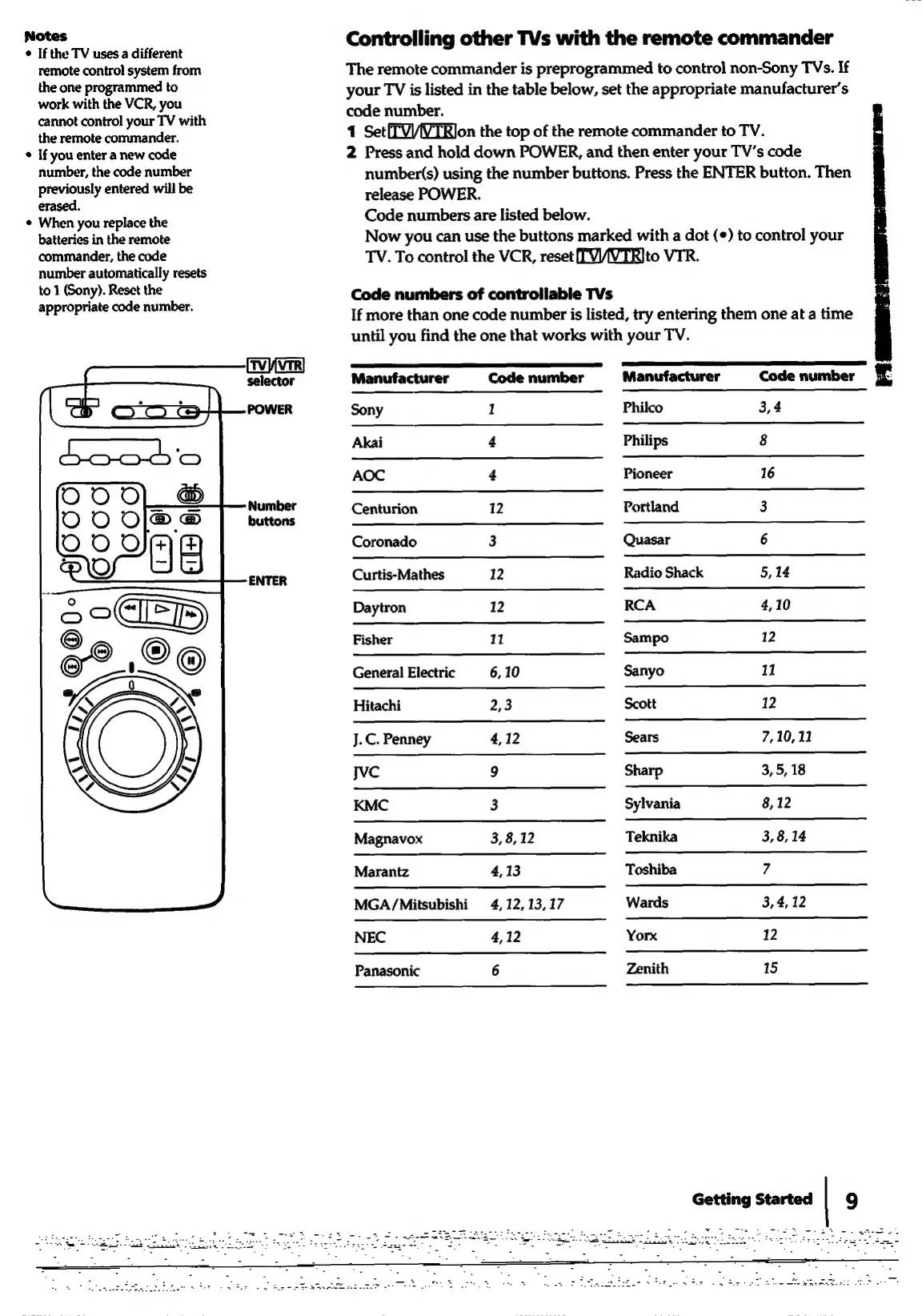
ENTER
Controlling
other
TVs
with
the
remote
commander
The
remote
commander
is
preprogrammed
to
control
non-Sony
TVs.
If
your
TV
is
listed
in
the
table
below,
set
the
appropriate
manufacturer's
code
number.
4
Set(TV/VTRlon
the
top
of
the
remote
commander
to
TV.
2
Press
and
hold
down
POWER,
and
then
enter
your
TV’s
code
number(s)
using
the
number
buttons.
Press
the
ENTER
button.
Then
release
POWER.
Code
numbers
are
listed
below.
Now
you
can
use
the
buttons
marked
with
a
dot
(¢)
to
control
your
TV.
To
control
the
VCR,
reset
TV/IVTRIto
VTR.
Code
numbers
of
controllable
TVs
If
more
than
one
code
number
is
listed,
try
entering
them
one
at
a
time
until
you
find
the
one
that
works
with
your
TV.
Manufacturer
Code
number
Sony
1
Akai
4
AOC
4
Centurion
12
Coronado
3
Curtis-Mathes
12
Daytron
12
Fisher
11
General
Electric
6,10
Hitachi
2,3
J.C.
Penney
4,12
Jvc
9
KMC
3
Magnavox
3,8,
12
Marantz
4,13
MGA/Mitsubishi
4,
12,
13,
17
NEC
4,12
Panasonic
6
Manufacturer
Code
number
£
Philco
3,4
Philips
8
Pioneer
16
Portland
3
Quasar
6
Radio
Shack
5,
14
RCA
4,10
Sampo
12
Sanyo
11
Scott
12
Sears
7,10,
11
Sharp
3, 5,
18
Sylvania
8,12
Teknika
3,
8,
14
Toshiba
7
Wards
3,4,
12
Yorx
12
Zenith
15
Getting
Started
|
9

Related product manuals