EasyManua.ls Logo

Sony EV-S800 - Page 40

Sony EV-S800
44 pages
Print Icon
To Next Page IconTo Next Page
To Previous Page IconTo Previous Page
Loading...
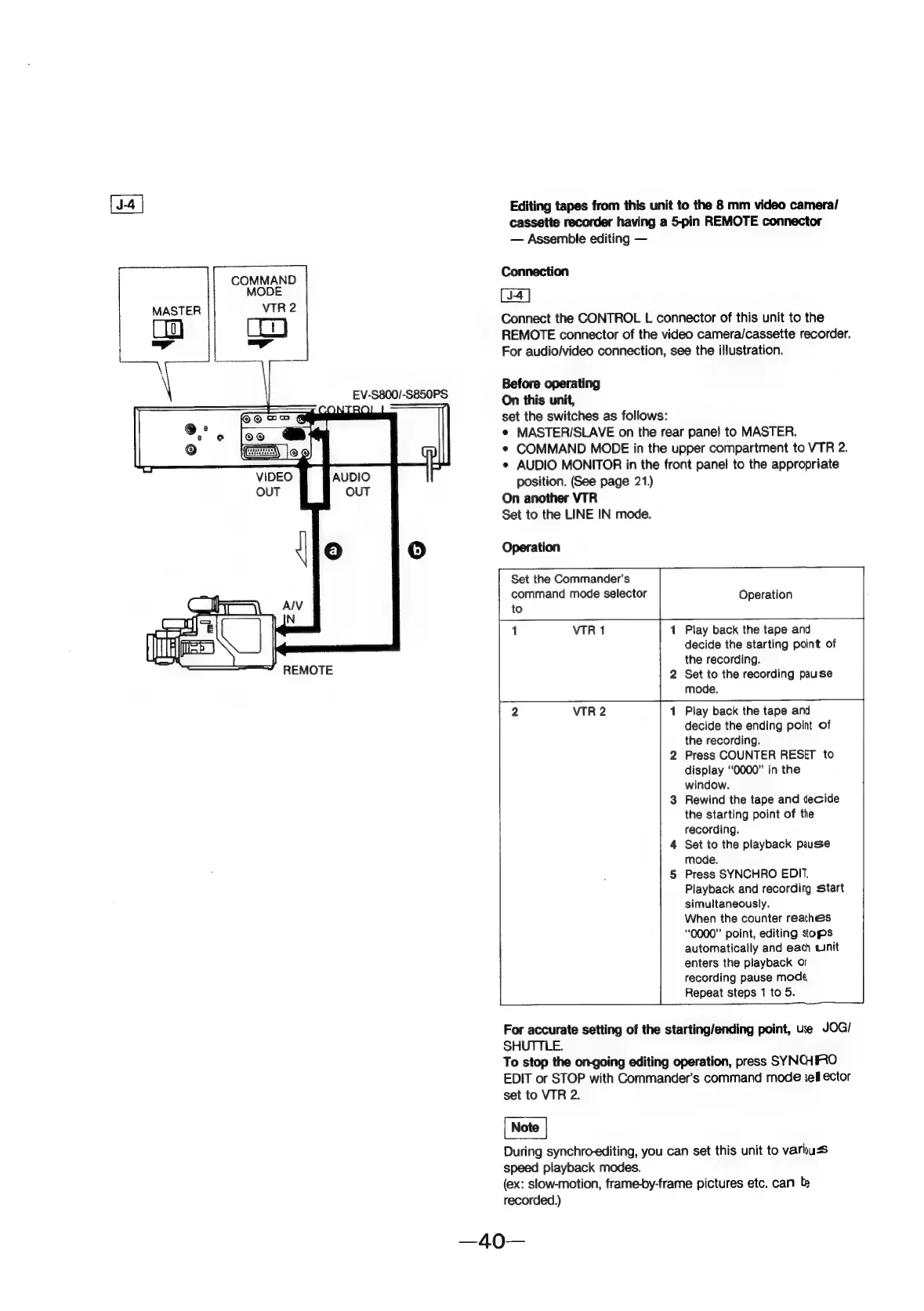
COMMAND
MODE
VTR
2
EV-S800/-S850PS
va
com
egl
—~
REMOTE
Editing
tapes
from
this
unit
to
the
8
mm
video
cameral/
cassette
recorder
having
a
5-pin
REMOTE
connector
Assemble
editing
Connection
Connect
the
CONTROL
L
connector
of
this
unit
to
the
REMOTE
connector
of
the
video
camera/cassette
recorder.
For
audio/video
connection,
see
the
illustration.
Before
operating
On
this
unit,
set
the
switches
as
follows:
e
MASTER/SLAVE
on
the
rear
panel
to
MASTER.
¢
COMMAND
MODE
in
the
upper
compartment
to
VTR
2.
e
AUDIO
MONITOR
in
the
front
panel
to
the
appropriate
position.
(Gee
page
21.)
On
another
VTR
Set
to
the
LINE
IN
mode.
Operation
Set
the
Commander’s
command
mode
selector
to
Operation
Play
back
the
tape
and
decide
the
starting
point
of
the
recording.
2
Set
to
the
recording
pause
mode.
Play
back
the
tape
and
decide
the
ending
point
of
the
recording.
2
Press
COUNTER
RESET
to
display
“0000”
in
the
window.
3
Rewind
the
tape
and
decide
the
starting
point
of
the
recording.
4
Set
to
the
playback
pause
mode.
5
Press
SYNCHRO
EDI".
Playback
and
recording
start
simultaneously.
When
the
counter
reaches
“0000”
point,
editing
stops
automatically
and
each
unit
enters
the
playback
or
recording
pause
mode,
Repeat
steps
1
to
5.
For
accurate
setting
of
the
starting/ending
point,
ue
JOG/
SHUTTLE.
To
stop
the
on-going
editing
operation,
press
SYNCHRO
EDIT
or
STOP
with
Commander’s
command
mode
ell
ector
set
to
VTR
2.
During
synchro-editing,
you
can
set
this
unit
to
varbuss
speed
playback
modes.
(ex:
slow-motion,
frame-by-frame
pictures
etc.
can
b
recorded.)