EasyManua.ls Logo

Sony EV-S800 - Page 42

Sony EV-S800
44 pages
Print Icon
To Next Page IconTo Next Page
To Previous Page IconTo Previous Page
Loading...
EV-S800/-S850PS
CONTROL
S
IN
VTR
J-7
EV-S800/-S850PS
CONTROL
SIN
AIV
OUT
VTR
Le
Editing
tapes
from
this
unit
to
a
Betamax
or
8
mm
VTR
having
a
CONTROL
S
IN
jack
Assemble
editing
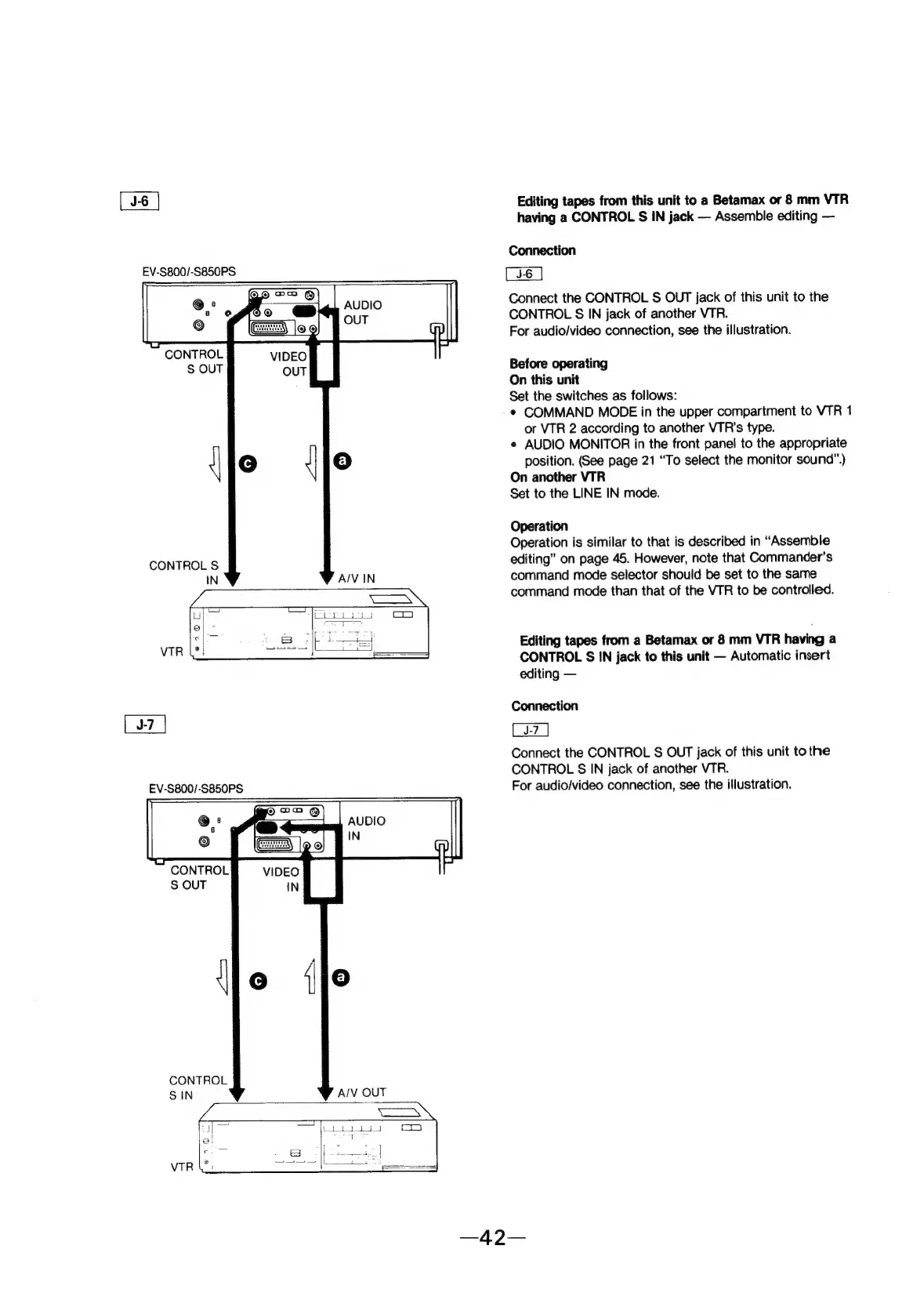
Connection
Connect
the
CONTROL
S
OUT
jack
of
this
unit
to
the
CONTROL
§
IN
jack
of
another
VTR.
For
audio/video
connection,
see
the
illustration.
Before
operating
On
this
unit
Set
the
switches
as
follows:
¢
COMMAND
MODE
in
the
upper
compartment
to
VTR
1
or
VTR
2
according
to
another
VTR’s
type.
AUDIO
MONITOR
in
the
front
panel
to
the
appropriate
position.
(See
page
21
“To
select
the
monitor
sound”.)
On
another
VTR
Set
to
the
LINE
IN
mode.
Operation
Operation
is
similar
to
that
is
described
in
“Assemble
editing”
on
page
45.
However,
note
that
Commander’s
command
mode
selector
should
be
set
to
the
same
command
mode
than
that
of
the
VTR
to
be
controlled.
Editing
tapes
from
a
Betamax
or
8
mm
VTR
having
a
CONTROL
S
IN
jack
to
this
unit
Automatic
insert
editing
Connection
Connect
the
CONTROL
S
OUT
jack
of
this
unit
to
the
CONTROL
§
IN
jack
of
another
VTR.
For
audio/video
connection,
see
the
illustration.