HCD-SX7/SX7B
14
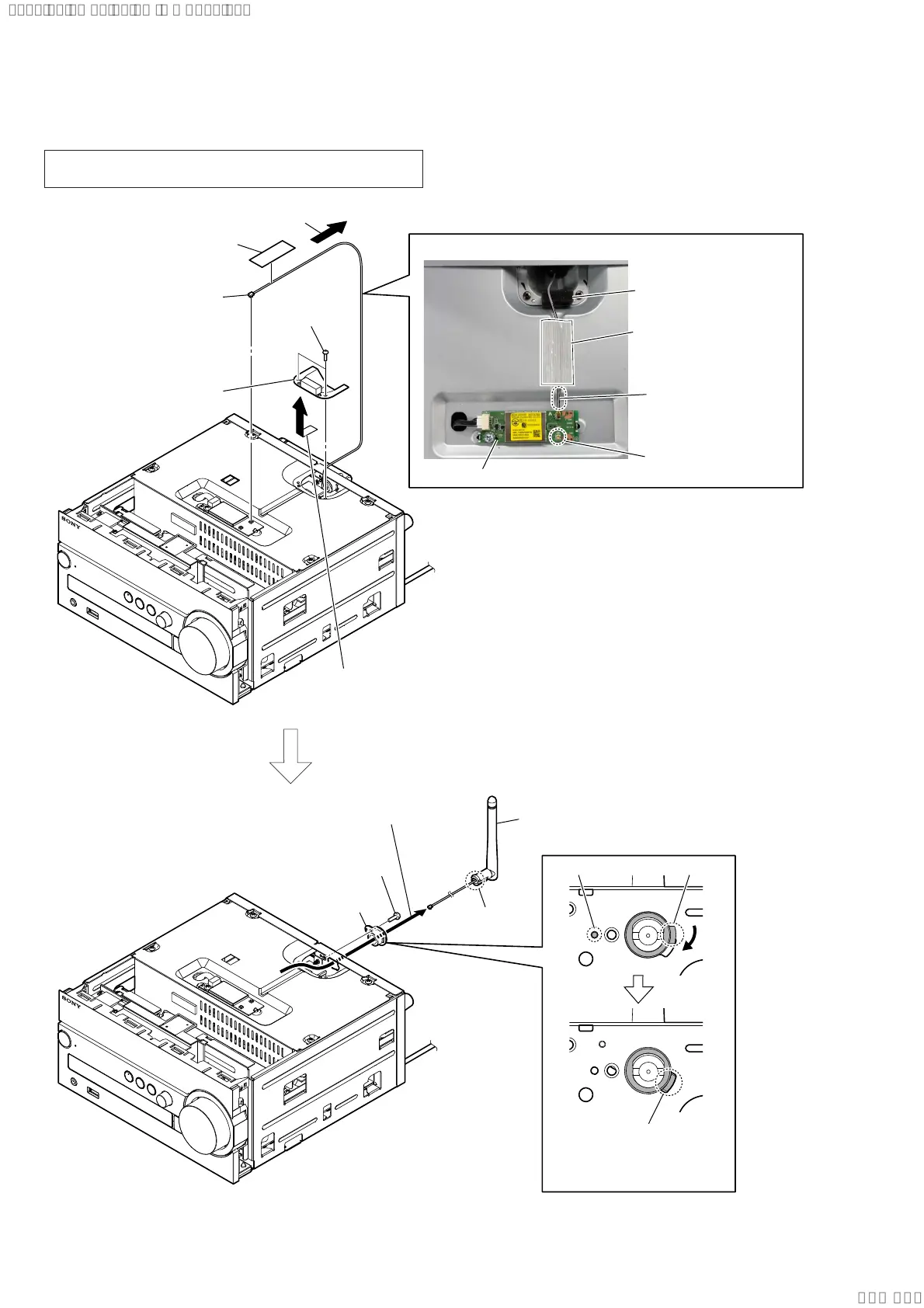
2-4. ANTENNA (2.4 GHz & 5 GHz) (ANT1), HOLDER (ANTENNA)
Note: When replacing the antenna (Ref. No. ANT1), refer to “CHECK-
ING OF NETWORK CONNECTION” on page 5.
5 Remove the cover (ANT) block
in the direction of the arrow.
6 cover (ANT) block
1 filament tape
(sub material)
3 Move the antenna cable to the rear side.
2 wireless LAN
antenna connector
(CON4)
4 two screws
(BTP2.6 u 6)
$QWHQQDZLUHVHWWLQJ
card WLAN/BT combo
filament tape
(sub material)
cushion (B)
Note 1:
Check that the wire
is not slack.
Note 2:
Do not connect the
wire to the CON5.
9 antenna (2.4 GHz & 5 GHz)
(ANT1)
0 screw
(BV/ring)
(L= 8 mm)
7 claw
qd holder
(antenna)
qs Rotate the claw of holder
(antenna) in the direction of
the arrow, align the hole of
panel (back).
claw
qa boss
8 Draw the antenna wire
out of the hole.
SYSSET
2020/02/2722:53:44(GMT+09:00)


 To Next Page