2-8 (E)
HDC-P1
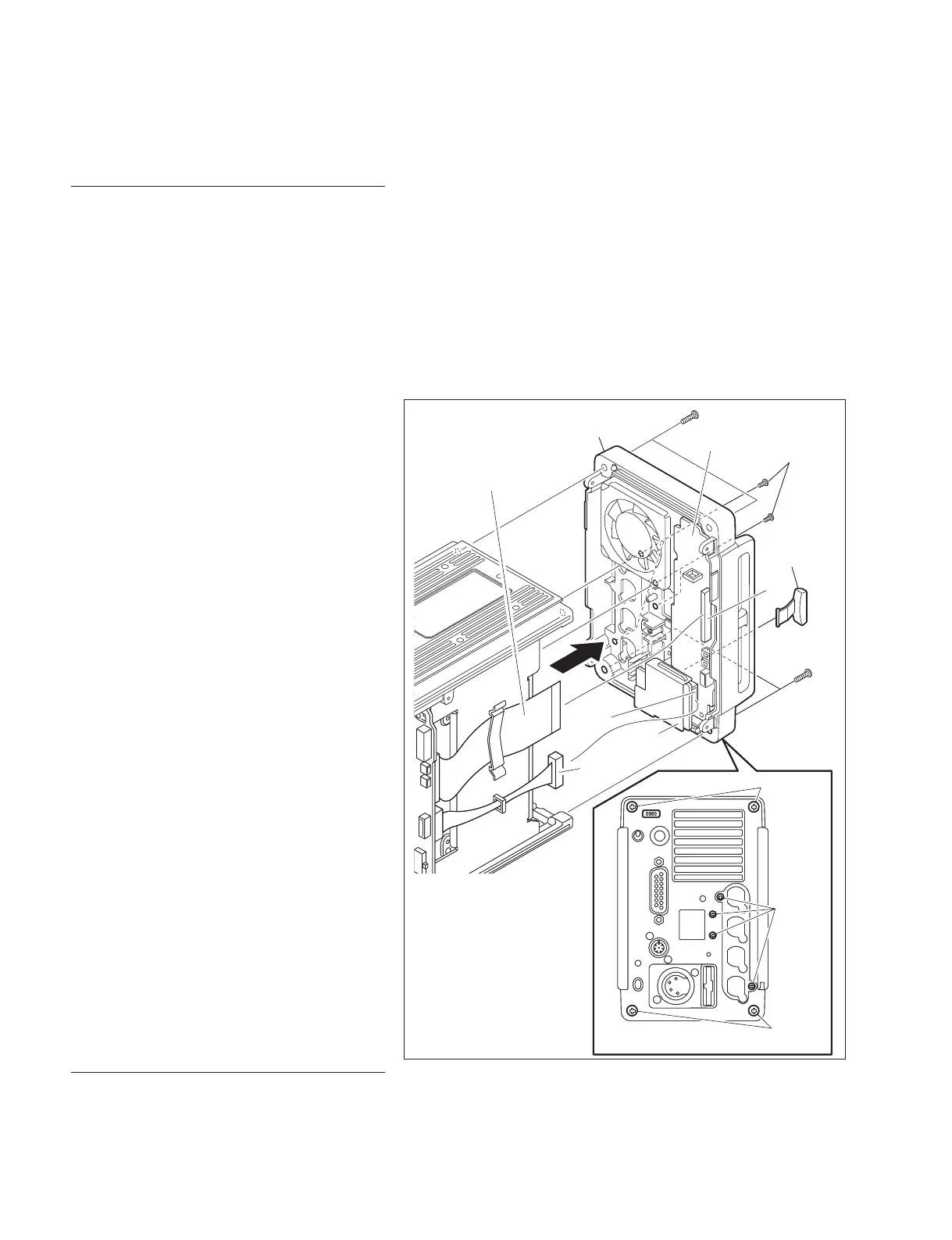
2-6. Removal and Installation of
Rear Panel Assembly
Removal
1. Remove the side panel (L) assembly and the
side panel (R) assembly.
(Refer to Section 1-5.)
2. Disconnect the fl exible fl at cable from the
connector (CN2) on the SW-1485 board and
the harness from the connector (CN2) on the
CN-3283 board.
3. Remove the four screws (B3 x 10) and the
four screws (M2.6 x 5) shown in the fi gure to
detach the rear panel assembly.
n
Detach and keep the MS cap not to lose it.
Installation
1. Install the rear panel assembly by reversing
the steps of removal.
< Rear view >
B3 x 10
B3 x 10
B3 x 10
CN2
M2.6 x 5
B3 x 10
M2.6 x 5
CN2
SW-1485 board
MS cap
Rear panel assembly
Flexible flat cable
Harness
CN-3283
board
< Rear view >
B3 x 10
B3 x 10
B3 x 10
CN2
M2.6 x 5
B3 x 10
M2.6 x 5
CN2
SW-1485 board
MS cap
Rear panel assembly
Flexible flat cable
Harness
CN-3283
board



 To Next Page