3-23 (E)
HDC-P1
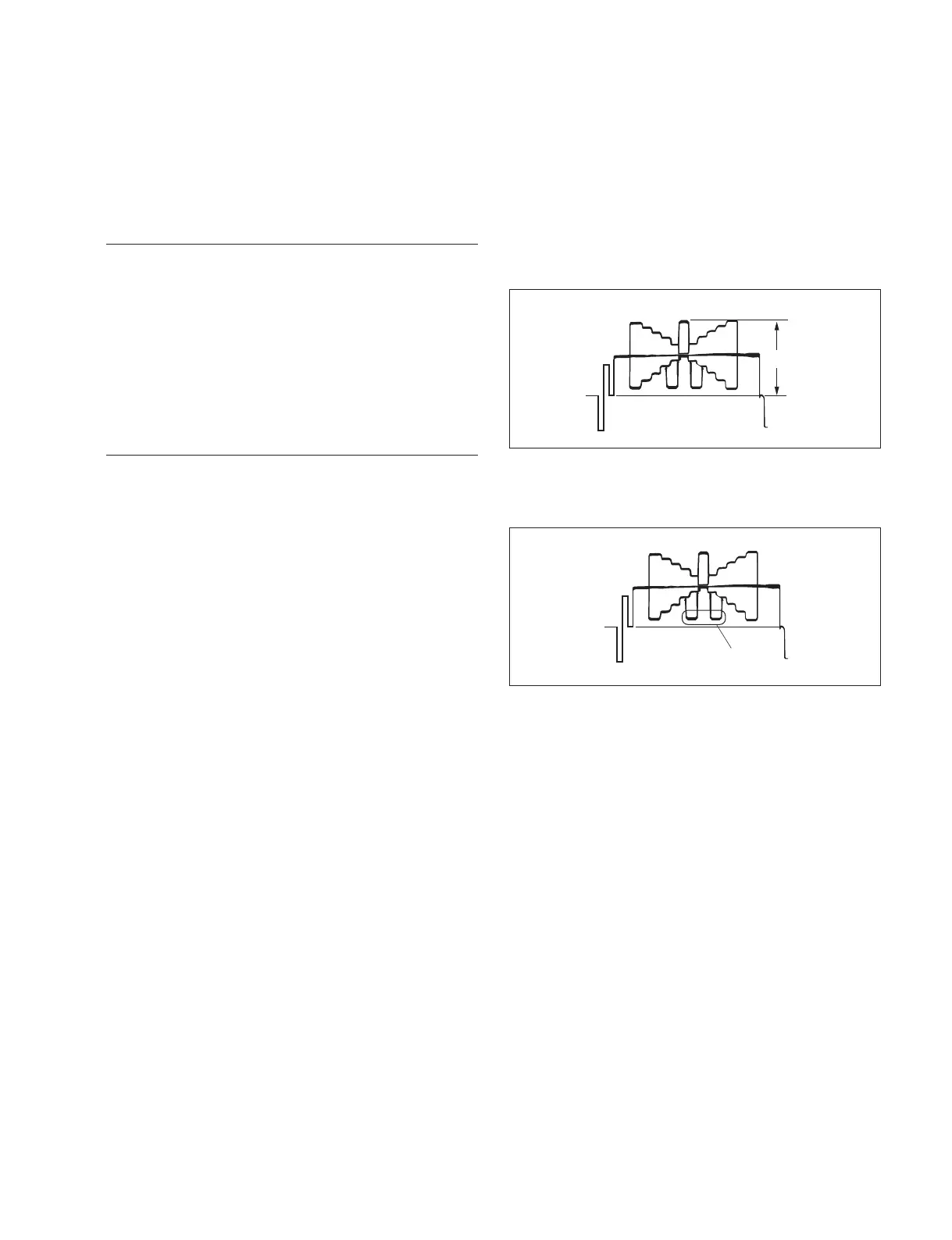
B
A
3-4-8. Flare Adjustment
Equipment: Waveform monitor (R, G, B)
Test Point: SDI 1 and SDI 2 connectors
Object: Grayscale chart
Preparations
. Setting for MSU-900
KNEE OFF button → OFF (lit)
DETAIL OFF button → OFF (lit)
MATRIX OFF button → OFF (lit)
. Shoot the grayscale chart so that the chart frame is
aligned with the underscanned monitor frame.
. Iris of the lens: A = 600 ?20 mV
Adjustment Procedure
1. MSU menu operation:
. PAINT button → ON (lit)
. Touch panel operation
(Page 1/4) → [Flare]
Adjustment item: R, G, B
Specifi cation: Set level B shown in the fi gure to
a desired level sequentially for R,
G, and B.
Or adjust the levels of other
channels to the lowest level B of
a channel.



 To Next Page