3-26 (E)
HDC-P1
A
3-4-11. White Clip Level Adjustment
Equipment: Waveform monitor (R, G, B)
Test Point: SDI 1 and SDI 2 connectors
Preparation
. Setting for MSU-900
MASTER GAIN → +12 dB
TEST1 button → ON (lit)
Adjustment Procedure
1. MSU menu operation:
. PAINT button → ON (lit)
. Touch panel operation
(Page 2/4) → [White|Clip]
Adjustment item: R, G, B, Master
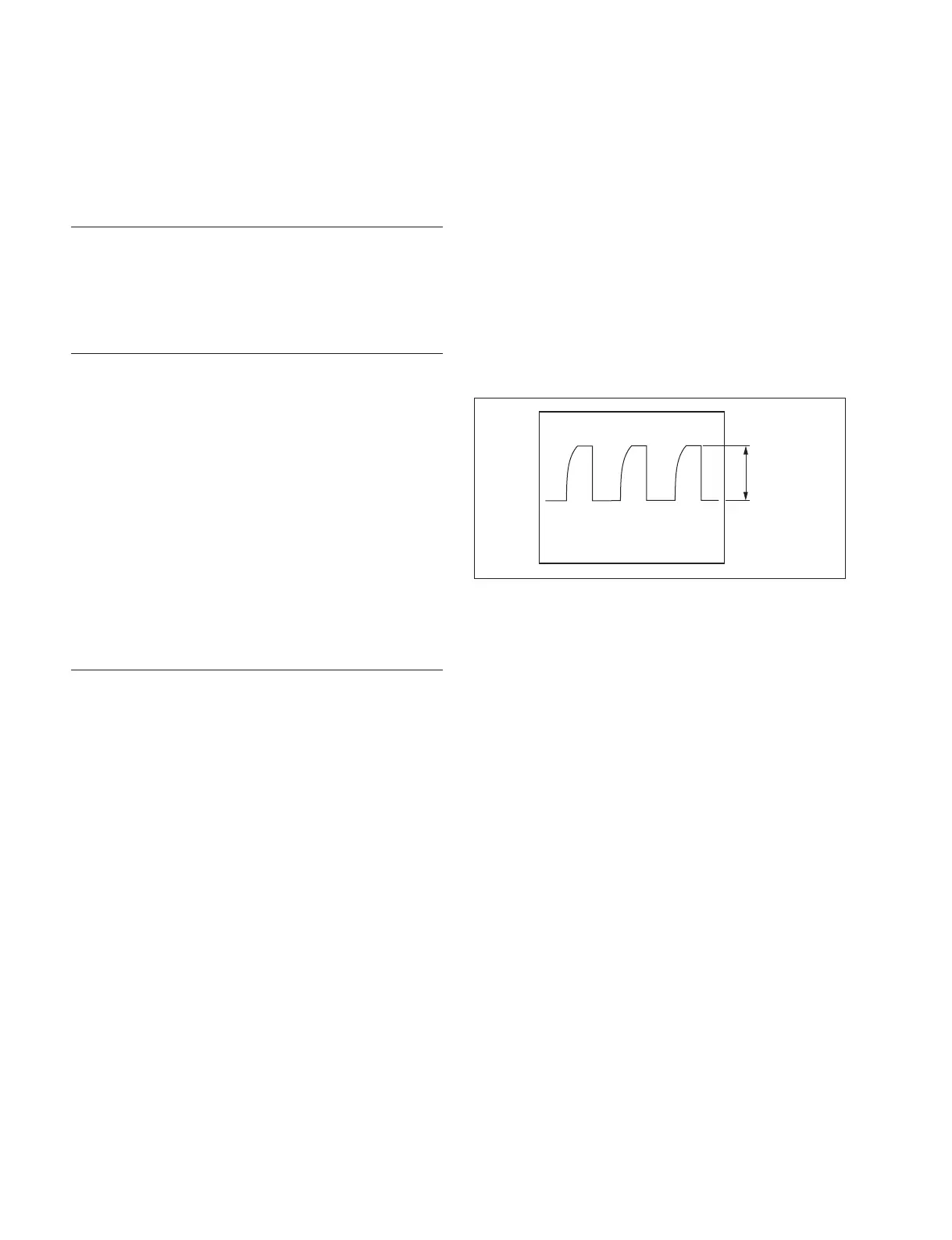
Specifi cation: Set level A shown in the fi gure to
a desired level sequentially for R,
G, and B.
To adjust all levels for R, G and
B simultaneously, adjust them
using Master.
(Reference value: A = 756 mV)
Setting after Adjustment
. MASTER GAIN/MSU-900 → 0 dB
. TEST1 button/MSU-900 → OFF (dark)
3-4-12. File Store
After adjustments described in Section 3-4 are completed,
be sure to execute the reference fi le store.
1. MSU menu operation:
. FILE button → ON (lit)
. Touch panel operation
[Reference] → [Ref|Store] → [Start]
2. When the store operation is completed, a message
“Completed” appears.



 To Next Page