47
4-16. SE-1216 Board (HDC-P31)
Preparation
1. Remove the outside assembly. (Refer to "4-4. Outside Assembly")
2. Remove the inside assembly. (Refer to "4-5. Inside Assembly")
3. Remove the front panel block. (Refer to "4-7. Front Panel Block")
4. Remove the IF-1331 board. (Refer to "4-14. IF-1331 Board (HDC-P31)")
5. Remove the DPR-699 board. (Refer to "4-15. DR-699 Board (HDC-P31)")
6. Remove the CMOS block assy. (Refer to "4-13. CMOS Block Assembly (HDC-P31)")
Procedure
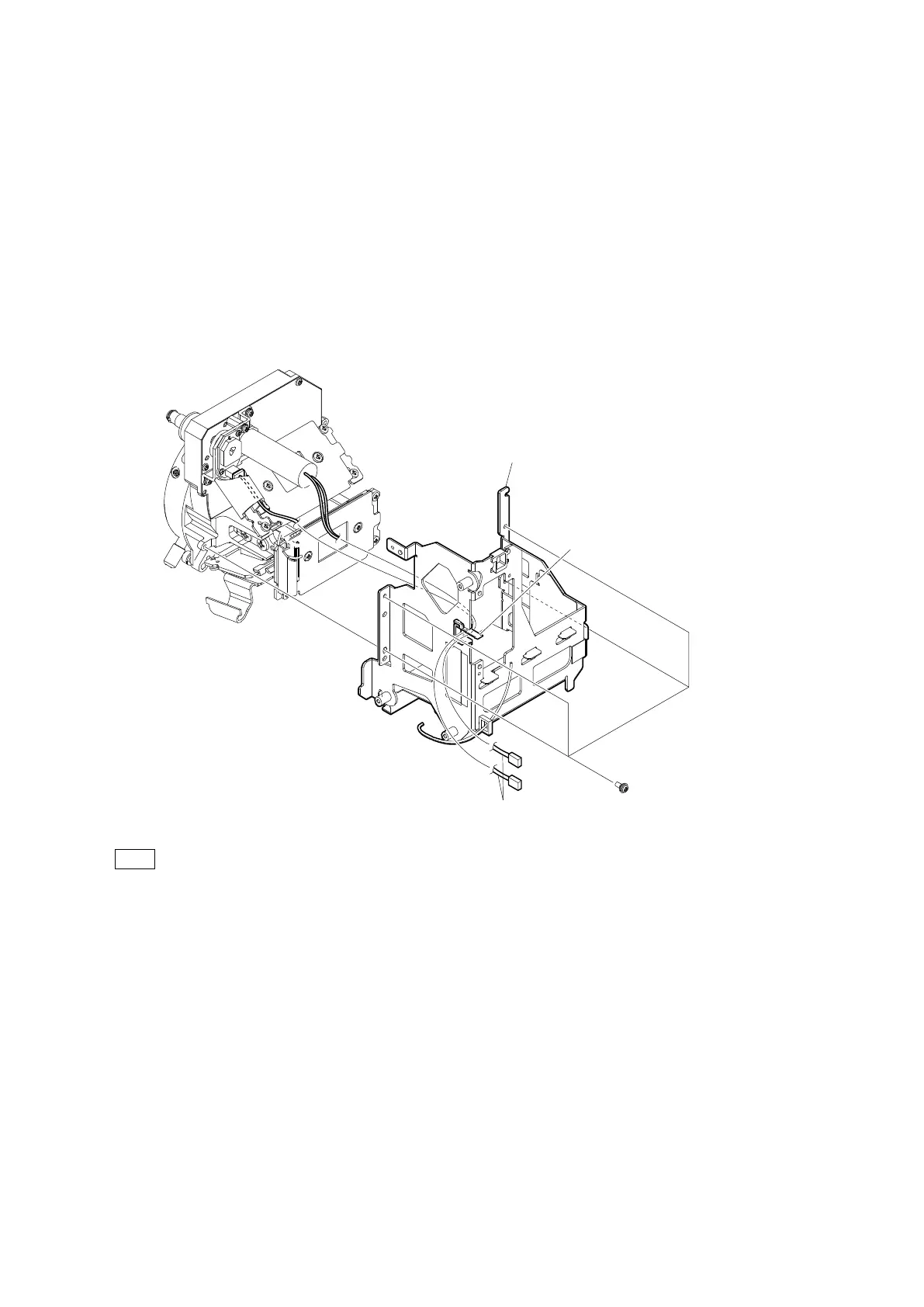
1. Release the two harnesses from the clamper.
2. Remove the four screws, and then remove the IF holder assembly.
When installing the IF holder assembly, tighten the screws in the following sequence: (a), (b), (c), (d).
PSW2 x 5
IF holder assembly
Clamper
Harnesses
(a)
(b)
(c)
(d)



 To Next Page