77
5-3. Camera System Adjustment
5-3-1. Sensitivity Adjustment
Equipment: Waveform monitor (R, G, B)
Test Point: SDI 1 connector
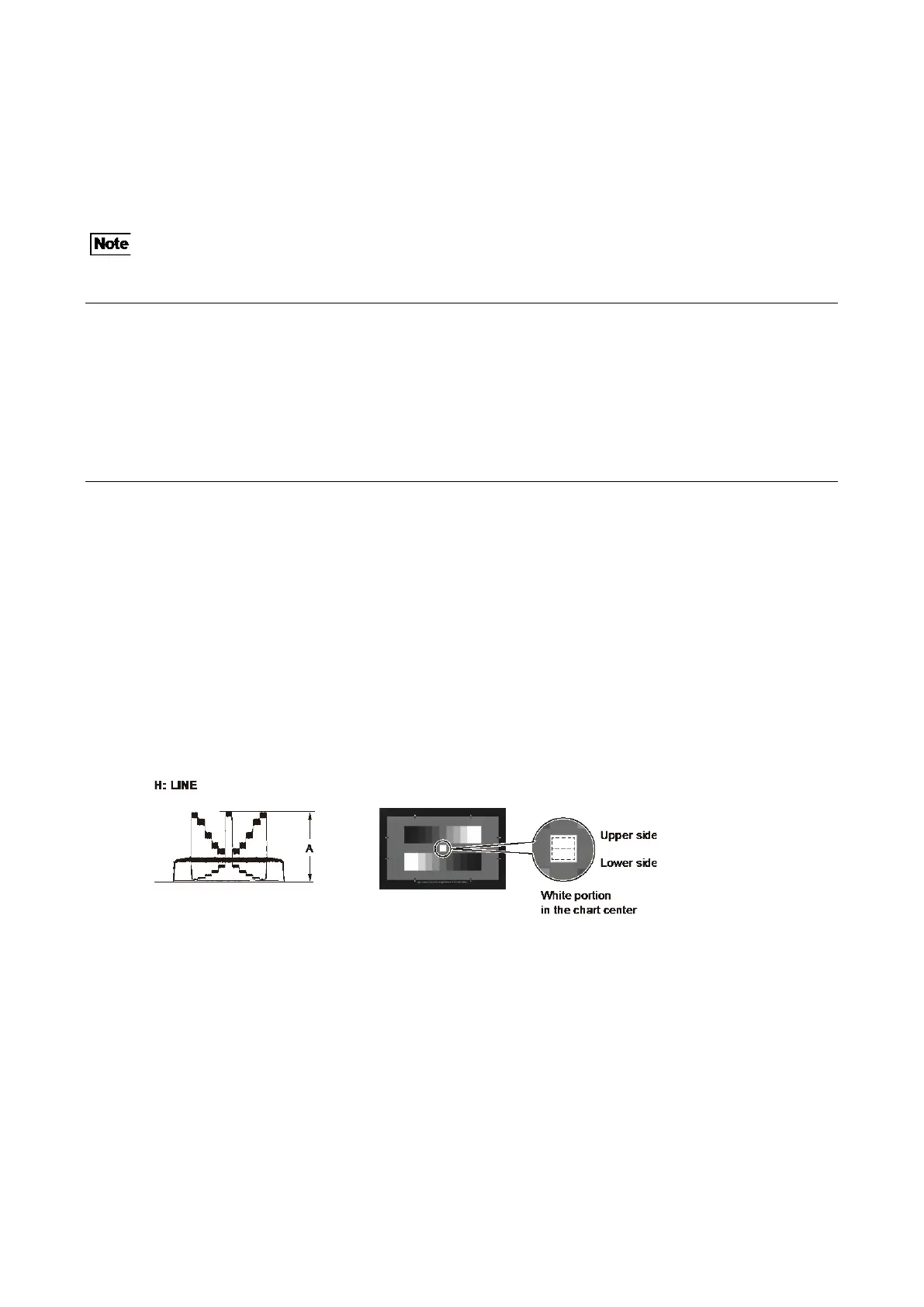
Subject: ITE grayscale chart (γ=0.45) (16:9)
Adjust the luminance control of the pattern box so that the white portion in the center of the chart is 573 ±10 cd/m².
Preparation
• Setting for the MSU
CLOSE button → OFF (unlit)
GAMMA OFF button → OFF (lit)
MASTER GAIN → 0 (0 dB)
DETAIL OFF button → OFF (lit)
KNEE OFF button → OFF (lit)
• Shoot the ITE grayscale chart so that it is aligned with the under scanned monitor frame.
Procedure
1. Set as follows on the camera setup menu.
MENU: MAINTENANCE
PAGE: OUTPUT FORMAT
ITEM: CURRENT 1080/59.94P
2. Open the following page on the camera setup menu.
MENU: SERVICE
PAGE: OHB-ADJ1
3. Adjust the level of G channel roughly, so that the level of portion A on the waveform becomes the specification.
ITEM: GAIN CONT [G1], [G2]
Specification: A = 700 mV
(1) Adjust the [G1] so that the waveform level of the lower side of the white portion in the chart center becomes the
specification.
(2) Adjust the [G2] so that the waveform level of the upper side of the white portion in the chart center becomes the
specification.
4. Also adjust R and B channels roughly in the same way as above step.
ITEM: GAIN CONT [R1], [R2]
ITEM: GAIN CONT [B1], [B2]
5. Remove the ITE grayscale chart, and shoot the full-white pattern so that it is aligned with the under scanned monitor frame.
If waveform is saturated, adjust the light amount with the shutter.



 To Next Page