79
5-3-2. Black Shading Adjustment
Equipment: Waveform monitor (R, G, B)
Test Point: SDI 1 connector
Preparation
• Setting for the MSU
CLOSE button → ON (lit)
GAMMA OFF button → OFF (lit)
MASTER GAIN → 12 (12 dB)
MASTER BLACK → 30
Procedure
1. Set as follows on the camera setup menu.
MENU: MAINTENANCE
PAGE: OUTPUT FORMAT
ITEM: CURRENT 1080/59.94P
2. Open the following page on the camera setup menu.
MENU: SERVICE
PAGE: BLACK SHADING
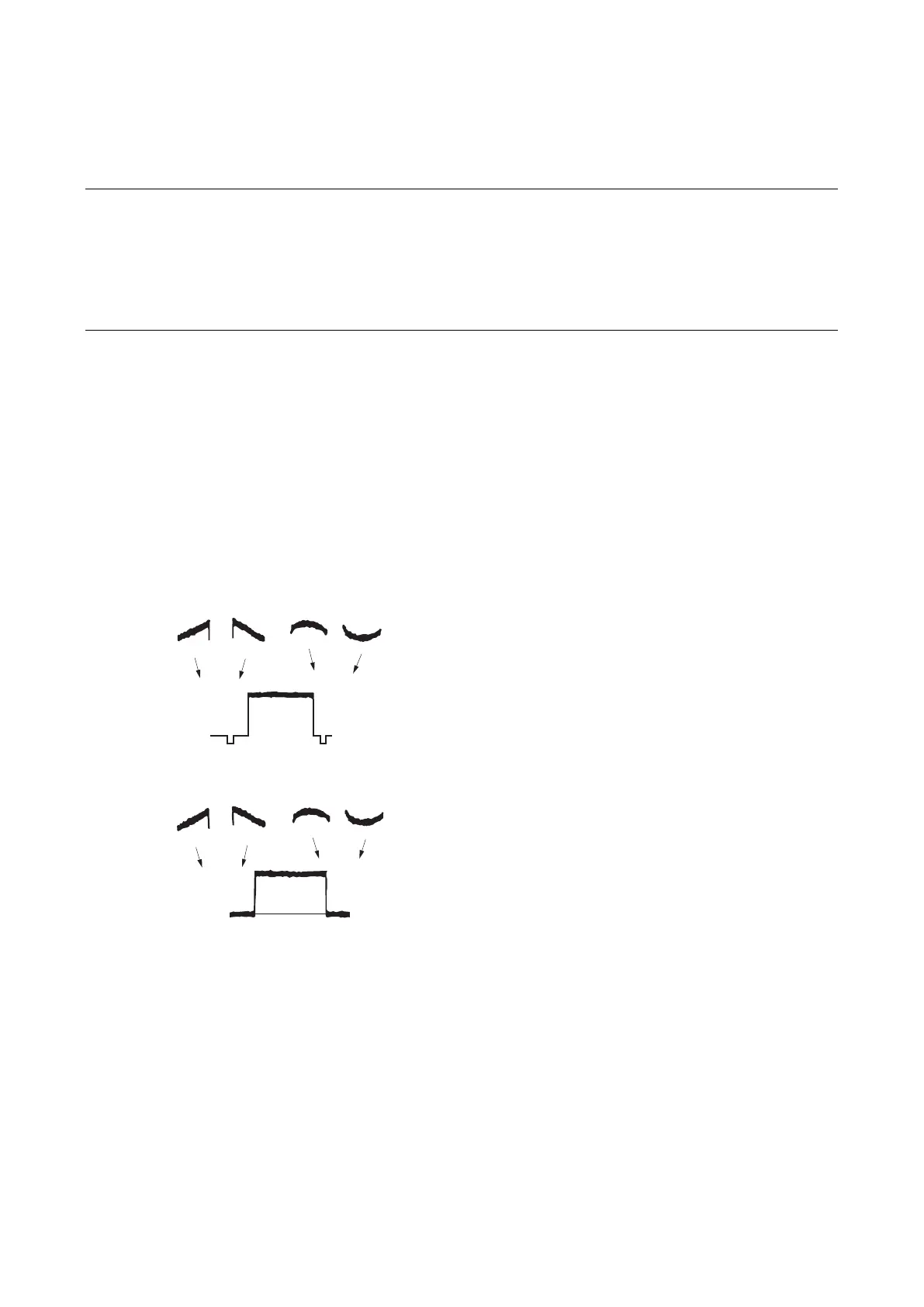
3. Adjust R channel waveform on the monitor so that it becomes as flat as possible.
ITEM: H SAW [R]
ITEM: H PARA [R]
ITEM: V SAW [R]
ITEM: V PARA [R]
4. Also adjust G and B channel waveforms in the same way as above step.
ITEM: H SAW [G], H PARA [G], V SAW [G], V PARA [G]
ITEM: H SAW [B], H PARA [B], V SAW [B], V PARA [B]
5. Store the file.
MENU: SERVICE
PAGE: BLACK SHADING
ITEM: STORE FILE



 To Next Page