17
If the tilt/pan angle available for the
viewfinder is restricted
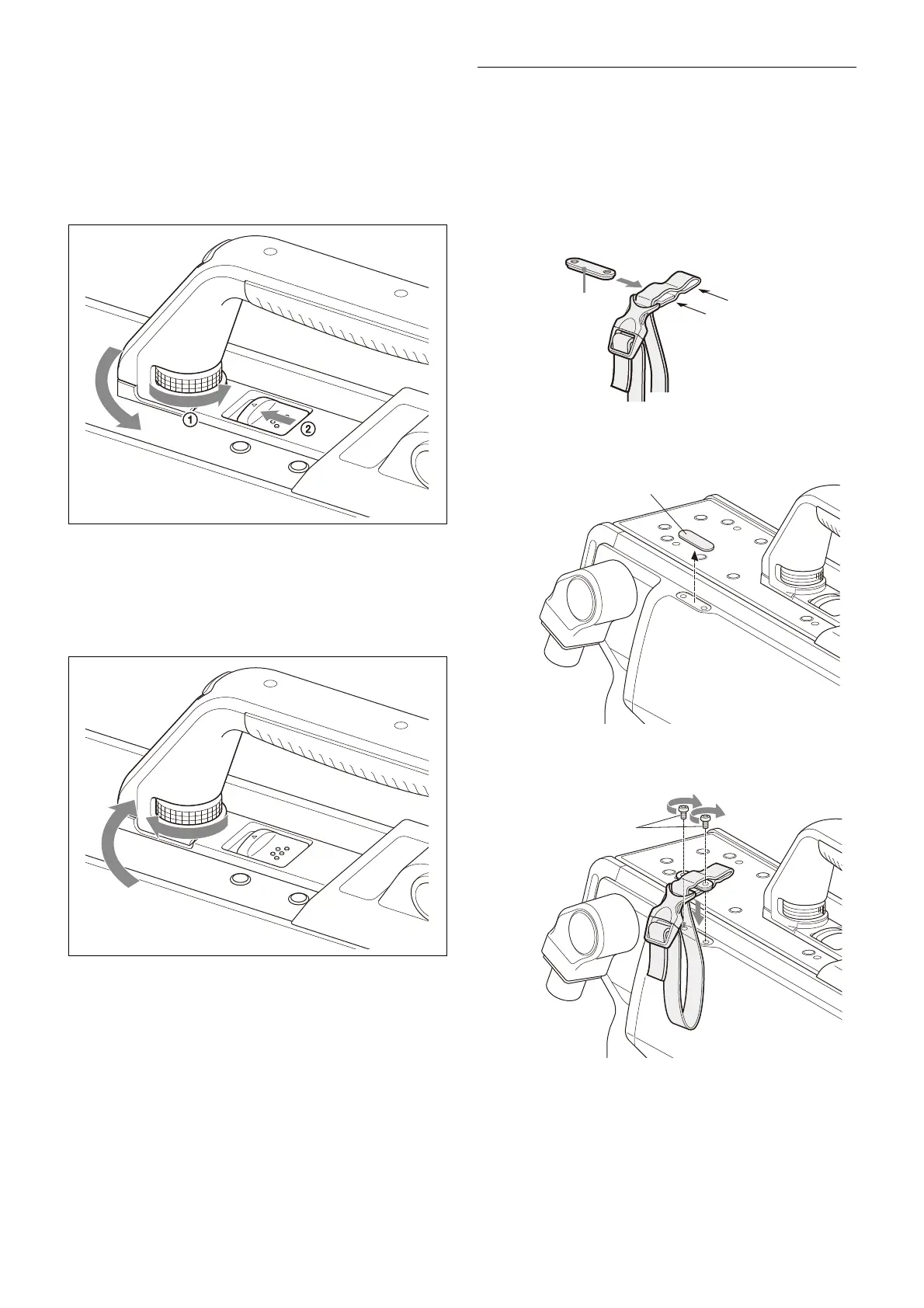
You can alleviate interference by rotating the camera
handle.
1
Loosen the handle rotation lock knob 1 of the
camera until it turns freely, then push the handle
rotation release lever 2 to unlock the grip.
2 Rotate the handle toward the front of the camera.
To stow the handle of the camera in the original
position
Return the handle to the lock position, and securely tighten
the handle rotation lock knob.
Attaching the Cable Clamp Belt
(Supplied)
You can secure the optical/electrical multi cable or triax
cable, connected to the CCU connector, to the side of the
camera by attaching the supplied cable clamp belt.
1 Insert the belt bracket into hole A or B of the cable
clamp belt.
2 Peel off the cover seal from the camera as shown in
the following diagram.
3 Secure the cable clamp belt to the camera, using the
two supplied +B3×8 screws.
A
B



 To Next Page