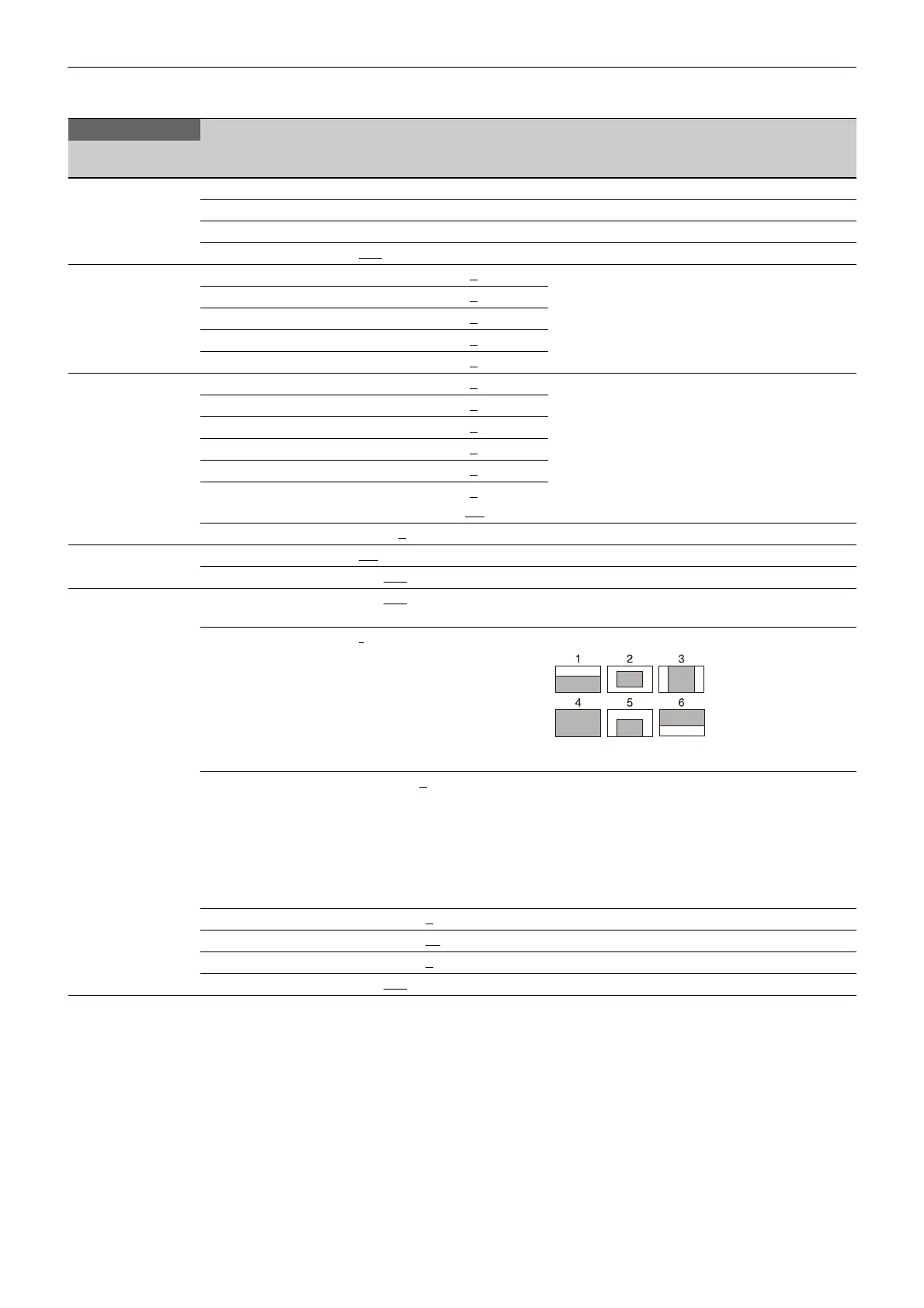
60
MAINTENANCE Menu
MAINTENANCE
Page name
Page No.
Item Settings Description
<AUTO SETUP>
M01
AUTO BLACK Execute using ENTER.
AUTO WHITE Execute using ENTER.
AUTO LEVEL Execute using ENTER.
TEST OFF
, SAW, 10STEP
<WHITE SHADING>
M02
V SAW R/G/B: –99 to +99, 0
R, G, and B values can be independently set.
V PARA R/G/B: –99 to +99, 0
H SAW R/G/B: –99 to +99, 0
H PARA R/G/B: –99 to +99, 0
WHITE R/G/B: –99 to +99, 0
<BLACK SHADING>
M03
V SAW R/G/B: –99 to +99, 0 R, G, and B values can be independently set.
M (master) value can also be set for BLACK.
V PARA R/G/B: –99 to +99, 0
H SAW R/G/B: –99 to +99, 0
H PARA R/G/B: –99 to +99, 0
BLK SET R/G/B: –99 to +99, 0
BLACK R/G/B: –99 to +99, 0
M: –99.9 to +99.9, 0.0
MASTER GAIN –6, –3, 0, 3, 6, 9, 12 dB
<OHB MATRIX>
M04
OHB MATRIX ON
, OFF
MATRIX ON, OFF
<AUTO IRIS>
M05
AUTO IRIS ON, OFF, (ON), (OFF) Settings in ( ): When a remote control unit/panel or a
CCU is not connected (cannot be changed)
WINDOW 1
, 2, 3, 4, 5, 6 Selects the auto iris windows:
The shaded parts indicate the area where light
detection occurs.
OVERRIDE –99 to 99, 0
, --- Sets the override to temporarily change the
reference value for brightness of the automatic iris
level in the range of ±2 steps:
–99: Two steps to fully closed iris.
99: Two steps to fully opened iris.
---: OFF
The setting returns to “---” when the power is
turned off.
IRIS LEVEL –99 to +99, 0
±4 steps
APL RATIO –99 to +99, 65
IRIS GAIN –99 to +99, 0
IRIS CLOSE ON, OFF



 To Next Page