10
GB
KLV-32/26/19T400A/26/19T400G/19T400W
4-000-037-11(1)
Watching TV
1 Press 1 on the TV to turn on the TV.
2 Press the number buttons or PROG +/– to
select a TV channel.
3 Press 2 +/– to adjust the volume.
Detaching the Table-
Top Stand from the TV
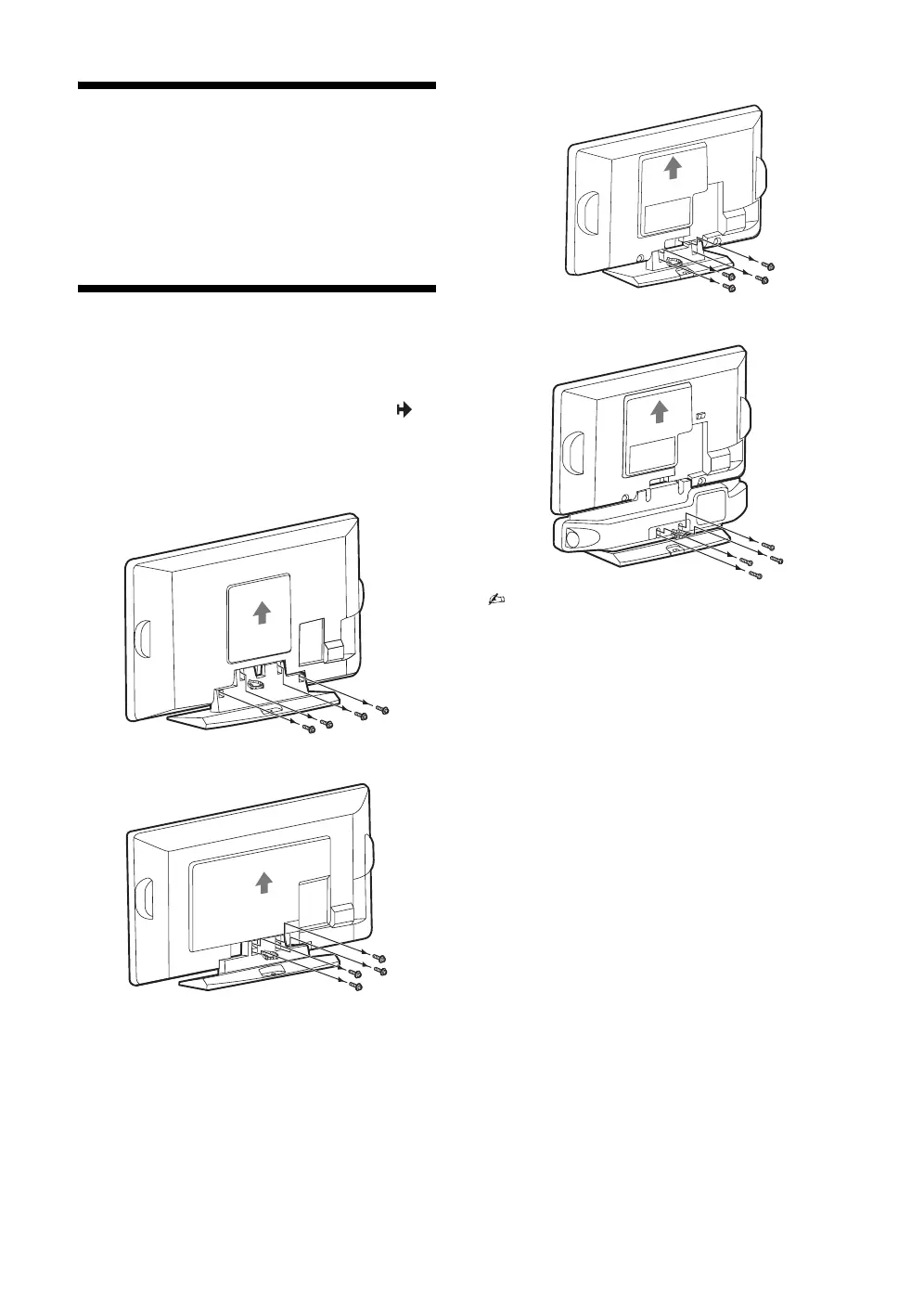
Remove the screws guided by the arrow marks of
the TV.
Do not remove the Table-Top Stand for any reason
other than to wall-mount the TV.
B KLV-32T400A
B KLV-26T400A/26T400G
B KLV-19T400A/19T400G
B KLV-19T400W
• For bracket installation, refer to the instruction
guide provided by the Wall-Mount Bracket model
for your TV. Sufficient expertise is required in
installing this TV, especially to determine the
strength of the wall for withstanding the TV’s
weight. For product protection and safety
reasons, Sony strongly recommends that you
use the Wall-Mount Bracket model designed
for your TV and the wall-mounting of your TV
should be performed by Sony dealers or
licensed contractors.
010COV.book Page 10 Thursday, June 19, 2008 11:21 AM


 To Next Page