21
GB
Using MENU Functions
KLV-32/26/19T400A/26/19T400G/19T400W
4-110-401-11(1)
Navigating through menus
“MENU” allows you to enjoy various convenient
features of this TV. You can easily select channels or
inputs sources, preset FM radio stations and change
the settings for your TV.
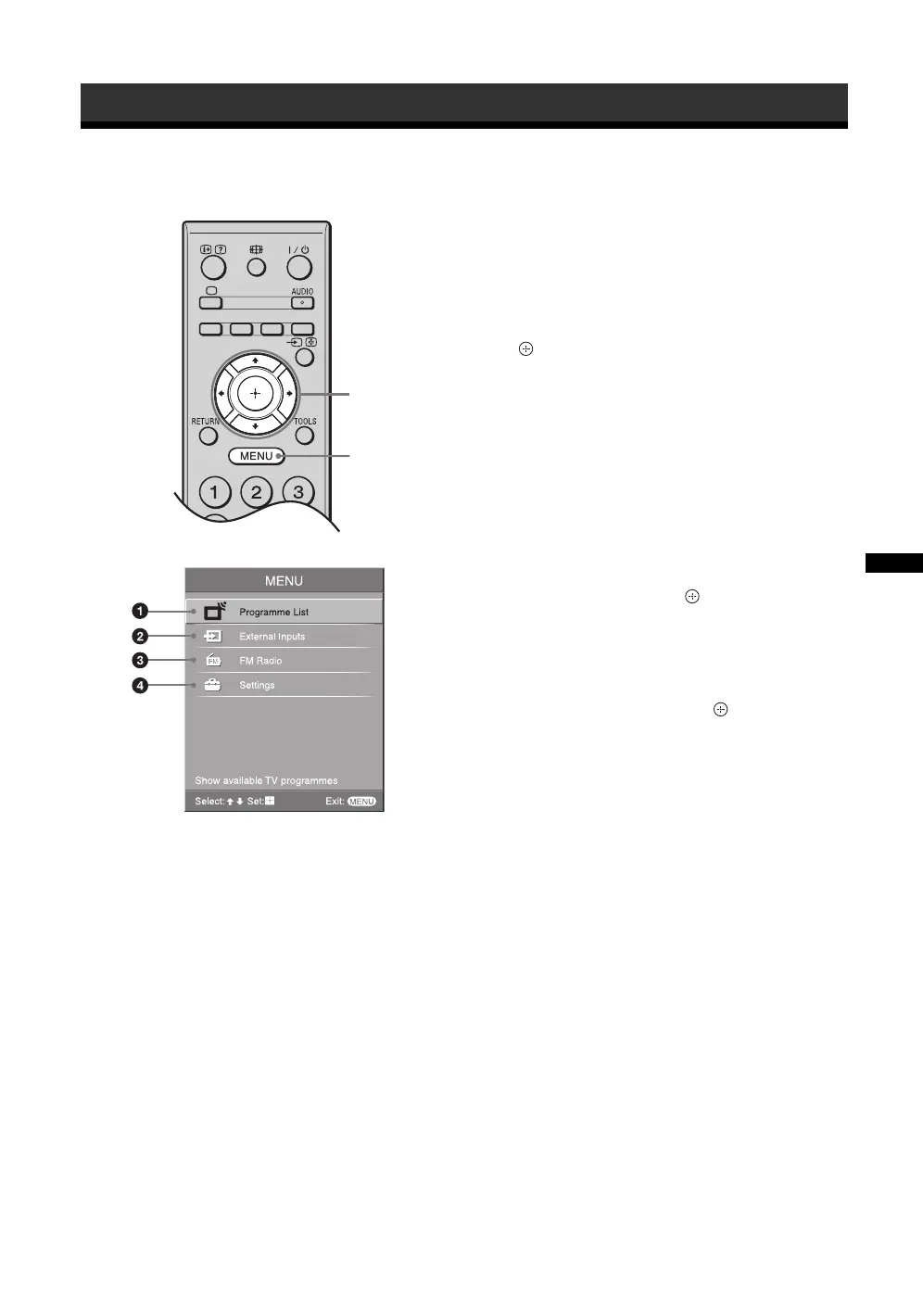
1 Press MENU.
2 Press F/f to select an option, then press
.
To exit the menu, press MENU.
1 Programme List
Displays available TV channels.
• To watch the desired channel, select the
channel, then press .
• To assign a label to a channel, select “Edit
Programme Labels”, then see page 31.
2 External Inputs
Selects equipment connected to your TV.
• To watch the desired external input, select the
input source, then press .
• To assign a label to an external input, select
“Edit Video Labels”, then see page 28.
3 FM Radio
Listens to the FM Radio (page 22).
4 Settings
Displays the “Settings” menu where most of the
advanced settings and adjustments are performed.
For details about settings, see page 23 to 24.
Using MENU Functions
2
1
010COV.book Page 21 Thursday, June 19, 2008 9:17 AM


 To Next Page