23
GB
Using MENU Functions
KLV-32/26/19T400A/26/19T400G/19T400W
4-110-401-11(1)
Settings adjustment
You are able to change the settings of your TV from “Settings” menu.
1 Press MENU. Press F/f to select “Settings”, then press .
2 Press F/f to select a menu icon, then press .
3 Press F/f/G/g to select an option or adjust a setting, then press .
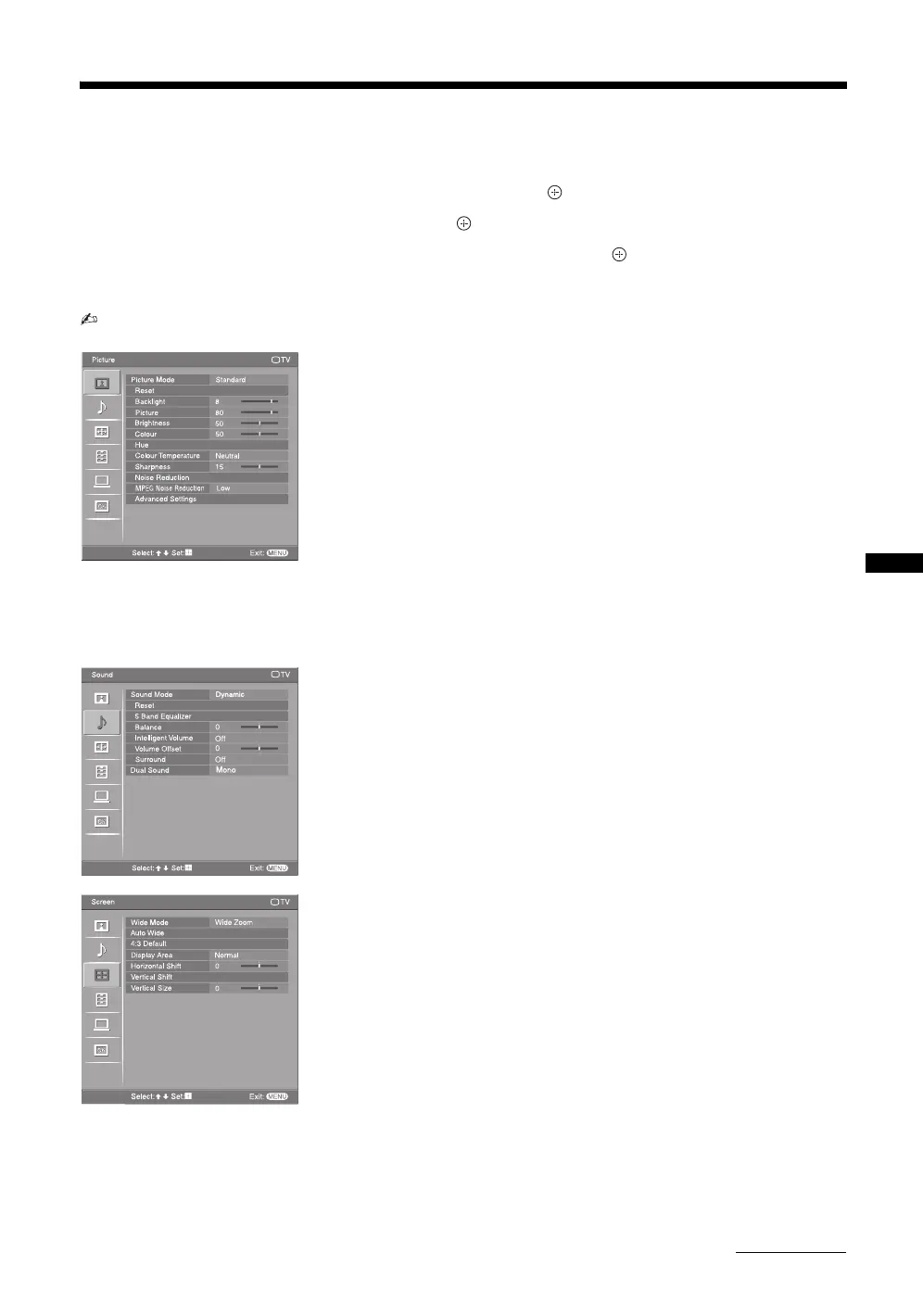
The following is an overview of the items that can be adjusted.
• The options you can adjust vary depending on the situation. Unavailable options are greyed out or not displayed.
Picture menu (page 25)
“Picture Mode”: “Vivid” t “Standard” t “Cinema”
“Display Mode”: “Video” t “Text”
“Reset”
“Backlight”
“Picture”
“Brightness”
“Colour”
“Hue”
“Colour Temperature”: “Cool” t “Neutral” t “Warm 1” t “Warm 2”
“Sharpness”
“Noise Reduction”: “High” t “Medium” t “Low” t “Off”
“MPEG Noise Reduction”: “High” t “Medium” t “Low” t “Off”
“Advanced Settings”: “Reset”, “Adv. Contrast Enhancer”, “Gamma”, “Clear
White”, “Live Colour”
Sound menu (page 26)
“Sound Mode”: “Dynamic” t “Standard” t “Clear Voice”
“Reset”
“5 Band Equalizer”: “Adjust”, “Reset”
“Balance”
“Intelligent Volume”: “On” t “Off”
“Volume Offset”
“Surround”: “On” t “Simulated Stereo” t “Off”
“Dual Sound”
Screen menu (page 27)
“Wide Mode”: “Wide Zoom” t “Normal” t “Full” t “Zoom”
“Auto Wide”: “On” t “Off”
“4:3 Default”: “Wide Zoom” t “Normal” t “Off”
“Display Area”: “Normal” t “-1” t “-2”
“Horizontal Shift”
“Vertical Shift”
“Vertical Size”
Picture TV
MENU
Select: Set: Exit:
Picture Mode
Standard
Reset
Sharpness
Noise Reduction
Advanced Settings
Backlight
Picture
Brightness
Colour
Hue
Colour Temperature
MPEG Noise Reduction
Low
15
Neutral
50
50
80
8
MENU
TV
Sound
Select: Set: Exit:
Sound Mode
Reset
5 Band Equalizer
Balance
Intelligent Volume
Volume Offset
Surround
Dual SoundDual Sound
Mono
Dynamic
0
0
Off
Off
Select:
Set:
Exit:
MENU
TV
Screen
Wide Mode
Auto Wide
4:3 Default
Display Area
Horizontal Shift
Vertical Shift
Vertical Size
Normal
Wide Zoom
0
0
Continued
010COV.book Page 23 Thursday, June 19, 2008 9:17 AM


 To Next Page