16
GB
KLV-32/26/19T400A/26/19T400G/19T400W
4-110-401-11(1)
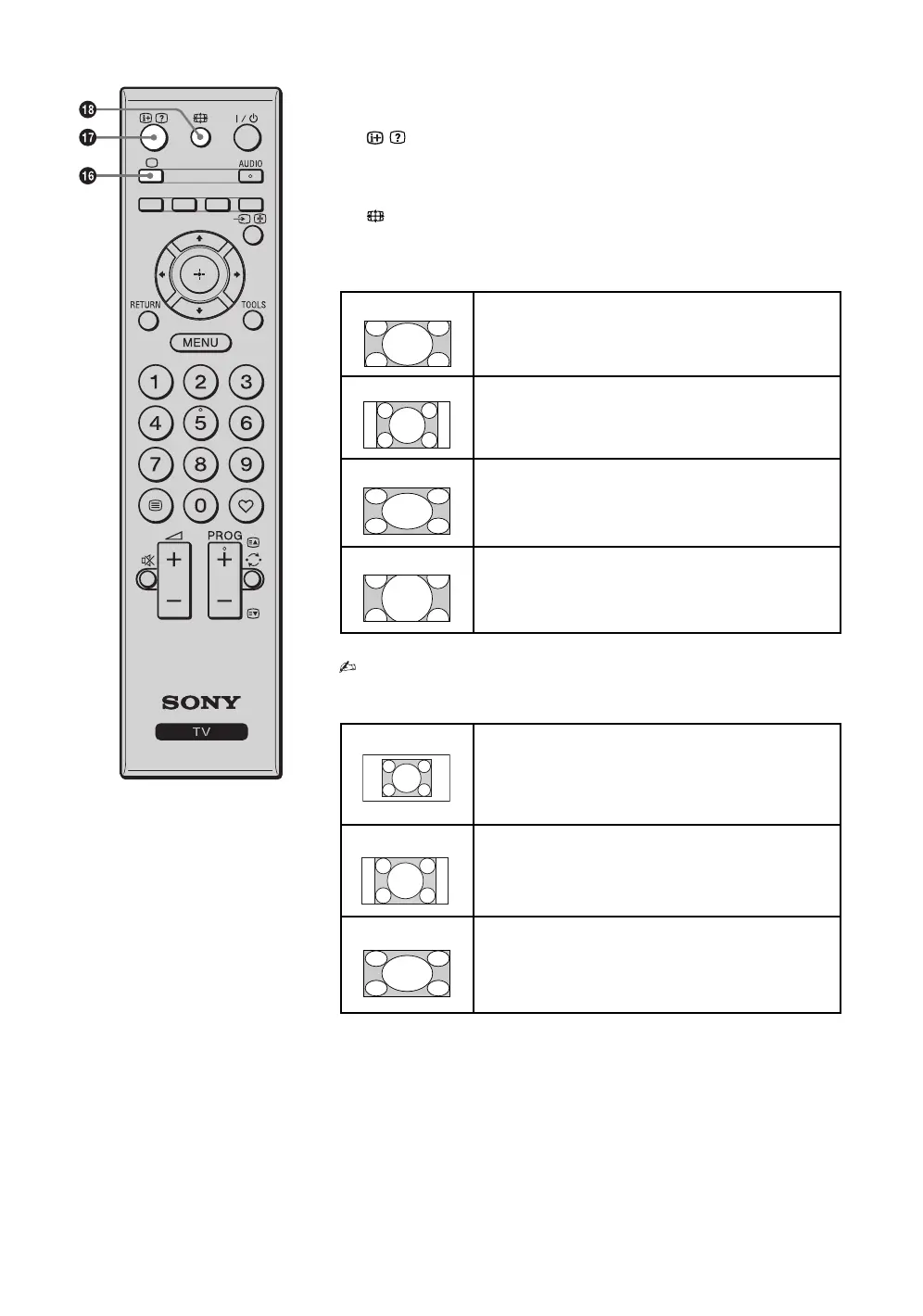
qh a – TV mode
Exit Text mode, or switches to a TV display when displaying external input.
qj / – Info / Text reveal
• Displays information. Press once to display current channel number and
screen mode. Press again to remove the display from the screen.
• In Text mode: Reveals hidden information (e.g. answers to a quiz).
qk – Wide Mode
Changes the picture size. Press repeatedly to select the desired wide mode.
For TV, Video, HD/DVD or HDMI (except PC input)
* Parts of the top and bottom of the picture may be cut off.
• You cannot select “Normal” for HD signal source pictures.
For PC Input
Wide Zoom* Enlarges the centre portion of the picture. The left and
right edges of the picture are stretched to fill the 16:9
screen.
Normal Displays the 4:3 picture in its original size. Side bars are
shown to fill the 16:9 screen.
Full Stretches the 4:3 picture horizontally to fill the 16:9
screen (KLV-32/26T400A/26T400G) and the 16:10
screen (KLV-19T400A/19T400G/19T400W).
Zoom* Displays cinemascopic (letter box format) broadcasts in
the correct proportions.
Normal Displays the picture in its original pixel size. Bars are
shown at the top, bottom, and both sides for small
picture.
Full 1 Stretches the original picture to fill the screen vertically.
Full 2 Stretches the Full 1 picture horizontally to fill the 16:9
screen (KLV-32/26T400A/26T400G) and the 16:10
screen (KLV-19T400A/19T400G/19T400W).
010COV.book Page 16 Thursday, June 19, 2008 9:17 AM


 To Next Page