1-6
26
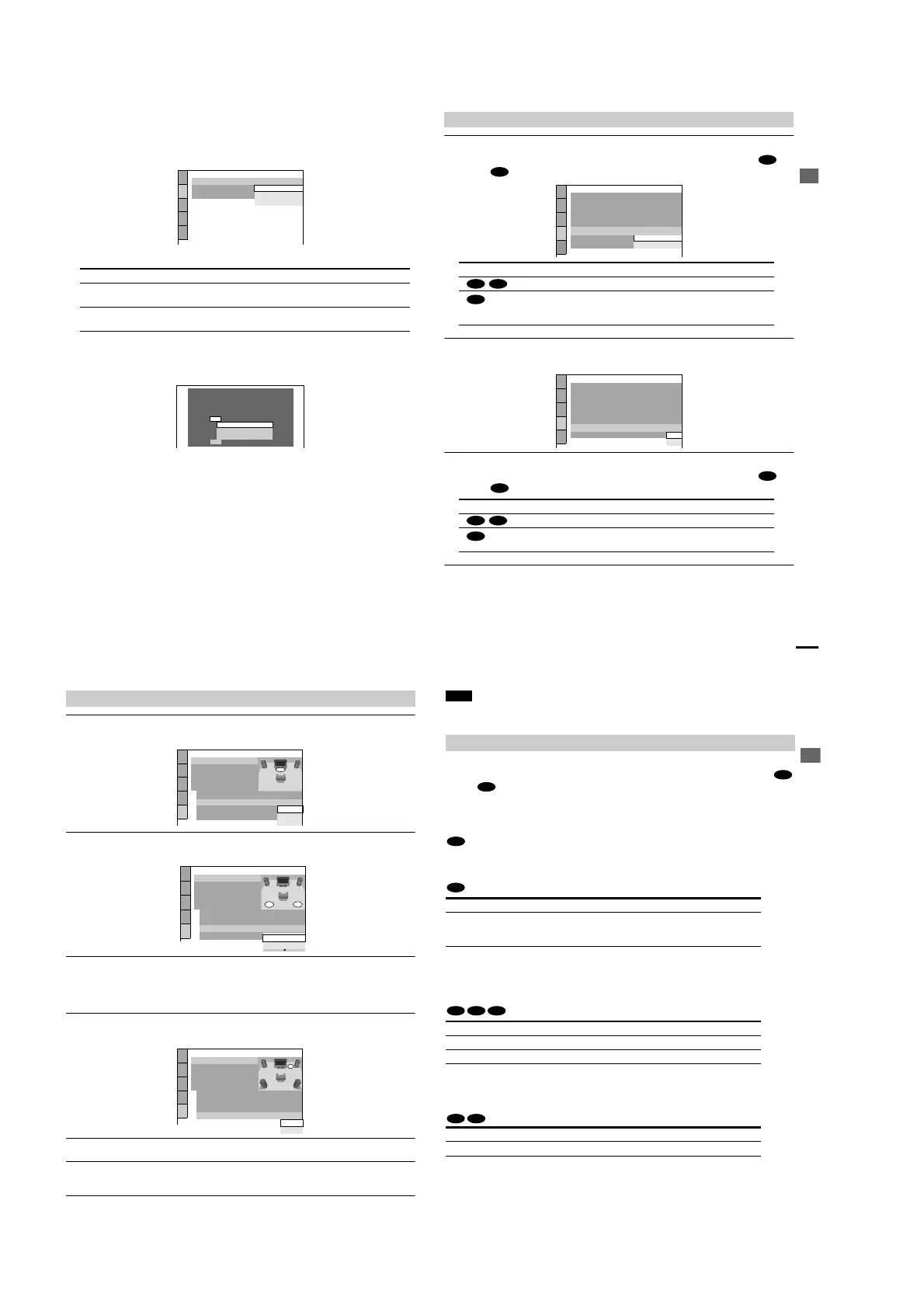
5 Press X/x to select a language.
The player uses the language selected here to display the DVD menu and subtitle as well.
6 Press ENTER.
The Setup Display for selecting the aspect ratio of the TV to be connected appears.
7 Press X/x to select the item.
8 Press ENTER.
The Setup Display for selecting the type of jack used to connect your amplifier (receiver)
appears.
9 Press X/x to select the item, then press ENTER.
• When “NO” or “LINE OUTPUT L/R (AUDIO)” is selected, Quick Setup is finished and
connections are complete.
• When “DIGITAL OUTPUT” is selected, the Setup Display for “DOLBY DIGITAL”
appears.
• When “5.1CH OUTPUT” is selected, the Setup Display for “SPEAKER SETUP” appears.
TV Type You select Page
4:3 standard TV 4:3 LETTER BOX or 4:3 PAN
SCAN
67
A wide-screen TV or 4:3 standard TV with a
wide-screen mode
16:9 67
SCREEN SETUP
TV TYPE:
SCREEN SAVER:
BACKGROUND:
16:9
4:3 LETTER BOX
4:3 PAN SCAN
4:3 LETTER BOX
Is this player connected to an amplifier
(receiver)? Select the type of jack you
are using.
LINE OUTPUT L/R(AUDIO)
DIGITAL OUTPUT
5.1CH OUTPUT
YES
NO
Hookups
27
1 Press X/x to select the item.
Choose the item that matches the audio connection you selected in page 21 to 24 (
through ).
2 Press ENTER.
DTS is selected.
3 Press X/x to select the item.
Choose the item that matches the audio connection you selected in page 21 to 24 (
through ).
4 Press ENTER.
Quick Setup is finished. All connections and setup operations are complete.
When DIGITAL OUTPUT is selected
Audio Cord Connection Type You select Page
D-PCM 71
DOLBY DIGITAL (only if the
amplifier (receiver) has a Dolby
Digital decoder)
71
Audio Cord Connection Type You select Page
OFF 71
ON (only if the amplifier (receiver)
has a DTS decode
r)
71
B
D
DOLBY DIGITAL
AUDIO SETUP
AUDIO ATT:
AUDIO DRC:
DOWNMIX:
DIGITAL OUT:
DOLBY DIGITAL:
OFF
STANDARD
DOLBY SURROUND
CENTER SPEAKER EQ:
FLAT
ON
D-PCM
48kHz/96kHz PCM:
DTS:
D-PCM
C-2 D-2
B-2
AUDIO SETUP
AUDIO ATT:
AUDIO DRC:
DOWNMIX:
DIGITAL OUT:
DOLBY DIGITAL:
OFF
STANDARD
DOLBY SURROUND
CENTER SPEAKER EQ:
FLAT
ON
D-PCM
48kHz/96kHz PCM:
DTS:
OFF
OFF
ON
B
D
C-2 D-2
B-2
continued
28
1 Press X/x to select the size of the center speaker.
If no center speaker is connected, select “NONE.” Refer to page 72 for each selection item.
2 Press ENTER.
The Setup Display for selecting the size of the rear speaker appears.
3 Press X/x to select the size.
If no rear speaker is connected, select “NONE.”
“SIDE” and “REAR” refer to the speakers’ position relative to your listening positi
on.
Refer to page 72 for each selection item.
4 Press ENTER.
The Setup Display for selecting whether or not you have connected a subwoofer appears.
5 Press X/x to select the item.
6 Press ENTER.
Quick Setup is finished. All connections and setup operations are complete.
When 5.1 CH OUTPUT is selected
SPEAKER SETUP
SIZE:
DISTANCE:
BALANCE:
LEVEL:
OFF
TEST TONE:
FRONT:
CENTER:
SMALL
LARGE
NONE
LARGE
REAR:
SUBWOOFER:
NONE
SPEAKER SETUP
SIZE:
DISTANCE:
BALANCE:
LEVEL:
OFF
TEST TONE:
FRONT:
CENTER:
LARGE
REAR:
SUBWOOFER:
To set
press
then .
ENTER
NONE
LARGE(REAR)
NONE
LARGE
SPEAKER SETUP
SIZE:
DISTANCE:
BALANCE:
LEVEL:
OFF
TEST TONE:
FRONT:
CENTER:
LARGE
REAR:
SUBWOOFER:
To set, press , then .
p
ENTER
NONE
NONE
YES
LARGE(REAR)
LARGE
Hookups
29
Note
You can directly start Quick Setup only when you run it for the first time.
To run Quick Setup a second time, select “QUICK” under “SETUP” in the Control Menu (page 65).
To enjoy the surround sound effects of this player or your amplifier (receiver), the following
items must be set as described below for the audio connection you selected in page 21 to 24 (
through ). Each of these are the default settings and do not need to be adjusted when you
first connect the player. Refer to page 65 for using the Setup Display.
Audio Connection (page 21 to 24)
No additional settings are needed.
•
If the sound distorts even when the volume is turned down, set “AUDIO ATT” to “ON” (page 70).
• If “ENHANCED” or “SOFT” is selected in “CENTER SPEAKER EQ,” it makes the spoken
track sound clear (page 70).
• Set “48kHz/96kHz PCM” to “96kHz/24bit,” only if you connect the amplifier (receiver) that
conforms to the 96 kHz sampling frequency (page 71).
•
If the sound distorts even when the volume is turned down, set “AUDIO ATT” to “ON” (page 70).
Enjoying the surround sound effects
Item You select Page
DISTANCE
BALANCE
LEVEL
Set according to the connected
speakers
72
Item You select Page
DOWNMIX DOLBY SURROUND 70
DIGITAL OUT ON 70
Item You select Page
DOWNMIX DOLBY SURROUND 7
0
B
D
A
B-1
B-2 C-2 D-2
C-1 D-1



 To Next Page