1-2
10
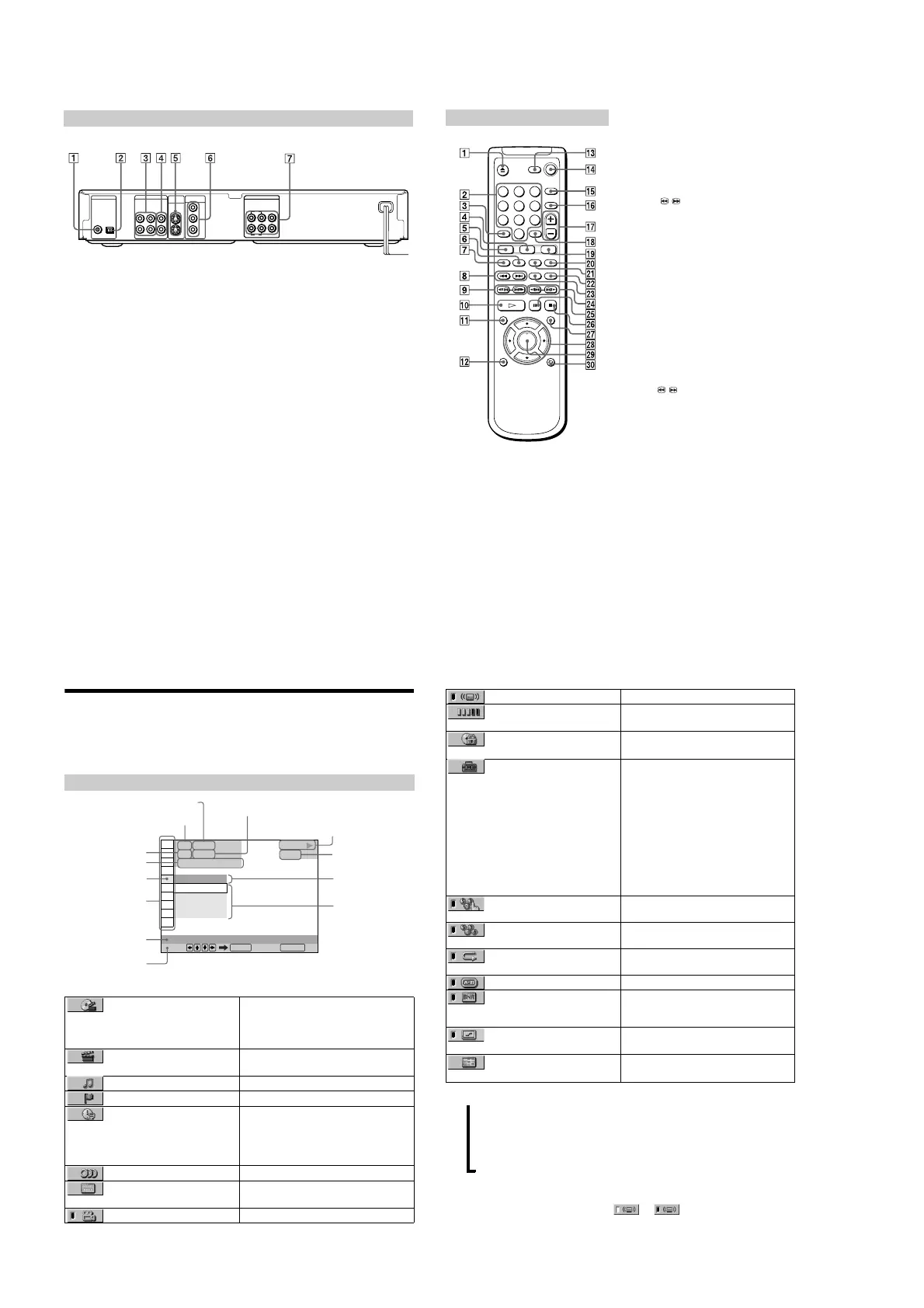
1 DIGITAL OUT (COAXIAL) jack (21,
23, 24)
2 DIGITAL OUT (OPTICAL) jack (21,
23, 24)
3 LINE OUT L/R (AUDIO) 1/2 jacks (15,
20, 23, 24)
4 LINE OUT (VIDEO) 1/2 jacks (17)
5 S VIDEO OUT 1/2 jacks (17)
6 COMPONENT VIDEO OUT jacks (17)
7 5.1CH OUTPUT jacks (21)
Rear Panel
LINE OUT
PCM/DTS/
DOLBY DIGITAL
S VIDEO
OUT
COMPONENT
VIDEO OUT
COAXIAL
OPTICAL
R-AUDIO 1-L VIDEO 1
Y
P
B
P
R
R-AUDIO 2-L VIDEO 2
DIGITAL OUT
5.1CH OUTPUT
WOOFER
L
R
FRONT REAR CENTER
1
2
11
A
Z
OPEN/CLOSE button (31)
B Number buttons
C CLEAR button (35)
D ANGLE button (54)
5 AUDIO button (48)
6 PROGRAM button (35)
7 SHUFFLE button (37)
H ./> PREV/NEXT buttons (31)
I c / C SEARCH/STEP buttons
(40)
J H PLAY button (30)
K TITLE button (33)
L DISPLAY button (35)
M TV [/1 (on/standby) button (63)
N [/1 (on/standby) button (30)
O BNR (Block Noise Reduction) button
(56)
P TV/VIDEO button (63)
Q VOL +/– buttons (63)
R ENTER button
S SUBTITLE button (55)
T TIME/TEXT button (44)
U REPEAT button (37)
V INSTANT REPLAY button (31)
W SURROUND button (50)
X / y SCAN/SLOW buttons (40)
Y X PAU
SE button (31)
Z x STOP button (30)
wj DVD MENU button (33)
wk C/X/x/c buttons (25)
wl ENTER button
e; O RETURN button (34)
Remote
123
456
78
0
9
12
Guide to Control Menu Display
Use the Control Menu to select a function that you’d like to use. The Control Menu display
appears when the DISPLAY button is pressed. For details, please refer to the page in
parenthesizes.
List of Control Menu Items
Control Menu
OFF
1: ENGLISH
2: FRENCH
3: SPANISH
OFF
1 8
(
3 4
)
1 2
(
2 7
)
T
1 : 3 2 : 5 5
DVD
Select: Cancel:
SUBTITLE
ENTER RETURN
PLAY
Current playing chapter
number (Video CD/CD:
index number)
Playing time
Total number of chapters or indexes recorded
Current playing title number
(Video CD/CD: track number)
Options
Current setting
Total number of titles or tracks recorded
Playback status
(N Playback, XPause, xStop, etc.)
Function name of selected
Control Menu item
Operation message
Icon of selected
Control Menu item
Control Menu items
Type of disc being
played back
TITLE (DVD only) (page 41)/
SCENE (only VIDEO CD in PBC
playback) (page 41)/TRACK (VIDEO CD
only) (page 41)
Selects the title (DVD), the scene (VIDEO CD
in PBC playback) or the track (VIDEO CD) to
be played.
CHAPTER (DVD only) (page
41)/INDEX (VIDEO CD only) (page 41)
Selects the chapter (DVD) or the index
(VIDEO CD) to be played.
TRACK (CD only) (page 41) Selects the track (CD) to be played.
INDEX (CD only) (page 41) Selects the index (CD) to be played.
TIME/TEXT (page 44) Check the elapsed time and the remaining
playback time.
Input the time code for picture and music
searching.
Displays the DVD or the CD text.
AUDIO (page 48) Changes the audio setting.
SUBTITLE (DVD only) (page
55)
Displays the subtitles.
Changes the subtitle language.
ANGLE (DVD only) (page 54) Changes the angl
e.
13
z Each time you press
DISPLAY, the Control Menu display changes as follows:
You can display the Control Menu display 1 only during CD playback. The Control Menu items are different
depending on the disc.
z The Control Menu icon indicator lights up in green when you select any item except
“OFF.” (“SURROUND,” “PROGRAM,” “SHUFFLE,” “REPEAT,” “A-B Repeat,” “DIGITAL VIDEO
ENHANCER” only). The “ANGLE” indicator lights up in green only when the angles can be changed.
SURROUND (page 50) Selects the surround functions.
ADVANCED (DVD only) (page
47)
Checks the information (bit rate or layer) on the
disc while playing a DVD.
CUSTOM PARENTAL
CONTROL (page 58)
Sets the disc to prohibit playing.
SETUP (page 65) QUICK Setup (page 25)
Use Quick Setup to choose the desired
language of the on screen display, the shape of
the TV screen, the audio output, and speakers
connected to the player.
CUSTOM Setup
In addition to the Quick Setup setting, you can
adjust the image and sound quality, Parental
Control, and other various settings.
RESET
Returns the settings in “SETUP” to the default
setting.
PROGRAM (page 35) Selects the title, the chapter or the track to play
a disc in the order you want.
SHUFFLE (page 37) Plays the title, the chapter or the track in
random order.
REPEAT (page 37) Plays the entire disc (all titles/all tracks)
repeatedly or one title/chapter/track repeatedly.
A-B REPEAT (page 38) Specifies the parts you want to play repeatedly.
BNR (page 56) Adjusts the picture quality by reducing the
“block noise” or mosaic like patterns that
appear on yo
ur TV screen.
DIGITAL VIDEO ENHANCER
(page 57)
Exaggerates the outline of the image to produce
a sharper picture.
VIEWER (DVD/VIDEO CD only)
(page 42)
Divides the screen into 9 sub-screens to help
you find the scene you want quickly.
Control Menu display 1
m
Control Menu display 2
(The items except the first three items from the top are changed to other items.)
m
ADVA NCED display (Appears if you s
elect any setting other than "OFF." See page 47.)
m
Control Menu display of
f
,
t



 To Next Page