1-9
38
1 Press DISPLAY twice during playback
(when playing a CD, press once).
The Control Menu appears.
2 Select
REPEAT using X/x,
then press ENTER.
The options for REPEAT appear.
3 Press X/x to select the item.
xWhen playing a DVD (Program
Play and Shuffle Play are set to
OFF)
• DISC: repeats all of the titles.
• TITLE: repeats the current title on a
disc.
• CHAPTER: repeats the current
chapter.
xWhen playing a VIDEO CD or CD
(Program Play and Shuffle Play are
set to OFF)
• DISC: repeats all of the tracks on a
disc.
• TRACK: repeats the current tr
ack.
xWhen Program Play or Shuffle
Play is on
• ON: repeats Program Play or Shuffle
Play.
4 Press ENTER.
To return to normal play
Press CLEAR, or select “OFF” in Step 3.
To turn off the Control Menu
Press DISPLAY repeatedly until the Control
Menu is turned off.
z
You can set Repeat Play while the player stopped.
After selecting the “REPEAT” option, press H.
Repeat Play starts.
z You can select REPEAT directly by pressing
REPEAT.
You can play a specific portion of a title,
chapter or track repeatedly. (This function is
useful when you want to memorize lyrics, etc.)
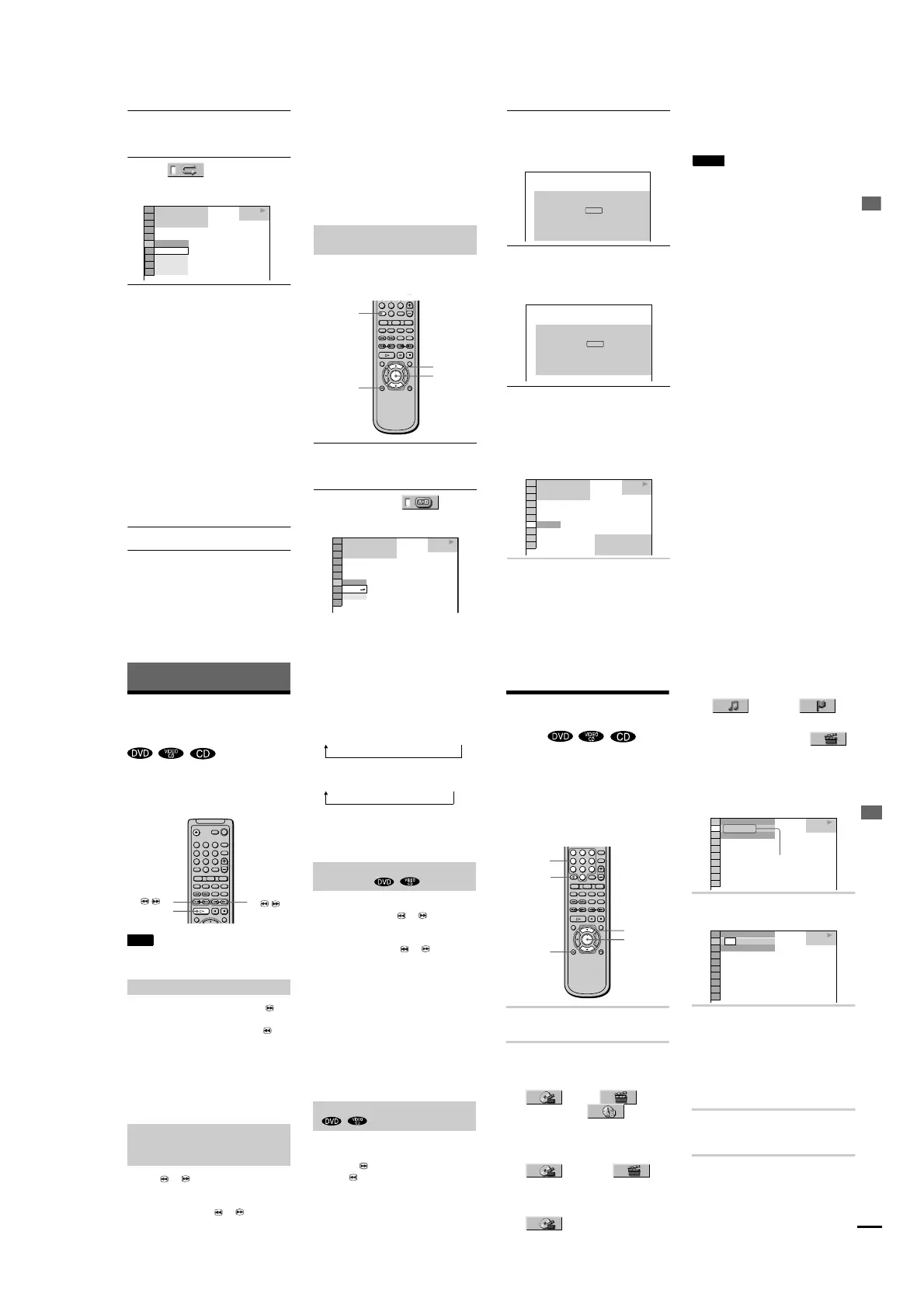
1 Press DISPLAY twice during playback
(when playing CD, press once).
The Control Menu appears.
2 Press X/x to select (A-B
REPEAT), then press ENTER.
The options for A-B REPEAT appear.
1 8
(
3 4
)
1 2
(
2 7
)
T
1 : 3 2 : 5 5
CHAPTER
DISC
OFF
TITLE
OFF
DVD
PLAY
Repeating a specific portion (A-B
Repeat Play)
456
78
0
9
ENTER
X/x
DISPLAY
CLEAR
SET
OFF
OFF
1 8
(
3 4
)
1 2
(
2 7
)
T
1 : 3 2 : 5 5
DVD
PLAY
Playing Discs
39
3 Press / to select “SET t”, then
press ENTER.
The A-B REPEAT setting display
appears.
4 During playback, when you find the
starting point (point A) of the portion to
be played repeatedly, press ENTER.
The starting point (point A) is set.
5 When you reach the ending point (point
B), press ENTER again.
The set points are displayed and the
player starts repeating this specific
portion.
“A-B” appears on the front panel display
during A-B Repeat Play.
To return to normal play
Press CLEAR, or select “OFF” in Step 3.
To turn off the Control Menu
Press DISPLAY repeatedly until the Control
Menu is turned off.
Notes
•
You can set A-B Repeat Play for only one specific
section.
•
When you set A-B Repeat Play, the settings for
Shuffle Play, Repeat Play, and Program Play are
cancelled.
Set point A with .
A-B REPEAT
ENTER
A: 18 – 1 : 32 : 55
CHAPTER
TIME
Set point B with .
ENTER
A-B REPEAT
1 8
(
3 4
)
1 2
(
2 7
)
T
1 : 34 : 30
DVD
A: 18 – 1 : 32 : 55
–
CHAPTER
TIME
ON
PLAY
Xx
40
Searching for a Scene
Searching for a Particular
Point on a Disc
(Search, Scan,
Slow-motion play, Freeze Frame)
You can locate a particular point on a disc
quickly by monitoring the picture or playing
back slowly.
Note
Depending on the DVD/VIDEO CD, you may not be
able to do some of the operations described.
While a disc is playing, keep pressing C
to locate a point in playback direction at the
FF1M* speed or keep pressing c to
locate a
point in opposite direction at the
FR1m* speed. When you find the point
you want, release the button to return to
normal playback speed.
∗ The FF1M/FR1m playback speed is the same as
the scan speed described below.
Press or y while playing a disc.
When you find the point you want, press H
to return to normal speed.
Each time you press or y during
scan the playback speed changes. Three
speeds are available. With each press the
indication changes as follows:
Playback direction
Opposite direction
The x2
B
/x2
b
playback speed is about twice
the normal speed. The FF2
M
/FR2
m
playback speed is faster than FF1
M
/FR1
m
.
You can use this function only for DVDs or
VIDEO CDs. Press or y when the
player is in the pause mode. To return to the
normal speed, press H.
Each time you press or y during
Slow-motion play the playback speed
changes. Two speeds are available. With
each press the in
dication changes as follows:
Playback direction
SLOW 2y y SLOW 1y
Opposite direction (DVD only)
SLOW 2 y SLOW 1
The SLOW2y/SLOW2 playback speed
is slower than SLOW1y/SLOW1 .
You can use this function only for DVDs or
VIDEO CDs. When the player is in the pause
mode, press C to go to the next frame.
Press c to go to the precding frame
(DVD only). To return to normal playback,
press H.
Locating a point quickly (Search)
Locating a point quickly by playing a
disc in fast forward or fast reverse
(Scan)
123
456
78
0
9
/ y
y
H
c / C
Watching frame by frame (Slow-
motion play)
Playing one frame at a time
x2B (DVD/CD only) t FF1M t FF2M
x2b (DVD only) t FR1m t FR
2
m
Searching for a Scene
41
continued
Searching for a Title/
Chapter/Track/Index/
Scene
You can search a DVD disc by title or
chapter, and you can search a VIDEO CD or
CD by track, index, or scene. As titles and
tracks are assigned unique numbers on the
disc, you can select the desired one by
entering its number. Or, you can search for a
scene using the time code. (TIME SEARCH)
1 Press DISPLAY.
The Control Menu appears.
2 Press X/x to select the search
method.
xWhen playing a DVD
(TITLE),
(CHAPTER), or (TIME/
TEXT)
Select TIME/ TEXT for TIME
SEARCH (See below).
xWhen playing a VIDEO CD
(TRACK) or
(INDEX)
xWhen playing a VIDEO CD with
PBC Playback
(SCENE)
xWhen playing a CD
(TRACK) or
(INDEX)
Example: when you select
(CHAPTER)
“
**
(
**
)” is selected (
**
refers to a
number).
The number in parentheses indicates the
total number of titles, chapters, tracks,
indexes or scenes.
3 Press ENTER.
“
**
(
**
)” changes to “-- (
**
)”.
4 Press X/x or the number buttons to
select the title, chapter, track,
index, or scene number you want to
search.
If you make a mistake
Cancel the number by pressing
CLEAR, then select another number.
5 Press ENTER.
The player starts playback from the
selected number.
To turn off the Control Menu
Press DISPLAY repeatedly until the Control
Menu is turned off.
123
456
78
0
9
X/x
DISPLAY
ENTER
CLEAR
Number
buttons
1 8
(
3 4
)
1 2
(
2 7
)
T
1 : 3 2 : 5 5
DVD
PLAY
Selected row
1 2
(
2 7
)
T
1 : 3 2 : 5 5
DVD
– –
(
3 4
)
PLAY



 To Next Page