HT-NT5
29
SECTION 3
TEST MODE
COLD RESET
It can initialize user setting of IFCon.
Procedure:
1. Touch the [
1
] button to turn the power on.
2. Touch the two buttons of the [VOL –] and [
1
] simultaneously
for fi ve seconds.
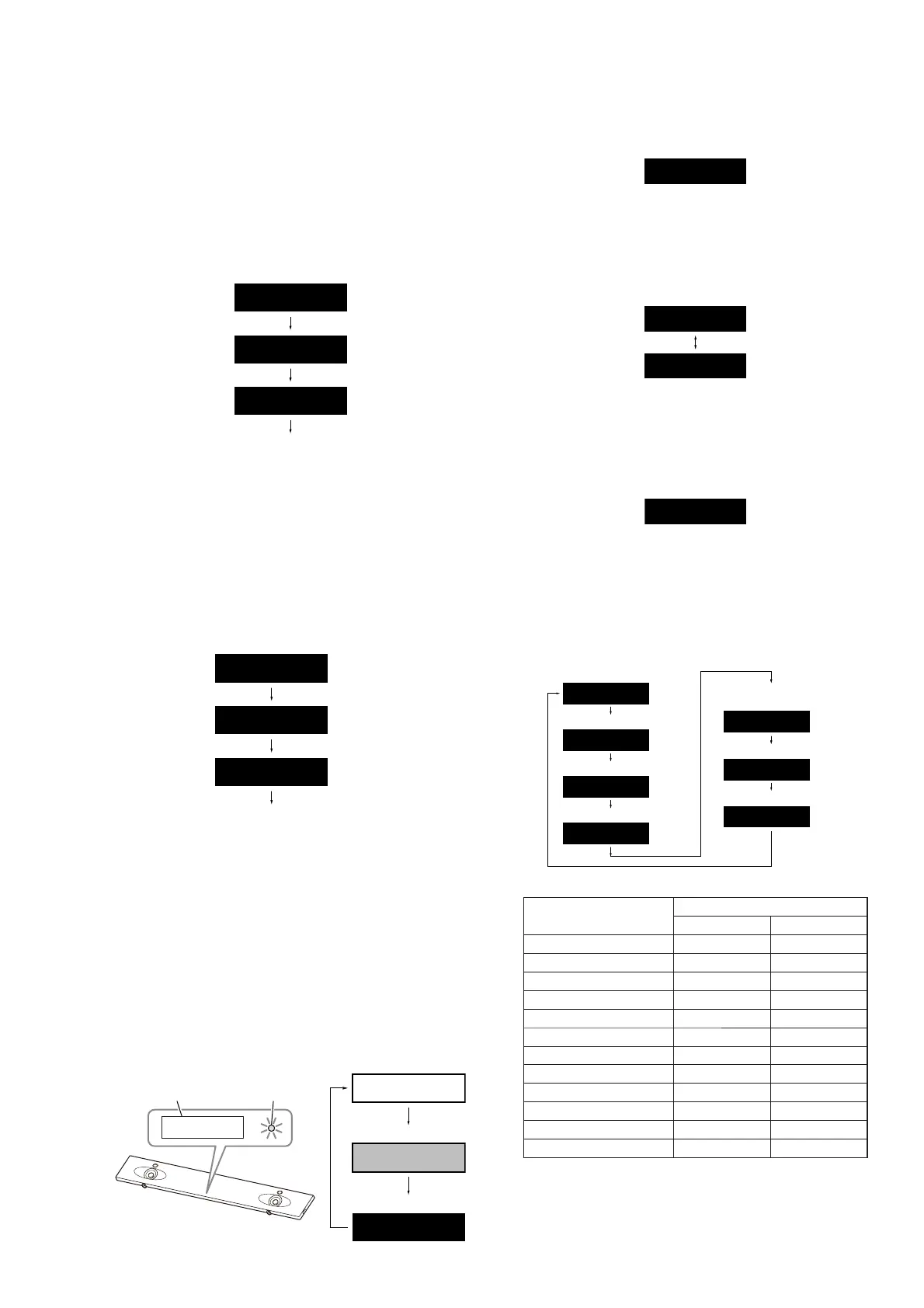
3. The message “WAIT” → “RESET” → “HELLO” is displayed
on the front panel display and then turn the power off.
RESET
WAIT
HELLO
Display is turned off
ALL RESET
It can initialize all settings of IFCon and SYSCON.
Procedure:
1. Touch the [
1
] button to turn the power on.
2. Touch the two buttons of the [VOL +] and [
1
] simultaneously
for fi ve seconds.
3. The message “WAIT” blinks for a few seconds → “RESET”
→ “HELLO” is displayed on the front panel display and then
turn the power off.
RESET
WAIT
HELLO
Display is turned off
Blinks
PANEL TEST
It can check the lighting state of organic EL indicator element
(front panel display) and LED, operation of buttons, display of
model name, destination and software version.
Procedure:
1. Touch the [
1
] button to turn the power on.
2. Press the buttons on the remote commander in the order of [
x
]
→ [DISPLAY] → [v] → [V].
3. BLUETOOTH indicator LED is lighted up, and repeatedly
changes display of front panel display in order from high-
brightness → low-brightness → lights off.
High-brightness
Low-brightness
Lights off
– Front view –
Front panel
display
BLUETOOTH
indicator
4. In the state of step 3, touch the [INPUT] button and “K 0” is
displayed on the front panel display.
K 0
Each time a button on the unit is touched, “K 0” value increas-
es. However, once a button is touched, it is no longer taken into
account.
When touching the all buttons, “OK” and “K 5” are alternately
displayed on the front panel display.
K 5
OK
5. Press the [
2
–] button on the remote commander and return to
the state of step 3.
6. In the state of step 3, touch the [VOL +] button and “SL_A”
(model name) is displayed on the front panel display. (“A” will
display differs depending on the destination)
SL
_
A
(Displayed characters in the above fi gure are example)
Each time the [VOL +] button is touched, the display changes
from destination → system version (IFCon) → system version
(MTK) → IFCon audio coeffi cient version → BD coeffi cient
version → SPC version in this order, and returns to the model
name display.
Destination
System version (IFCon)
System version (MTK)
Model name
IFCon audio
coefficient version
BD coefficient version
SPC version
NA
0. 32A
I0. 18
SL
_
A
R0039
B0. 28
SP. 00
(Displayed characters/values in the above fi gure are example)
Destination
Display
Model name Destination
US, CND models (UC2) SL_A NA
AEP model (CEL) SL_B CE2
RU model (RU3) SL_B RU
UK model (CEK) SL_B CEK
AUS model (AU1) SL_B AU
CH model (CN4) SL_B CN
EA model (EA3) SL_B EA3-2
BR model (BR1) SL_B BR
SP model (SP1) SL_B SP
TW model (TW2) SL_B TW
AR model (AR2) SL_B LATIN
LA model (LA9) SL_B LATIN
Releasing method:
Touch the [
1
] button and return to the normal mode.
Ver. 1.2



 To Next Page