16
STR-DA5300ES
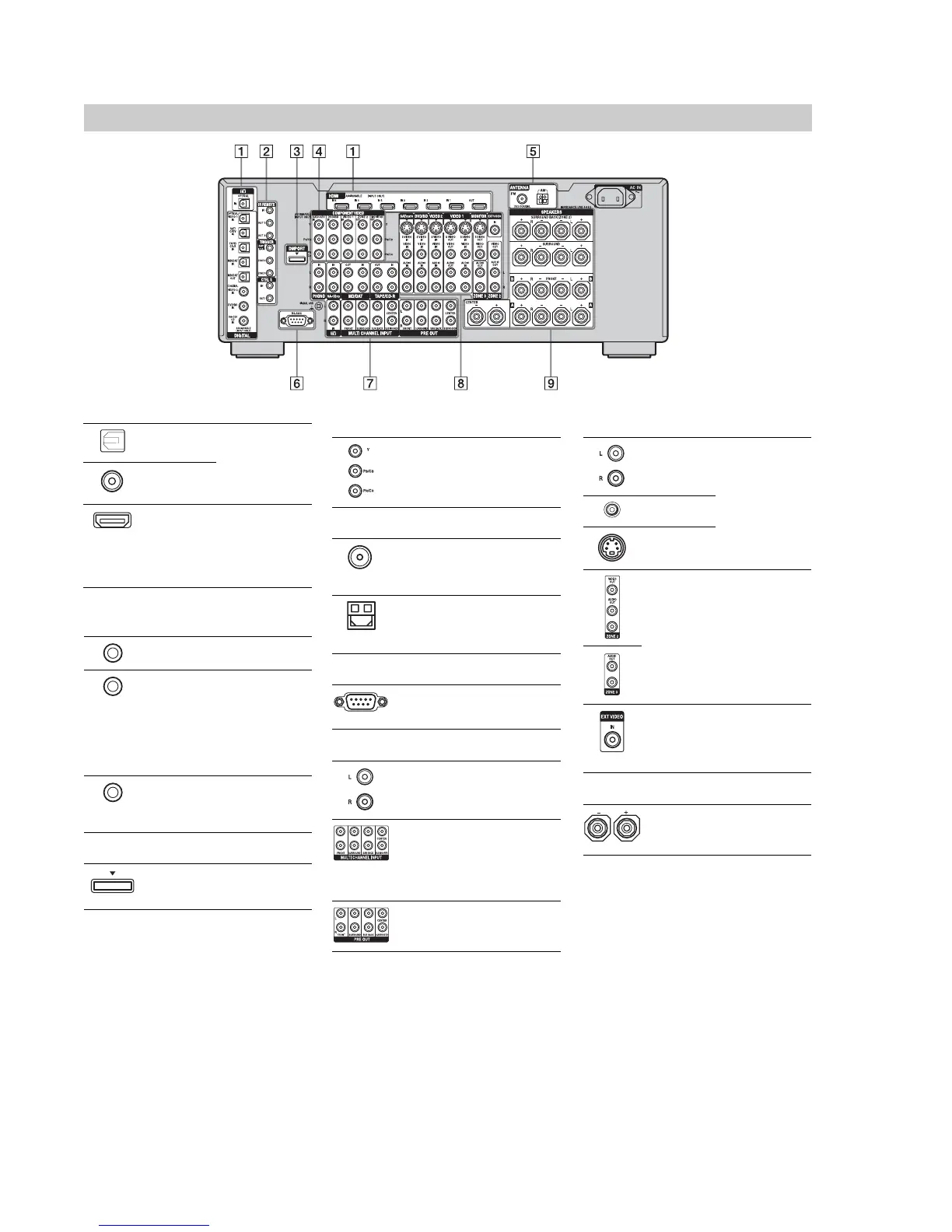
Rear panel
A DIGITAL INPUT/OUTPUT section
OPTICAL IN/
OUT jacks
Connect to a DVD
player, Super Audio
CD player, etc. The
COAXIAL jack
provides a better
quality sound.
COAXIAL IN
jacks
HDMI IN/
OUT* jacks
Connect to a DVD
player, Blu-ray Disc
Player, or a satellite
tuner. An image and
the sound are output
to TV or a projector.
B Control jack for Sony equipment
and other external components
IR REMOTE
IN/OUT jacks
Connect an IR
repeater.
TRIGGER
OUT jacks
Connect to interlock
on/off of the power
supply of other 12V
TRIGGER
compliant
components, or the
amplifier/receiver of
zone 2 or zone 3.
CTRL S IN/
OUT jacks
Connect to Sony TV,
DVD player or VCR
with CONTROL S
jack.
C DMPORT
Connects to a Sony
DIGITAL MEDIA
PORT adapter.
*You can watch the selected input image when you
connect the MONITOR VIDEO OUT jack to a TV.
You can operate this receiver using a GUI
(Graphical User Interface).
D COMPONENT VIDEO INPUT/
OUTPUT section
Y, P
B
/C
B
, P
R
/
C
R
IN/OUT*
jacks
Connect to a DVD
player, TV, or a
satellite tuner.
E ANTENNA section
FM ANTENNA
jack
Connects to the FM
wire antenna (aerial)
supplied with this
receiver.
AM
ANTENNA
jack
Connects to the AM
loop antenna (aerial)
supplied with this
receiver.
F RS-232C port
Used for
maintenance and
service.
G AUDIO INPUT/OUTPUT section
AUDIO IN/
OUT jacks
Connect to a tape
deck or MD deck, etc.
MULTI
CHANNEL
INPUT jacks
Connect to a Super
Audio CD player or
DVD player with an
analog audio jack for
7.1 channel or 5.1
channel sound.
PRE OUT jacks Connect to an
external power
amplifier.
H VIDEO/AUDIO INPUT/OUTPUT
section
AUDIO IN/
OUT jacks
Connect to a VCR or
a DVD player etc..
VIDEO IN/
OUT* jacks
S VIDEO IN/
OUT* jacks
AUDIO OUT
jacks
VIDEO OUT
jack
Connect to the
component in zone 2
or zone 3.
EXT VIDEO IN
jack
Connects to the
component when
you want to watch in
PIP (Picture in
Picture) window.
I SPEAKERS section
Connects to speakers.















 To Next Page