STR-DA5500ES
STR-DA5500ES
2121
VIDEO CALIBRATION ADJUSTMENT
Adjustment to decide the standard of the video input signal.
Note: After replacing D-VIDEO board, or after “SUPER RESET” of the
special menu mode is executed, perform this adjustment.
1. Adjustment jig
The color pattern generator that can output 100% in NTSC/PAL/
HD color bar signal to the component and the composite at the
same time is necessary for the adjustment.
When there is no color pattern generator, it is possible to substitute
it by the Blu-ray Disc player that can output the component termi-
nal and the video terminal at the same time (Substitution model
name example: BDP-S350).
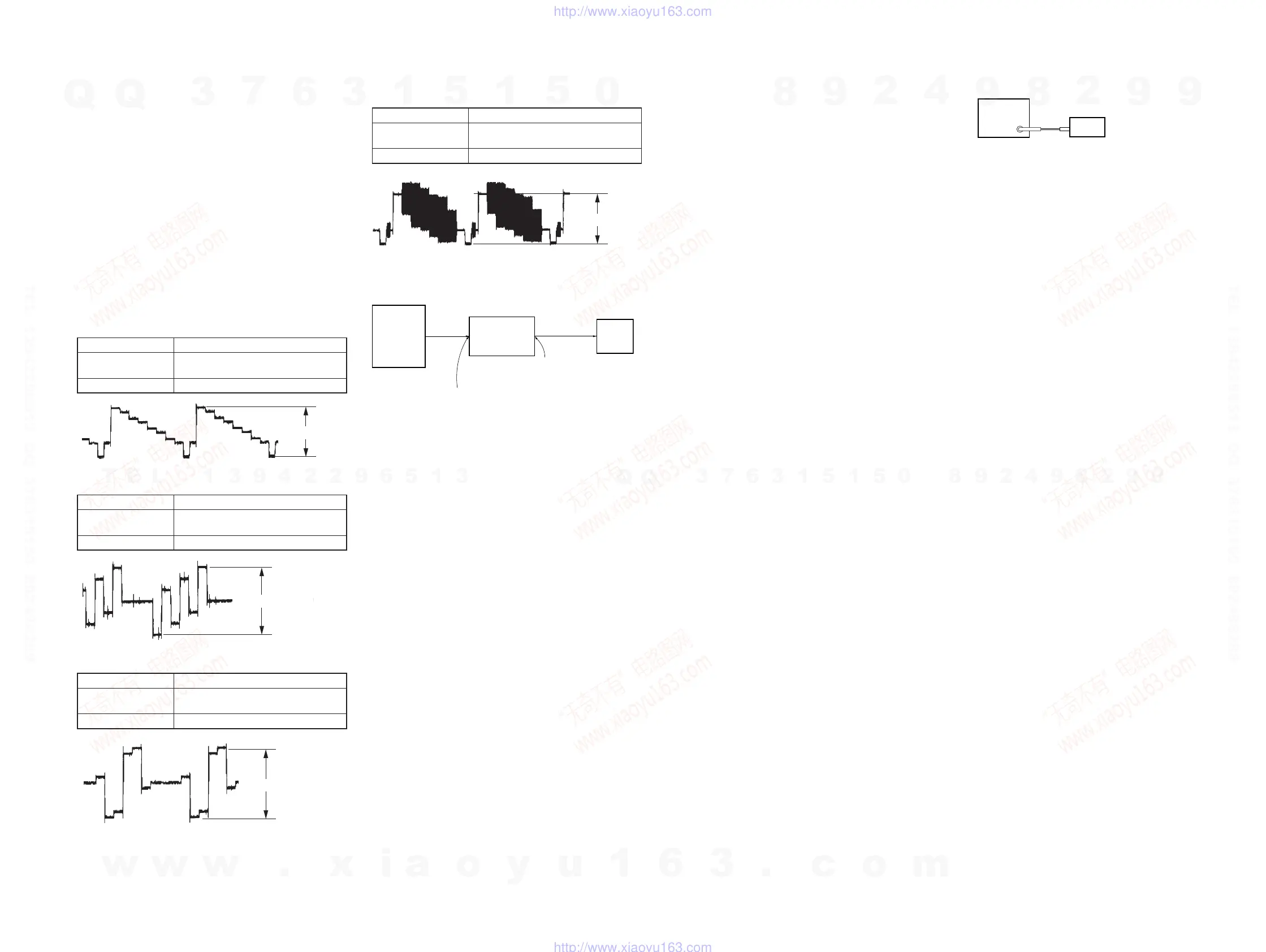
However, please do the following signal output confi rmation with
the oscilloscope beforehand when substituting it with the Blu-ray
Disc player.
1-1. Component signal
Checking Component Video Output Y
Signal DVD standard disc color bars (100%)
Check point
COMPONENT VIDEO OUT (Y)
terminal (75 Ω terminated)
Specifi cation 1.00 ± 0.03 Vp-p
2-2. Procedure for color pattern generator
1. It connects of step 2-1, and the turn on the main power.
2. “DVD” is selected by using [INPUT SELECTOR] dial.
3. Input NTSC color bars signal from the color pattern generator.
4. Enter the special menu mode referring to the “SPECIAL
MENU MODE” (refer to page 18) of the test mode.
5. Press the [M]/[m] buttons of remote commander,
“<<<SPECIAL>>>” is displayed.
6. Press the [,] button on the remote commander, and the [M]/
[m] buttons on the remote commander to select the “VIDEO
FACTORY MENU”, and press the [ENTER] button on the
remote commander. When correctly entering the test mode
“V.CAL COMPLETE N:P:H” is displayed.
7. The NTSC signal adjustment is begun when press the cross
(center of cursor) button of remote commander, and the dis-
play changes from “NTSC:MW -----” to “NTSC:PW OK C V_
_G” little by little. Finally, the display returns to the display of
“V.CAL COMPLETE N:P:H”.
8. Input PAL color bars signal from the color pattern generator.
9. Perform step 7 for the PAL signal adjustment.
10. Input HD color bars signal (720p or 1080i) from the color pat-
tern generator.
11. Perform step 7 for the HD signal adjustment.
12. The turn off the main power.
2-3. Procedure for Blu-ray Disc player
1. It connects of step 2-1, and the turn on the main power of set
and Blu-ray Disc player.
2. “DVD” is selected by using [INPUT SELECTOR] dial.
3. Press the OPEN/CLOSE button of the Blu-ray Disc player, and
DVD test disc “HLX-504 (Part No. J-6090-088-A)” or “HLX-
513 (Part No. J-2501-305-A)” is insert. The disc playback au-
tomatically becomes start “Main Menu” is display.
4. “1.Color Bar 100%” of “1.Video Signal” is reproduced, and
100% in the color bar is displayed in the TV monitor, playing
the Blu-ray Disc player is pause playback.
5. Enter the special menu mode referring to the “SPECIAL
MENU MODE” (refer to page 18) of the test mode.
6. Press the [
M]/[m] buttons of remote commander,
“<<<SPECIAL>>>” is displayed.
7. Press the [
,] button on the remote commander, and the [M]/
[m] buttons on the remote commander to select the “VIDEO
FACTORY MENU”, and press the [ENTER] button on the
remote commander. When correctly entering the test mode
“V.CAL COMPLETE N:P:H” is displayed.
8. The NTSC signal adjustment is begun when press the cross
(center of cursor) button of remote commander, and the dis-
play changes from “NTSC:MW -----” to “NTSC:PW OK C V_
_G” little by little. Finally, the display returns to the display of
“V.CAL COMPLETE N:P:H”.
9. Press the OPEN/CLOSE button of the Blu-ray Disc player, and
change to DVD test disc “HLX-506 (Part No. J-6090-077-A)”
or “HLX-507 (Part No. J-6090-078-A)”. The disc playback au-
tomatically becomes start “Main Menu” is display.
10. “1.Color Bar 100%” of “1.Video Signal” is reproduced, and
100% in the color bar is displayed in the TV monitor, playing
the Blu-ray Disc player is pause playback.
11. The PAL signal adjustment is begun when press the cross (cen-
ter of cursor) button of remote commander. Finally, the display
returns to the display of “V.CAL COMPLETE N:P:H”.
12. Press the OPEN/CLOSE button of the Blu-ray Disc player, and
change to DVD test disc “HLX-104 (Part No. J-6090-199-A)”.
The disc playback automatically becomes start “Main Menu”
is display.
13. “59.94Hz, 1080i” → “1.Video Signal” → “1.Color Bar 100%”
is selected, and 100% in the color bar is displayed in the TV
monitor, playing the Blu-ray Disc player is pause playback.
14. The video output of the Blu-ray Disc player is switched 1080i
(The output from the component terminal of the Blu-ray Disc
player becomes 1080i output).
15. The HD signal adjustment is begun when press the cross (cen-
ter of cursor) button of remote commander. Finally, the display
returns to the display of “V.CAL COMPLETE N:P:H”.
16. The turn off the main power.
FM AUTO STOP CHECK















 To Next Page