10
ENGLISH
AUDES DIGITAL PIANO User manual
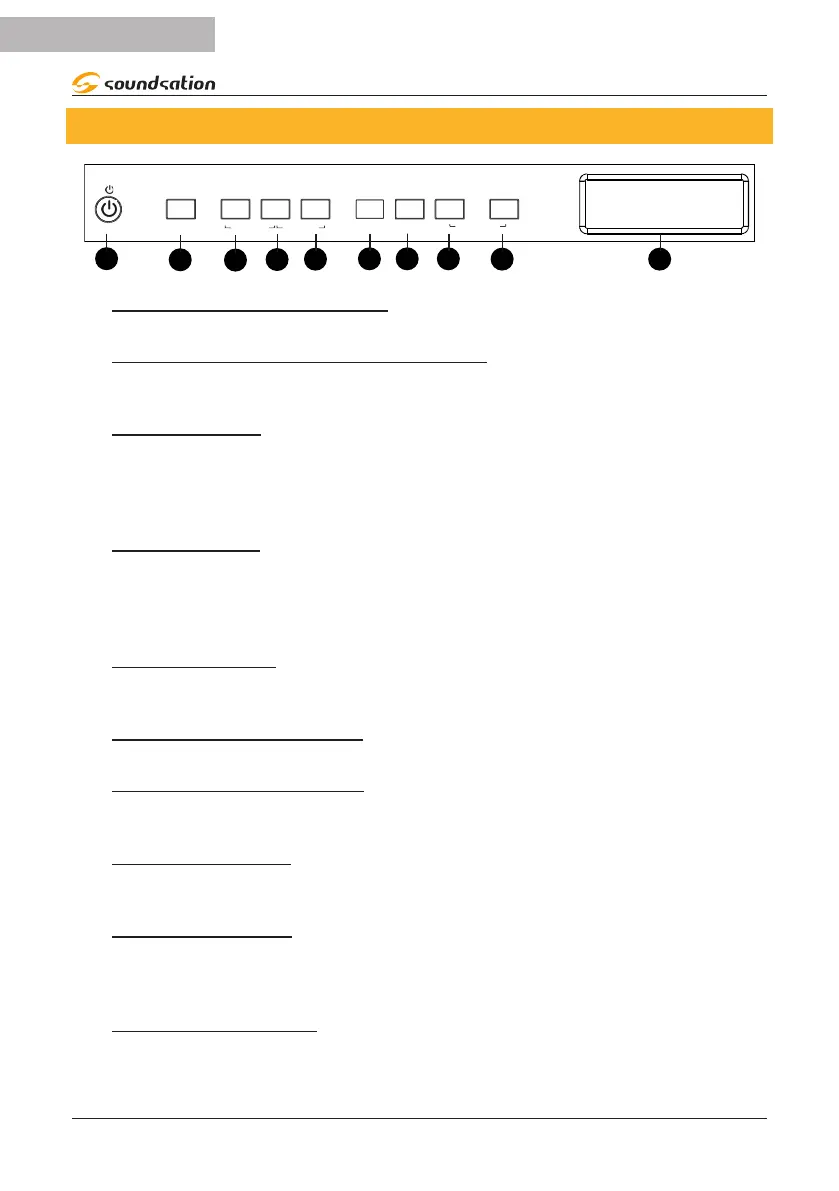
7. CONTROL PANEL
FUNCTION
ACC VOLUME
MP3
REC
PLAY
DEMO SONG
USER SONG
START
STOP
SYNC
FILL IN
CHORD
METRO
SPLIT POINT
1
6 7 8
1) Power ON/OFF BUTTON
Switch on/o the piano
2) FUNCTION/ACC VOLUME BUTTON
By pressing and holding this button you can access functions using the keyboard keys
or you can adjust the accompaniment volume by rotating the Alpha-Dial knob.
3) MP3 BUTTON
By pressing and holding this button you access the contents of the USB Flash drive if
inserted to select the MP3 song to play. Once the desired song has been selected, this
button activates/deactivates playback. In combination with the [REC] button it allows
access to the DEMO SONG environment.
4) REC BUTTON
Button for activating/deactivating recording of a user song.
In combination with the [MP3] button it allows access to the DEMO SONG environ-
ment. In combination with the [PLAY] button it allows access to the USER SONG envi-
ronment.
5) PLAY Button
Button for activating/deactivating playback of a user song.
In combination with the [REC] button it allows access to the USER SONG environment.
6) START/STOP button
Button for activating/deactivating playback of a style or demo song.
7) SYNC/FILL IN button
Button for activating the SYNC function for playback of a style or the FILL IN function
during playback of a style.
8) CHORD button
Button for activating/deactivating automatic chords. In combination with the [METRO]
button it allows selection of the split point by pressing a key on the keyboard.
9) METRO button
Button for activating/deactivating the metronome.
In combination with the [CHORD] button it allows selection of the split point by press-
ing a key on the keyboard.
10) Graphic display
The display shows current information relating to the instrument parameters.


 To Next Page