26
ENGLISH
AUDES DIGITAL PIANO User manual
15. RECORD FUNCTION
This digital piano can record and save 10 user songs. Each user song can record about
10000~20000 events according to the voice, rhythm, pedal etc. The piano has a shut-
down protection, so the user’s song will not be lost even in the event of a power failure.
RECORDING PREPARATION
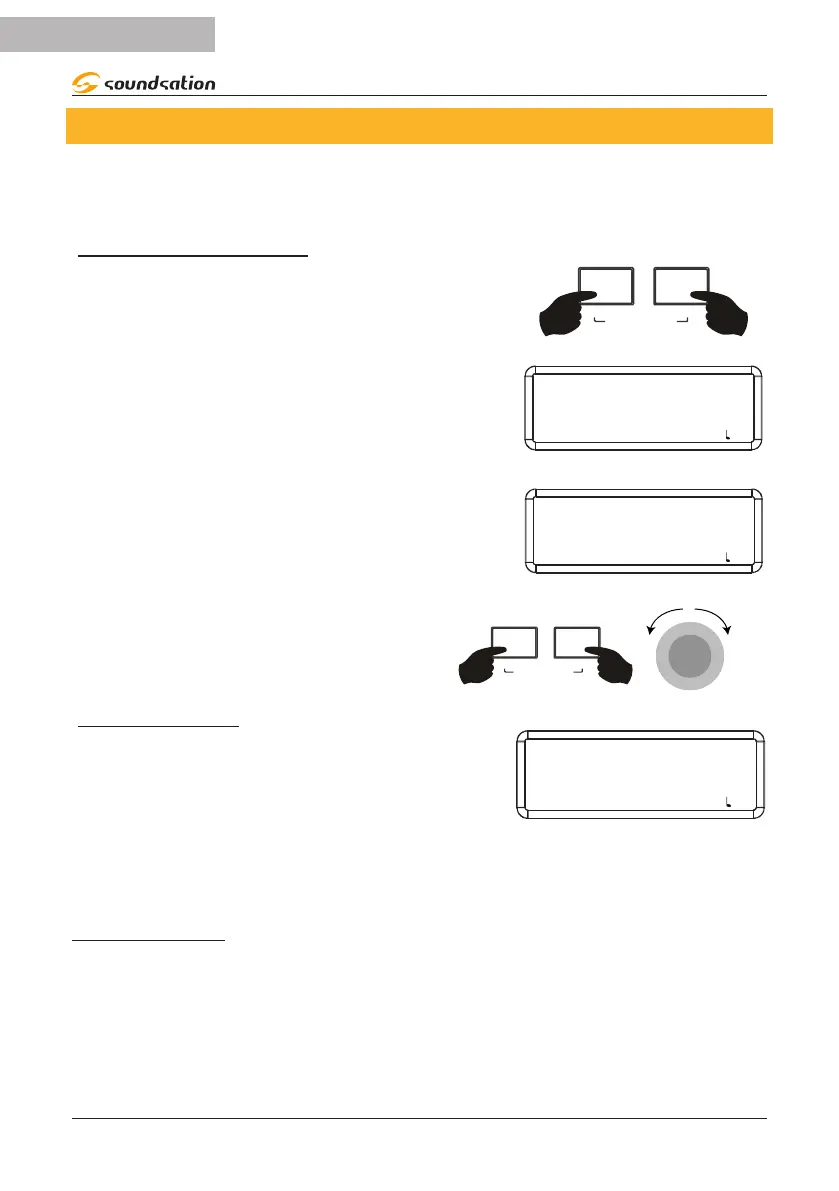
First of all you need to choose the sound, style, tempo
and make all other settings. At this point, by simul-
taneously pressing and holding the [REC] and [PLAY]
buttons you access the USER SONG environment.
USER SONG
The display shows the last selected user song indica-
ting with the name EMPTY and the number that con-
tains no data. If the user song already contains data, it
is displayed with the USER SONG name and number
as shown in the gure on the right.
Playback via the [PLAY] button will only be activated
for user songs with the USER SONG name and num-
ber.
USER SONG
EMPTY-01
SOUND: 000 STYLE: 00 TRANS: 0 BEAT: 4/4 : 120
USER SONG
USER SONG-01
SOUND: 000 STYLE: 00 TRANS: 0 BEAT: 4/4 : 120
To select the desired user song for recording,
simultaneously press and hold the [REC] and
[PLAY] buttons and then rotate the Alpha-Dial
to the right or left.
REC
PLAY
USER SONG
α-
START RECORDING
When you press the [REC] button, the button’s LED
ashes. At this point, simply play any key or start a
style to start recording. The button LED will remain lit
steadily and the display will show the user song being
recorded as shown in the gure to the right.
RECORDING
RECORDING-01
SOUND: 000 STYLE: 00 TRANS: 0 BEAT: 4/4 : 120
NOTE: If the CHORD function and SYNC mode were selected before starting
recording, recording will start as soon as a chord is played in the chord section
of the piano keyboard.
STOP RECORDING
To stop recording, press the [REC] button. The [REC] button LED turns o. At this point
it will be possible to listen to what was recorded.
NOTE:
Recording ends automatically when the memory is full and the user song will be saved
with what was recorded until recording stops.


 To Next Page