8
ENGLISH
AUDES DIGITAL PIANO User manual
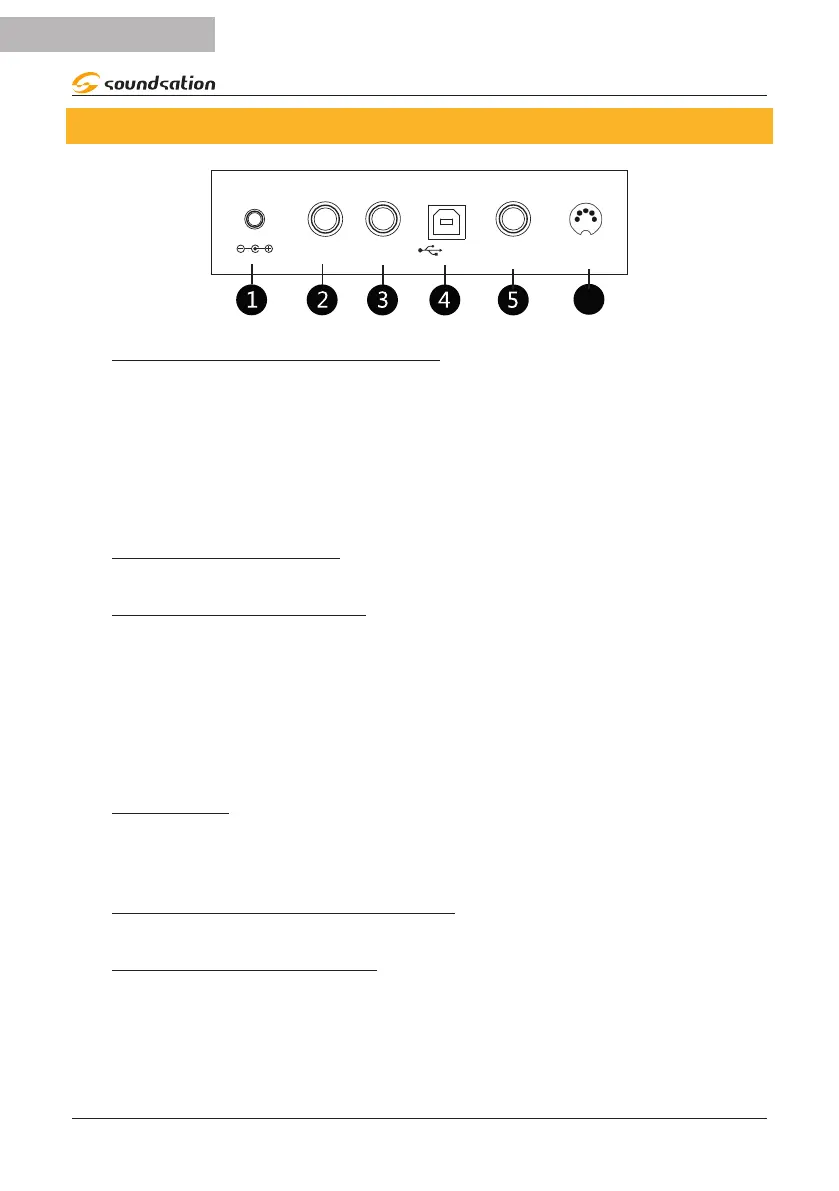
4. REAR PANEL
USB
LINEDC-IN
IN OUT
SUSTAIN
PEDAL
3-PEDAL IN
1) POWER SUPPLY CONNECTOR
a) Before connecting the supplied power supply, make sure that the piano
is turned o.
b) Plug the AC adaptor into an AC outlet.
c) Press the POWER switch to turn on the digital piano.
Note:
When the piano is not in use or during thunderstorm, please
disconnect the power for safety purpose.
2) LINE IN CONNECTOR
Connection for an external audio source, such as a MP3 or CD player.
3) LINE OUT CONNECTOR
The LINE OUT connector on the rear panel provide the instrument’s output for con-
nection to an amplier, stereo sound system, mixing console or recorder. Use jack type
audio cables to connect the LINE OUT connectors located on the rear panel to the
audio inputs of the external audio device.
Note:
To avoid damaging the speakers, make sure that the volume of the digital piano and
external audio device has been set to the minimum level
4) USB PORT
This USB port is for communicating with a computer via a USB cable (TYPE-A/TYPE-C).
“MIDI IN” and “MIDI OUT” can work simultaneously via USB using dedicated software
installed on the computer.
5) SUSTAIN PEDAL CONNECTOr
This connector is dedicated sustain pedal. Connect the included sustain pedal here.
6) 3-PEDAL UNIT SOCKET
Connect the pedalboard cable of the optional stand or optional 3-pedal unit to this jack
on the piano.


 To Next Page