27
ENGLISH
AUDES DIGITAL PIANO User manual
USER SONG PLAYBACK
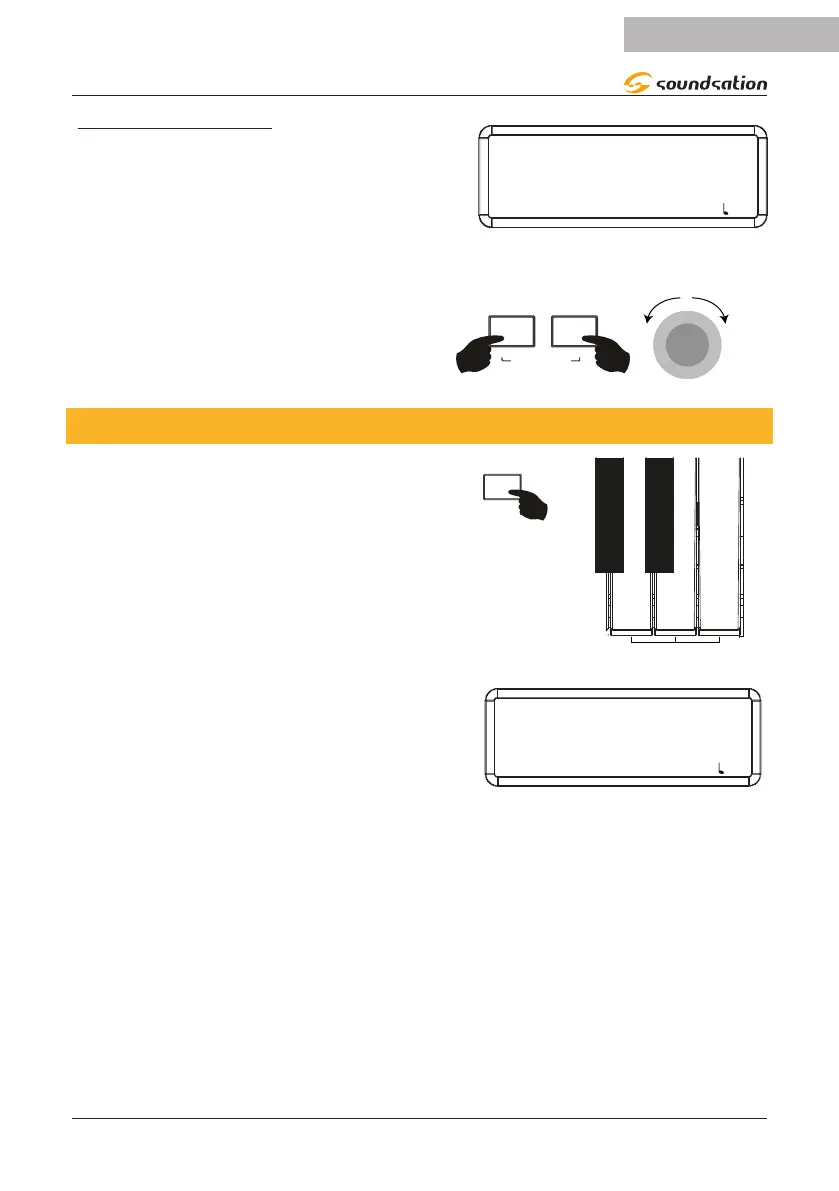
After recording a User Song, you can listen to it
immediately by pressing the [PLAY] button. The
display shows the current user song playing as
shown in the gure to the right.
PLAYING
PLAYBACK-01
SOUND: 000 STYLE: 00 TRANS: 0 BEAT: 4/4 : 120
Of course it is possible to listen to one of the
available user songs at any time by selecting
the desired user song by simultaneously press-
ing and holding the [REC] and [PLAY] buttons
and then rotating the Alpha-Dial to the right
or to the left.
REC
PLAY
USER SONG
α-
16. FACTORY RESET
To reset all piano settings to defaults, press
the [FUNCTION] button and then press the
A7, B7, and C8 keys simultaneously as shown
in the gure to the right.
A7
B7
C8
The display temporarily shows the message in the
gure on the right and then returns to showing
the main screen.
RESET
FACTORY RESET
SOUND: 000 STYLE: 00 TRANS: 0 BEAT: 4/4 : 120
NOTE: All current user memory and user song data will be permanently lost.


 To Next Page