21
ENGLISH
AUDES DIGITAL PIANO User manual
12.3. Transpose
TRANSPOSE VALUE ADJUSTMENT
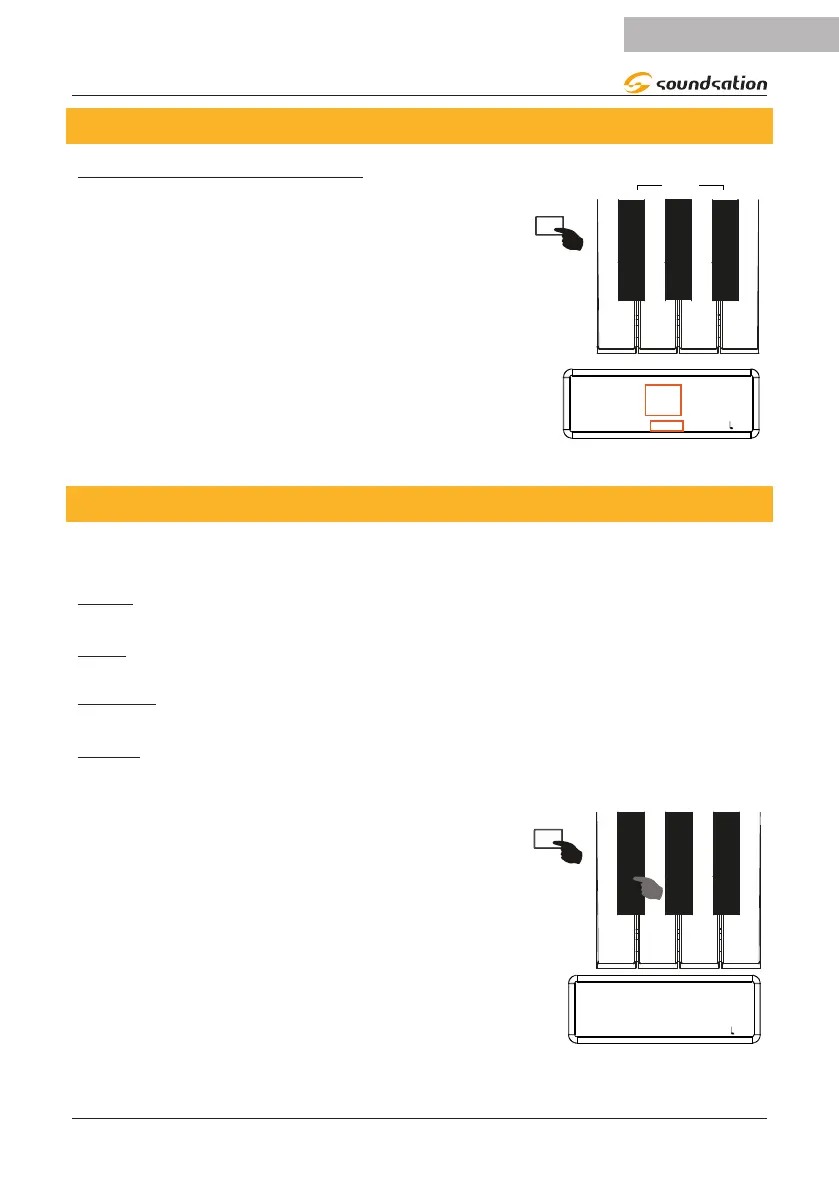
The “Transpose” parameter allows you to transpose
the general pitch of the instrument with a range from
-12 to +12. Press and hold the [FUNCTION] button
and then press the TRANSP [-] (F#3) / TRANSP [+]
(A#3) keys to increase/decrease the transpose value
as shown in the gure on the right. When you press
the TRANSP [0] (G#3) key, the value of the Transpo-
se” parameter will be reset to the default value of 0
(C). During the setting, the display shows the current
value of “Transpose” both as a numerical value and as
the name of the note. If after 3 seconds no operation
is performed the display will return to showing the
previous screen.
0 +
-
F#3
G#3
A#3
FUNCTION
TRANSPOSE
C
SOUND: 000 STYLE: 00 TRANS: 0 BEAT: 4/4 : 120
12.4. Touch
In this digital piano there are 4 types of curves relating to the sensitivity of the keybo-
ard to touch:
FIXED: This setting oers no touch sensitivity. Each key plays at the same dynamic
level, regardless of how hard the key is pressed on the keyboard.
SOFT: This curve gives a more sensitive keyboard response that allows for maximum
sound levels with a light touch.
MEDIUM: This is the default setting. The keyboard oers an intermediate touch re-
sponse suitable for most musical styles.
HEAVY: This curve gives a less sensitive keyboard response that requires a heavier
touch to achieve maximum sound levels
To set the desired curve, press and hold the
[FUNCTION] button and then repeatedly press the
[TOUCH] key (F#2) as shown in the gure on the
right. During the setting the display shows the current
curve. If after 3 seconds no operation is performed the
display will return to showing the previous screen.
F#2
FUNCTION
CURVE
MEDIUM
SOUND: 000 STYLE: 00 TRANS: 0 BEAT: 4/4 : 120


 To Next Page