15
ENGLISH
AUDES DIGITAL PIANO User manual
9.5. LOWER Volume Adjustment
It is possible to adjust the volume for the LOWER sound by doing the following opera-
tions:
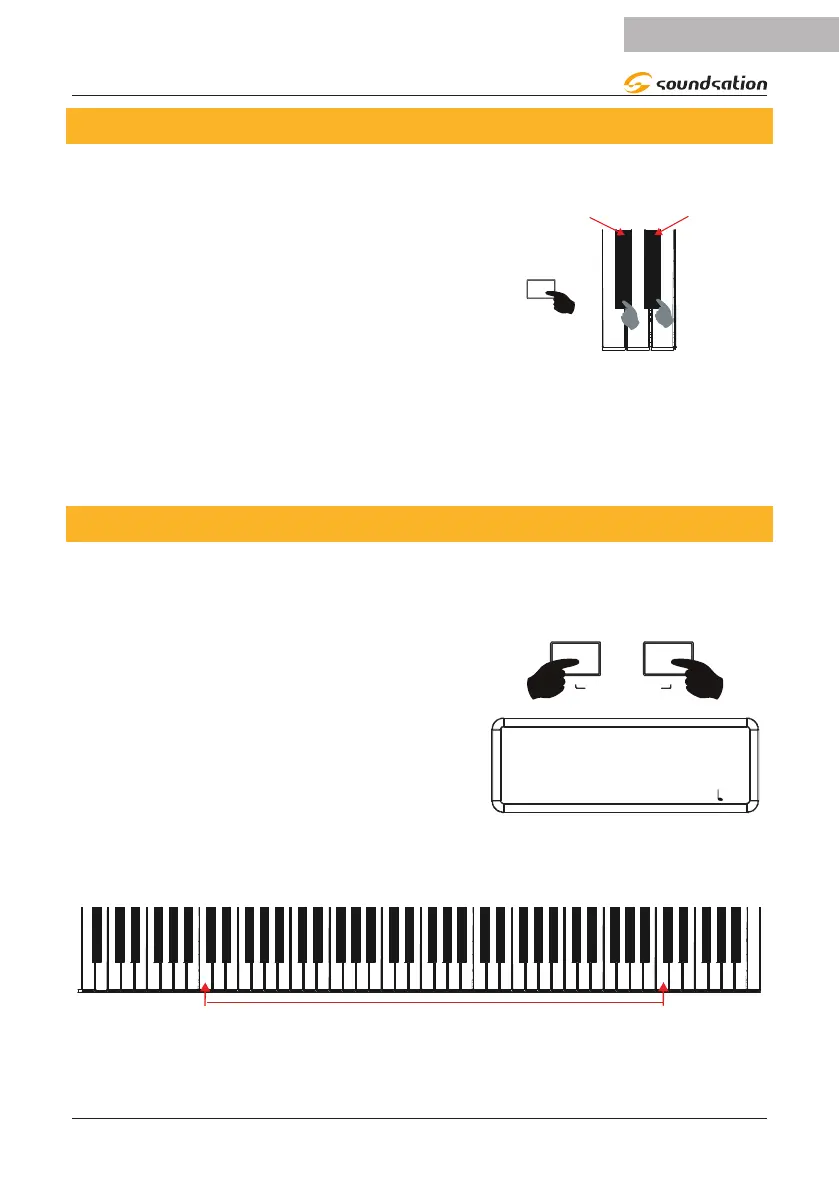
Press and hold down the [FUNCTION] button
and then press the C#2 key on the keyboard to
decrease the volume of the LOWER sound or the
D#2 key to increase it. Corresponding to the C#2
and D#2 keys, the silk-screen printing will relate to
the volume adjustment as shown in the gure on
the right.
- LOWER VOL +
FUNCTION
While increasing or decreasing the volume of the LOWER sound, the display will
always show the current volume value. If during the increase/decrease operations
the C#2 and D#2 keys are pressed simultaneously, the default value is reset. The
default value of the LOWER sound volume is 112. If no operation is performed within
3 seconds the display will return to the previous screen.
9.6. Split Point Setting
When the LOWER function is activated, the keyboard is divided into two areas. The pre-
set Split point is at the C4 key (Note No. 60). It is possible to set the Split Point accord-
ing to your needs doing the following operations:
Press and hold the [CHORD] and [METRO] but-
tons.
SPLIT POINT
The display shows the current Split Point indicat-
ing the Note Number and Note Name as shown in
the gure to the right. If no operation is per-
formed within 3 seconds the display will return to
the previous screen.
SPLIT POINT
60-C4
SOUND: 000 STYLE: 00 TRANS: 0 BEAT: 4/4 : 120
To change the Split Point, press a key on the keyboard while the [CHORD] and
[METRO] buttons are pressed.
The Split Point range is from note C2 (36) to note C7 (96).


 To Next Page