20
ENGLISH
AUDES DIGITAL PIANO User manual
12. OTHER CONTROLS and PARAMETERS
12.1. Metronone
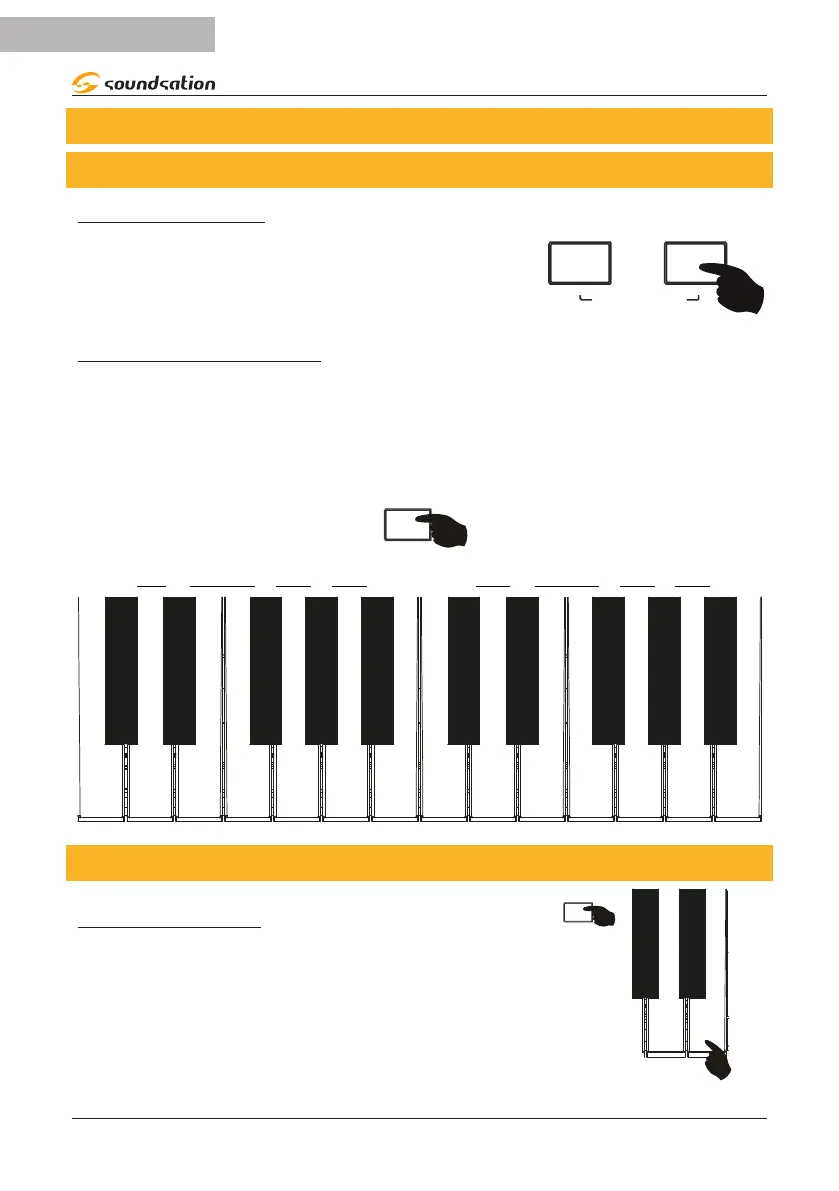
METRONOME ON/OFF
Press the [METRO] button to activate the metronome.
The [METRO] button LED ashes with each beat and the
metronome sound is heard. Pressing the [METRO] but-
ton again turns o the metronome. The [METRO] button
LED will turn o.
SPLIT POINT
TIME SIGNATURE SELECTION
The AUDES digital piano oers 10 selectable Time Signatures:
1/4, 2/4, 3/4, 4/4, 5/4, 6/4, 3/8, 6/8, 7/8, 12/8
To select the desired time signature, press and hold the [FUNCTION] button; Then
press the button relating to the desired time signature referring to the silk-screen
printing as shown in the gure below.
1/4 2/4 3/4 4/4 5/4 6/8 7/8 12/86/4 3/8
SIGNATURE
C#4
D#4 F#4
G#4 A#4
C#5
D#5 F#5
G#5 A#5
12.2. Tempo
TEMPO ADJUSTMENT
The range of the TEMPO parameter is 30 to 240 bpm.
To set the TEMPO value, press and hold down the
[FUNCTION] button and then press the B3 key on the
keyboard to increase or the A3 key to decrease the
TEMPO value. Pressing the A3 and B3 keys simultane-
ously resets the default value (120).
- TEMPO +


 To Next Page