14
ENGLISH
AUDES DIGITAL PIANO User manual
9.4. LOWER Keyboard Mode
Lower keyboard mode lets you divide the keyboard into two areas and assign a die-
rent sound to each.
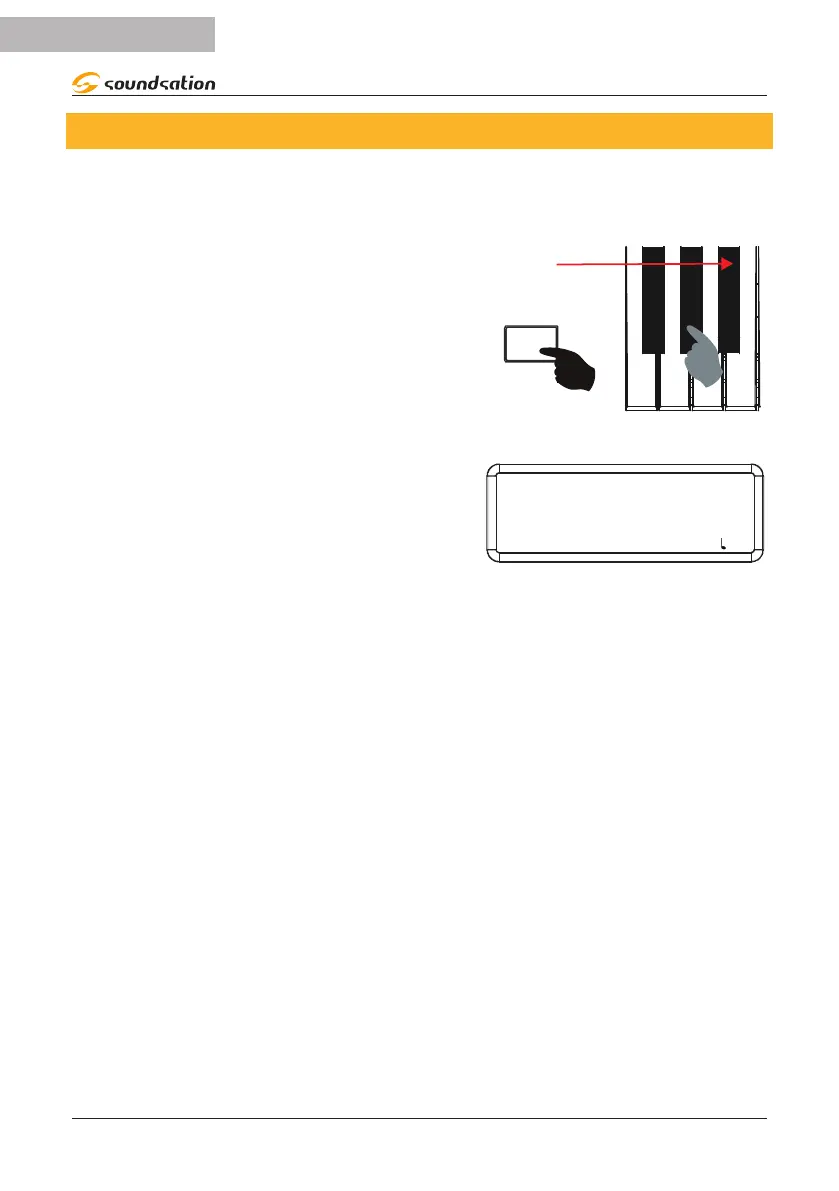
To activate the LOWER keyboard mode, press and
hold down the [FUNCTION] button and then press
the A#2 key on the keyboard which corresponds
to the LOWER silkscreen
A#2
FUNCTION
The display will show the temporary message
“ON” and then all the information relating to the
LOWER sound. The LED relating to the family the
LOWER sound belongs to will light up on the pan-
el. The default sound for LOWER keyboard mode
is ACOU BASS (0032).
LOWER 032
ACOU BASS
SOUND: 000 STYLE: 00 TRANS: 0 BEAT: 4/4 : 120
L:R1
To select the LOWER sound please use the same procedure as for the main sound
selection as described in section 9.1 Sounds Selection
To deactivate the LOWER keyboard mode, press and hold down the [FUNCTION]
button and then press the A#2 key on the keyboard which corresponds to the LOWER
silkscreen. The display will show the temporary message “OFF” to indicate that the
LOWER keyboard mode has been deactivated. The display will return to showing the
previous screen.
Notes:
1) Drum Sets (160 to 168) are not selectable as LOWER sounds.
2) Every time you activate the LOWER keyboard mode, the last previously selected
LOWER sound will be set.
3) If the DUAL keyboard mode is activated when the LOWER mode is already activated,
the sound selection will be assigned to the LOWER sound.


 To Next Page