28
ENGLISH
AUDES DIGITAL PIANO User manual
17. MP3 PLAYER
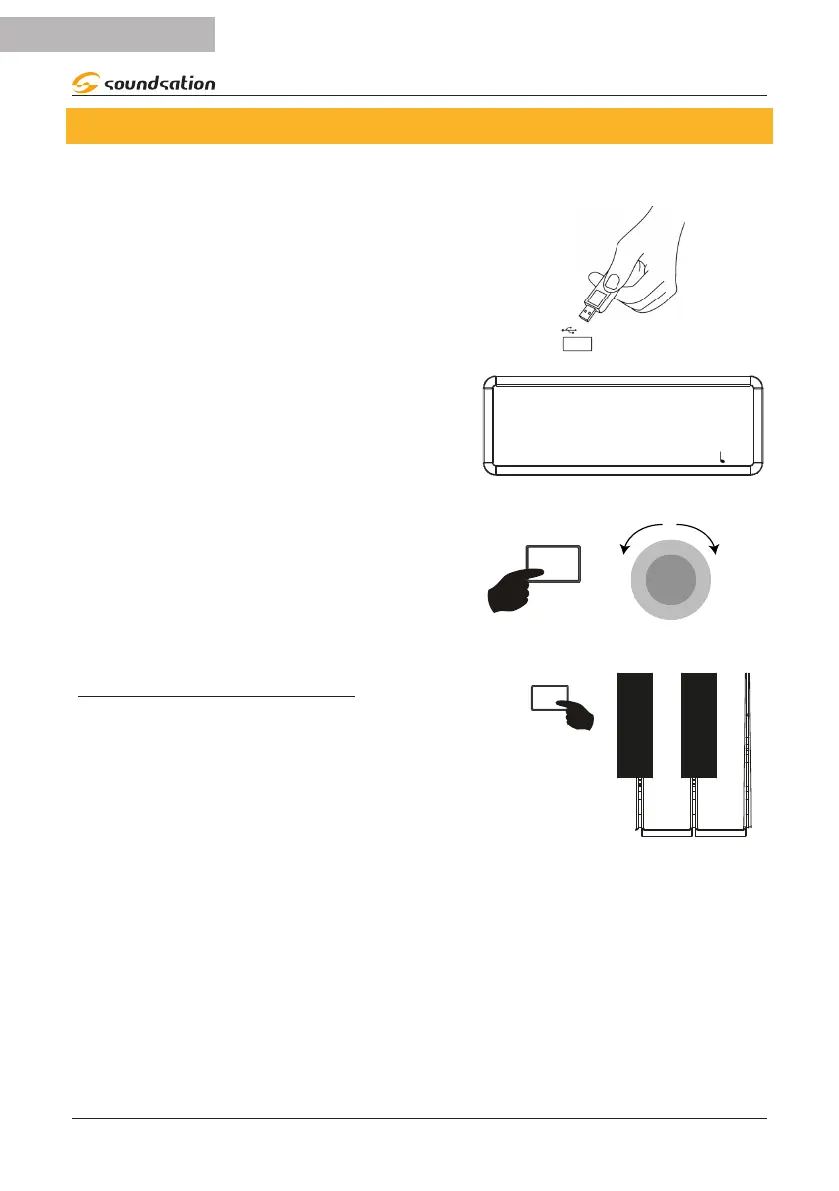
The AUDES digital piano can play audio les in MP3 format directly from a USB Flash
Drive. To play MP3 les follow the instructions below.
Insert the USB Flash Drive into the appropriate
USB port located on the right side of the piano
control panel
USB
After inserting the USB Flash Drive the display
shows the temporary message “Connecting” and
then the name (or part of the name) of the rst
MP3 le contained in the USB Flash Drive will be
displayed
MP3
CANZONE
SOUND: 000 STYLE: 00 TRANS: 0 BEAT: 4/4 : 120
To select any of the MP3 les contained in the
USB Flash Drive, press and hold the [MP3] button
and then rotate the Alpha-Dial right or left until
you nd the desired MP3 le.
MP3
α-
To start/stop playback of the selected MP3 le, press the [MP3] button.
VOLUME ADJUSTMENT FOR MP3
Adjusting the volume for MP3 le playback can be
done by pressing and holding the [FUNCTION] but-
ton and then pressing the [MP3 VOL -](D4) / [MP3
VOL +](E4) piano keys to decrease/increase the
volume of the MP3 le during playback. Pressing the
[MP3 VOL -](D4) / [MP3 VOL +](E4) keys at the same
time sets the default value.
- MP3 VOL. +
FUNCTION
ACC VOLUME
D4
E4


 To Next Page