11
ENGLISH
AUDES DIGITAL PIANO User manual
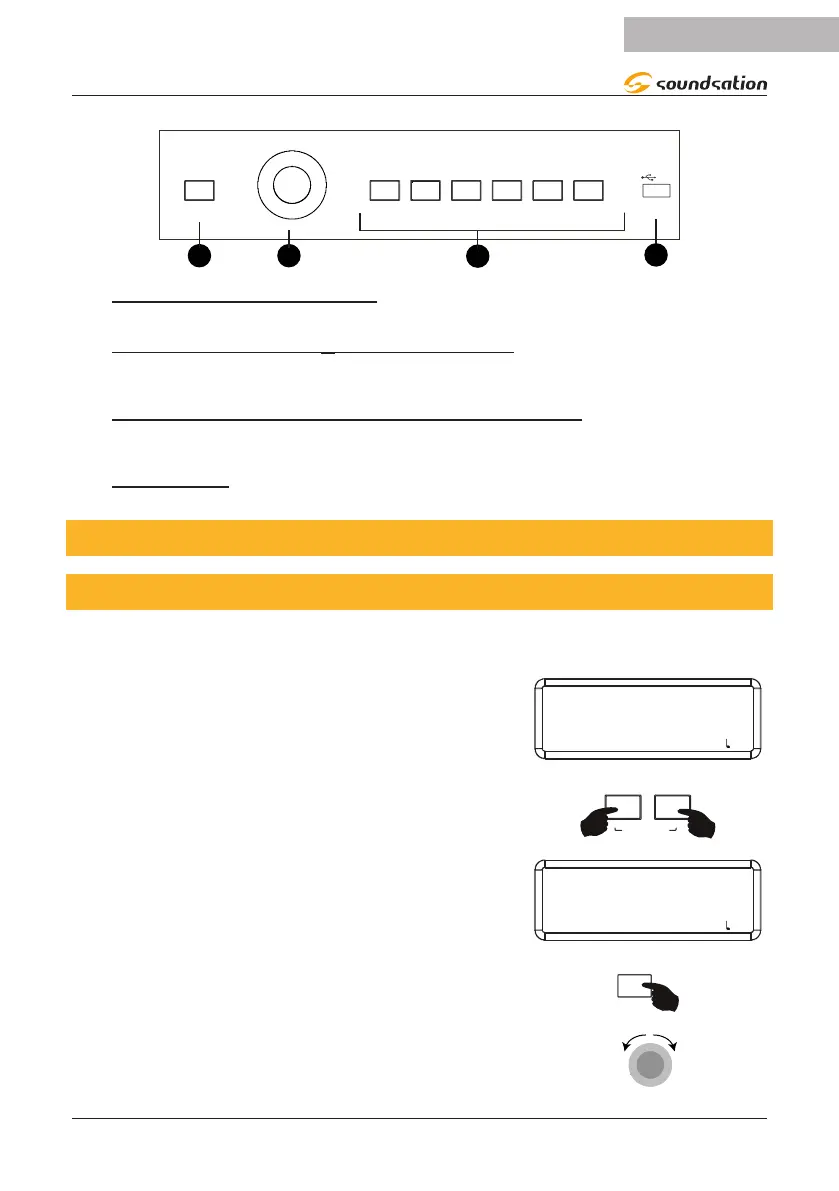
SOUND
STYLE
MASTER VOLUME
α-DIAL
PIANO
ORGAN
GUITAR
STRINGS
PIPE
ETHNIC
8 BEAT
16 BEAT
DISCO
DANCE
BALLROOM
50s & 60s
LATI N
BOSSA
JAZZ
WORLD/BLUES
USB
BASS
BRASS
DRUM SET
11) SOUND/STYLE button
This button allows you to alternately access the style or sound selection environments.
12) MASTER VOLUME/α-DIAL ENCODER
This knob has as its main function the adjustment of the main volume. When piano
parameters or functions are selected, the knob is used to adjust the values..
13) SOUND AND STYLE SHORTCUT BUTTONS
This piano has 160 sounds, 9 drum sets and 100 styles that can be selected using one
of these 6 shortcut buttons or in combination with the Alpha-Dial.
14) USB PORT
Insert the USB Flash Drive for playing Mp3 les.
8. START PLAYING
8.1. Demo Songs
This piano has 32 high quality Demo Songs (Refer to the Demo Songs list). These can
be selected with the following simple operations.
After turning on the piano the display shows the infor-
mation shown in the image on the right.
SOUND 000
PIANO GRD
SOUND: 000 STYLE: 00 TRANS: 0 BEAT: 4/4 : 120
Press the [MP3] and [REC] buttons simultaneously to
access the DEMO SONG environment. To exit the DEMO
SONG environment, press the [MP3] and [REC] buttons
simultaneously again.
DEMO SONG
The display will show the default Demo Song or the last
selected demo song. The default Demo Song is [SYM-
PHONY NO 40].
DEMO 01
SYMPHONY NO 40
SOUND: 000 STYLE: 00 TRANS: 0 BEAT: 4/4 : 120
Press the [START/STOP] button to start or stop playback
of the Demo Song.
STOP
By using the “MASTER VOLUME” knob, you can adjust
the master volume when the demo song is playing. If
the demo song is not playing this knob is used to select
the desired demo song.
-DIAL


 To Next Page