25
ENGLISH
AUDES DIGITAL PIANO User manual
14. USER MEMORIES
The AUDES piano has 10 user memories on which to save the following parameters:
N.
Descrizione
1
Sound
2
Style + Accompaniment Volume
3
DUAL mode (ON/OFF) + DUAL sound + DUAL sound volume
4
LOWER mode (ON/OFF) + LOWER sound + LOWER sound volume
5
Reverb (ON/OFF) + Reverb Type + Reverb Level
6
Chorus (ON/OFF) + Chorus Type + Chorus Level
7
Tempo
8
Transpose
9
Time Signature Metronome
10
Touch
11
MP3 volume
PARAMETERS STORAGE
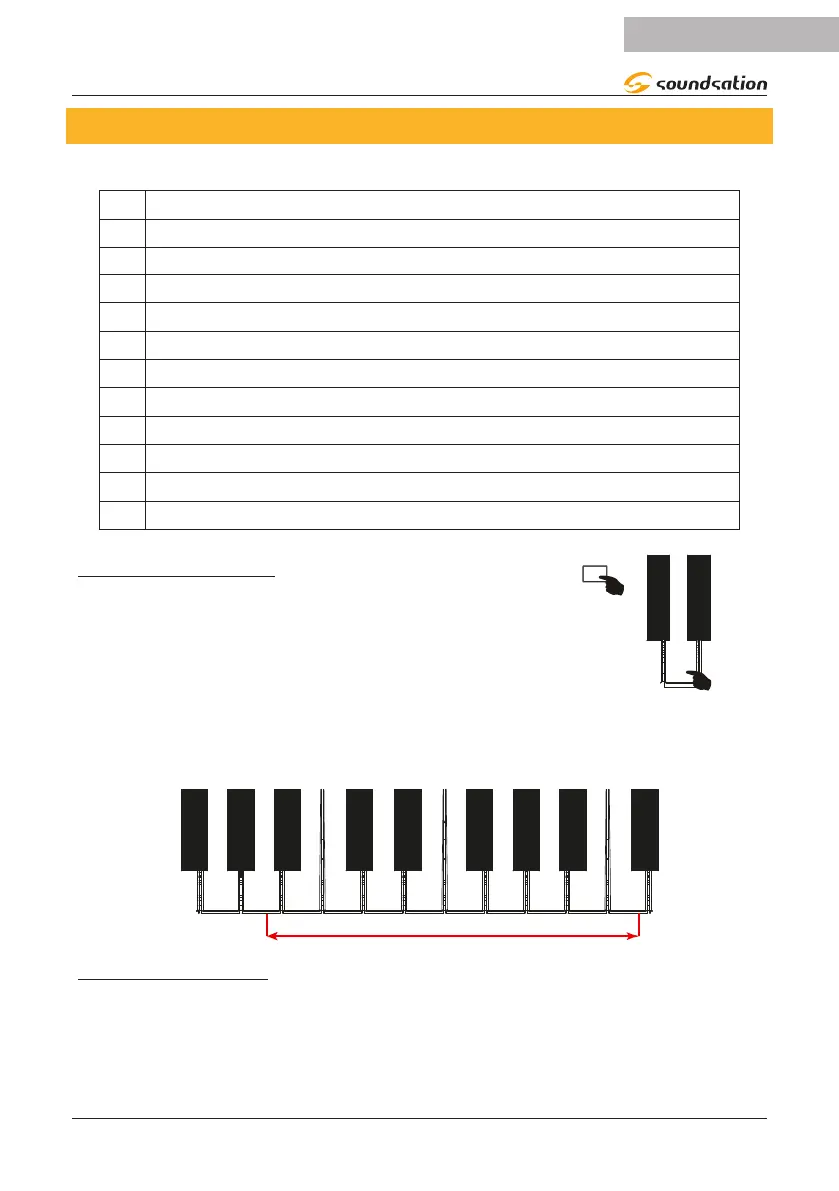
To store all the parameters listed above in a user me-
mory, follow the instructions below:
1) Press and hold the [FUNCTION] button and then
press the [MEMORY] key (G4) as shown in the gure
on the right.
G4
2) While still holding down the [FUNCTION] button, after pressing the [MEMORY]
key (G4) as indicated above, choose in which memory to save the parameters by
pressing one of the keys shown below.
MEMORY 1 2 3 4 5 6 7 8 9 10
A4 B4
C5 D5 E5 F5 G5
A5
B5 C6
RECALL OF A MEMORY
To recall a previously stored memory, press and hold the [FUNCTION] button and
then press one of the keys shown in the gure above. All parameter values will be
reset to the contents of the selected memory.


 To Next Page