22
ENGLISH
AUDES DIGITAL PIANO User manual
12.5. Auto Power OFF
In the AUDES digital piano it is possible to activate the “Auto Power O” function.
The default setting for this function is OFF
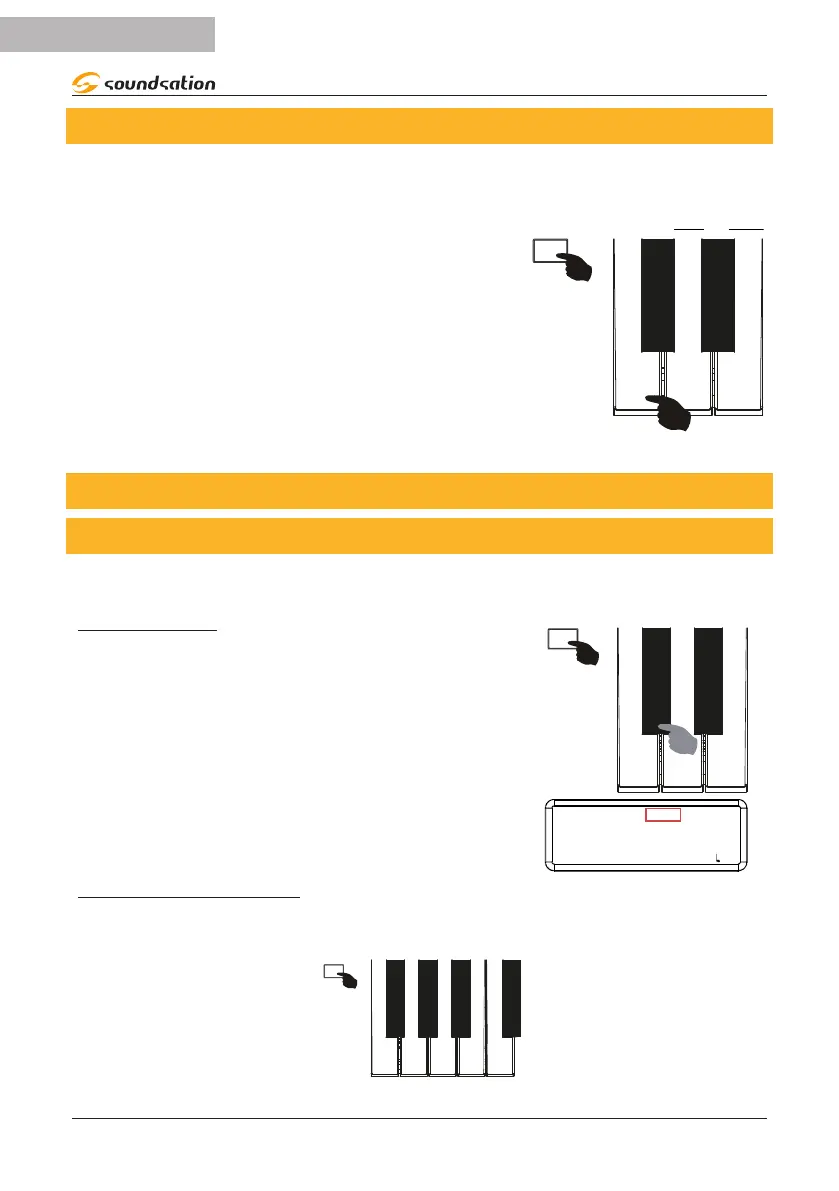
To activate the “Auto Power O” function, press and
hold the [FUNCTION] button and then press the
[AUTOPOWER OFF] button (C4) as shown in the
gure on the right. When the function is activated,
the display will temporarily show the message ON.
When the “Auto Power O” function is active, the
piano will turn o after approximately 1 hour. To
deactivate the “Auto Power O” function, press and
hold the [FUNCTION] button again and then press the
[AUTOPOWER OFF] button (C4). When the function
is deactivated, the display will temporarily show the
message OFF.
AUTO POWER
- MP3 VOL. +
C4
13. EFFECTS
13.1. Reverb
The AUDES piano has 8 selectable reverb types with adjustable level. The default setting
for the reverb eect is OFF.
REVERB ON/OFF
To activate the “Reverb” eect, press and hold the
[FUNCTION] button and then press the [REVERB] key
(C#3) as shown in the gure on the right. When the
reverb is activated, the display will temporarily show
the message ON and the type of reverb used will be
shown at the top left. To turn the reverb eect o,
press and hold the [FUNCTION] button again, and then
press the [REVERB] key (C#3). In this case the display
will temporarily show the message OFF.
C#3
REVERB
ON
SOUND: 000 STYLE: 00 TRANS: 0 BEAT: 4/4 : 120
R:RM1
REVERB TYPES SELECTION
By pressing and holding the [FUNCTION] button you can select 8 types of reverb by
pressing the corresponding keys as shown in the gure below.
ROOM 1 ROOM 3 HALL 2 DELAY PAN
F#6
F6 G6
G#6
A6
A#6
B6 C7


 To Next Page