18
ENGLISH
AUDES DIGITAL PIANO User manual
INTRO/ENDING FUNCTIONS
INTRO: The Intro is the opening pattern of a song. Once the intro pattern is nished,
it will automatically move to the Main section of the style. The length of the
INTRO pattern varies depending on the selected style.
ENDING: The Ending is the nal pattern of a song. Once the Ending pattern ends, the
accompaniment will also stop. The length of the ENDING pattern varies
depending on the selected style.
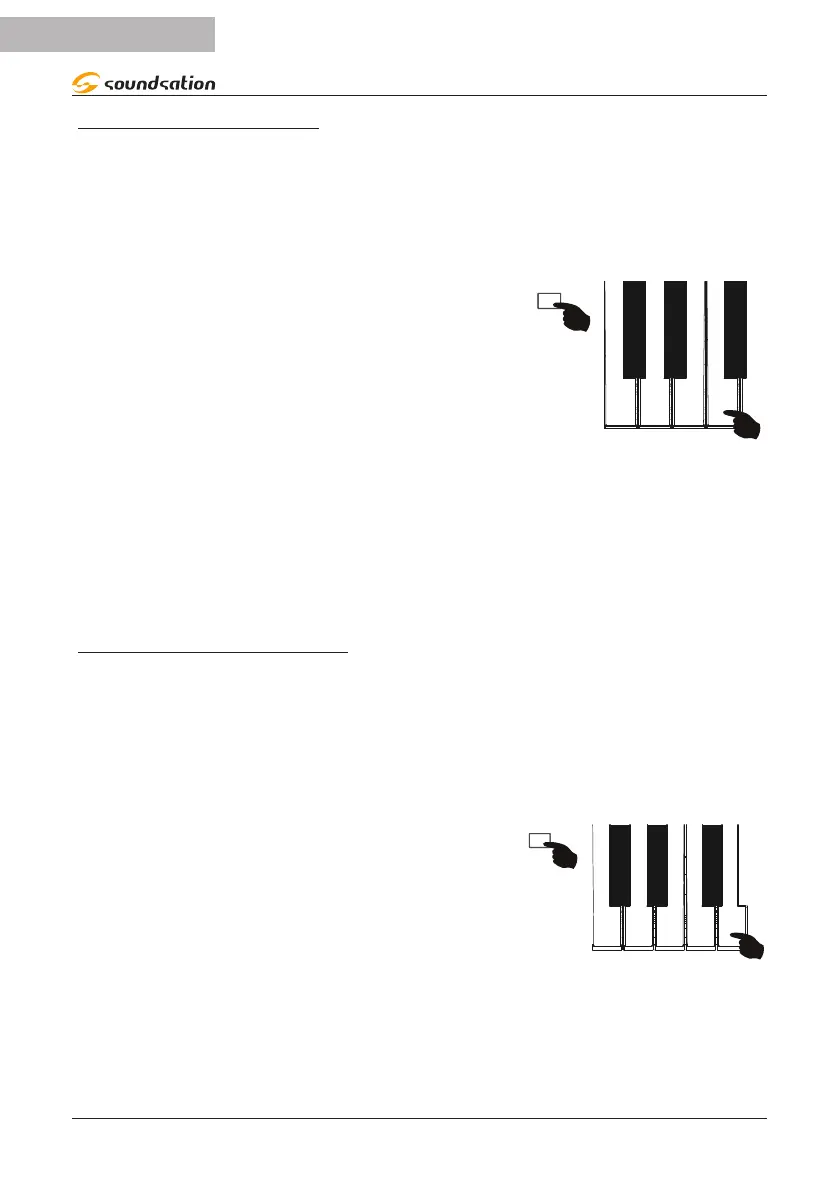
You can then activate the INTRO function before start-
ing the style and the ENDING function while the style
is playing. To activate the functions, press and hold
the [FUNCTION] button and then press the F3 key as
shown in the gure on the right.
INTRO/
F3
FUNCTION
ACC VOLUME
NOTES:
1) We suggest activating the INTRO function after activating the SYNC function and
the CHORD function so that, by playing a chord in the relevant section, the style will
start with the entire instrumental part of the INTRO pattern.
2) If you activate the INTRO function without having previously activated the SYNC and
CHORD functions, only the rhythmic part of the INTRO pattern will be started
automatically
FADE IN/FADE OUT FUNCTIONS
FADE IN: The FADE IN function allows you to start a style with a crescendo of the
accompaniment volume that starts softly and increases until reaching the set
accompaniment volume.
FADE OUT: The FADE-OUT function allows you to end the style with a fade by
gradually decreasing the volume of the accompaniment to zero. At the
end of the FADE-OUT the style will stop automatically
You can then activate the FADE IN function before
starting the style and the FADE OUT function while the
style is playing. To activate the functions, press and
hold the [FUNCTION] button and then press the G3
key as shown in the gure on the right.
INTRO/
FADE
FUNCTION
G3


 To Next Page