CR1620
+
3V
1
2
3
4
5
CR1620
+
3V
1
2
3
4
5
6
1
2
10
SEC
+
1
3
5
4
6
7
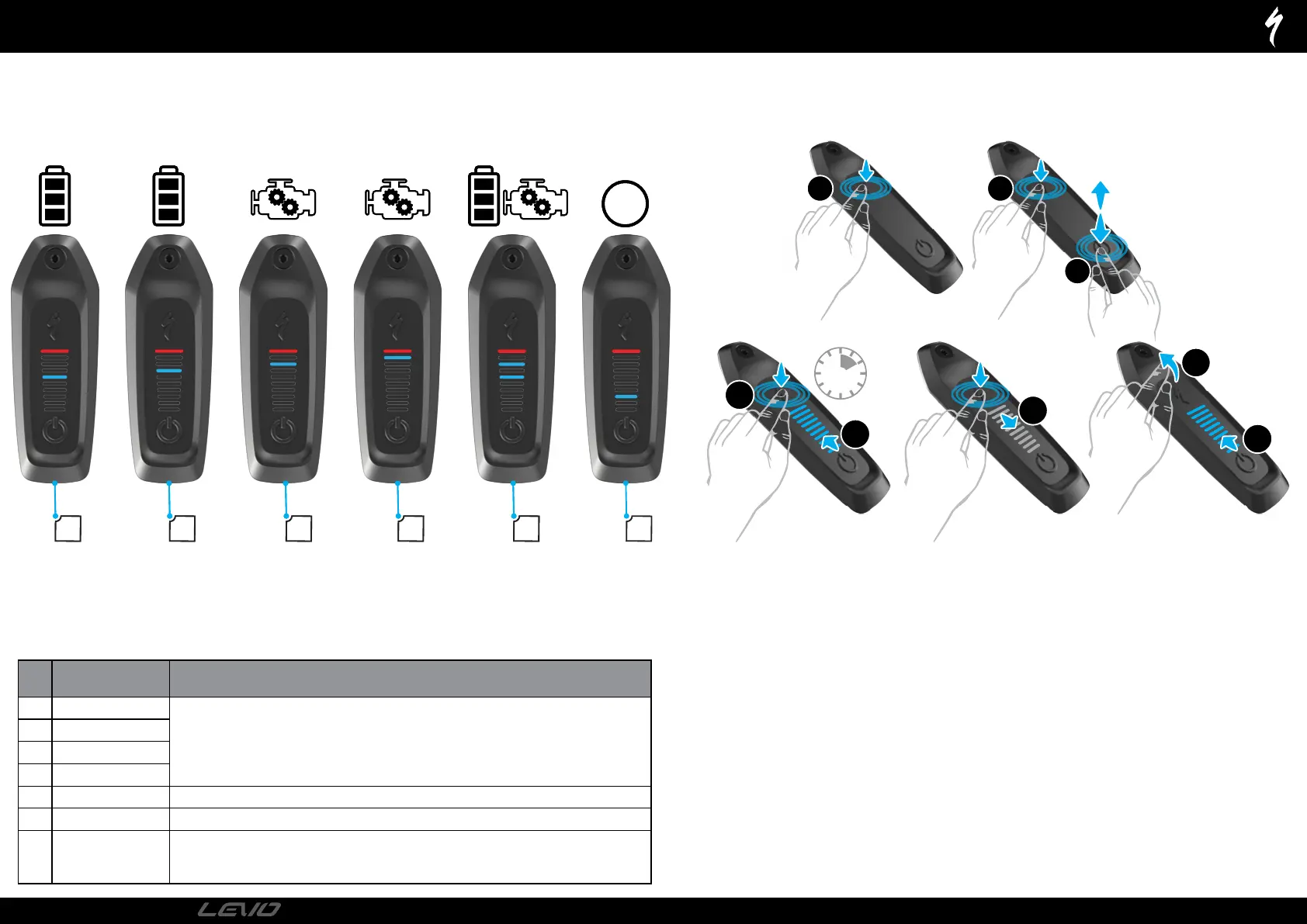
TCU - ERROR CODES & FACTORY RESET
# PART NAME RIDER ACTION
1 Battery error
SEE APP
For Error Codes 1-4 try the following solutions.
• Reboot your bicycle.
• Check Mission Control App for more information.
• If the problem persists, contact your Authorized Specialized Retailer.
2 Battery not found
3 Motor error
4 Motor not found
5 Battery & motor error SEE APP - Contact your Authorized Specialized Retailer.
6 TCU coin cell battery low SEE APP - Replace the coin cell battery in the TCU.
7 Range extender error
SEE APP - • Check the RE plug is inserted correctly into the charge port and locked. | • Disconnect the Range
Extender and check for water in the plug. | • If the problem persists, contact your Authorized Specialized
Retailer. | • Check the RE LED indicator for errors.
FACTORY RESET PROCESS
A factory reset should be performed before a new or used bicycle is handed over to a new rider. Factory Reset restores the system to factory
Settings, also clearing and resetting previous BLE pairings.
Long-press the Mode button (1).
Press and release the Power button (2) while continuing to press the Mode button (1). LEDs will light up (3).
Continue to long-press the Mode button for 10 seconds (4) until the LEDs turn off (5) then turn back on (6).
Release the Mode button (7).
PAGE
29
2022
TECHNICAL GUIDE




 To Next Page