Accessing the Components
Removing the ECO’s
Slide the ECO out of the metal clip and remove the two wires
attached to it. (Fig. 4-19) Be careful when re-installing the ECO,
if the bottom gets dented, the ECO will open and will need to be
replaced. The ECO should have continuity after installation - if not,
it will need to be replaced.
Removing the NTC Sensor
Remove the two Phillips head screws that secure the NTC sensor to
the duct assembly. Fig. (4-19)
Lift the NTC sensor out of the duct assembly. Then, remove the two
wires by pulling on the metal connector. DO NOT pull on the wires,
they could disconnect from the connector.
Removing the Fan Motor
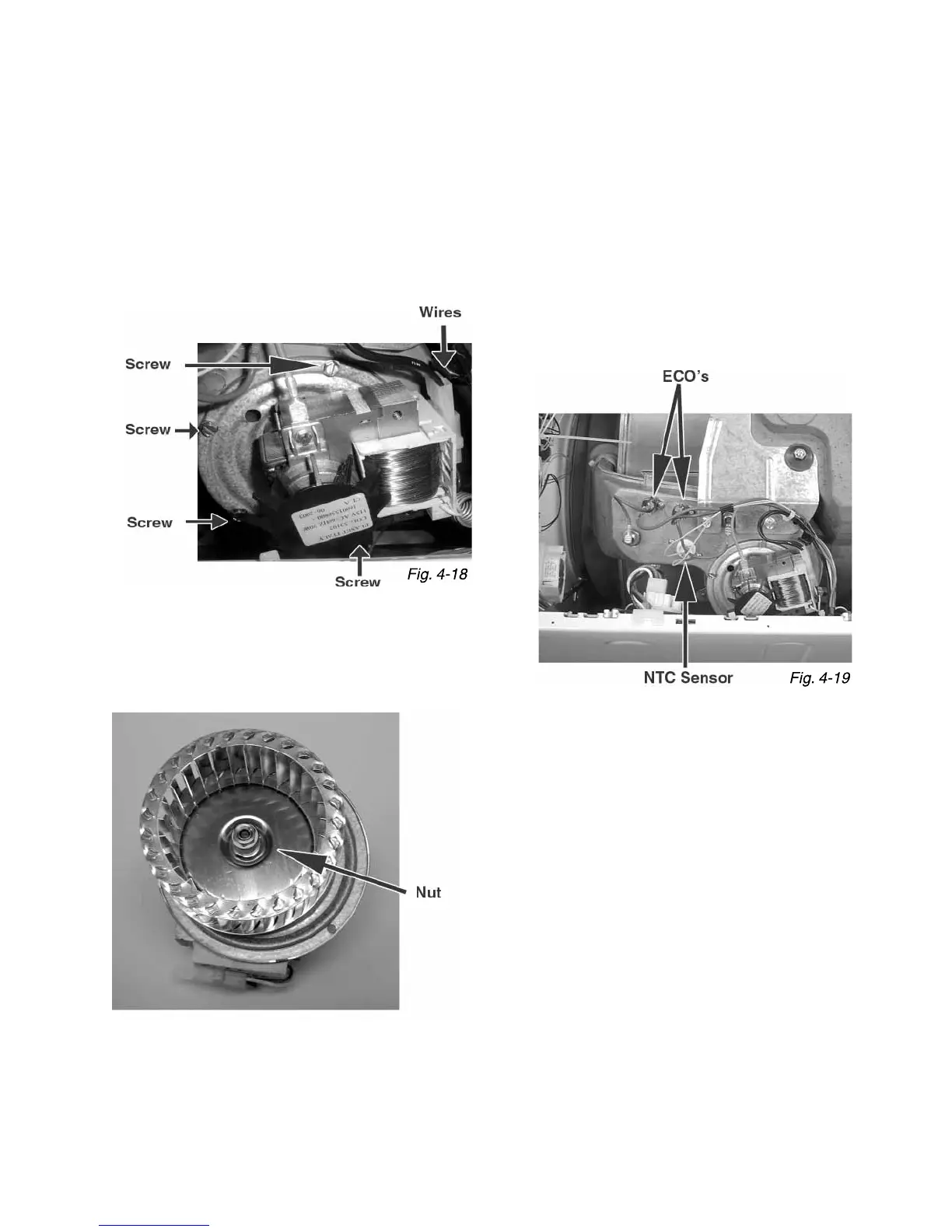
Disconnect the two wires that are attached to the fan motor. Next,
remove the four 7mm screws that secure the fan motor to the
heater duct assembly. (Fig. 4-18)
Remove the 10mm nut with LEFT-HANDED threads (Below) that
secures the impeller to the motor shaft. Lift the impeller straight off
the fan motor shaft. You may need to use a punch.
NOTE: Make sure the impeller does not touch the gasket when re-installed.
If the gasket is damaged it will need to be replaced.
Fan Motor / ECO’s, Heater Coil & Housing
The Fan Motor, ECO’s, Heater Coil and Housing sit on the drum and are located on the top, right side of the machine.
It can be accessed once the top is removed.
(Continued on the next page)



 To Next Page