PXS-710D Section 2
38
2.5.4
C
ONTINUED:
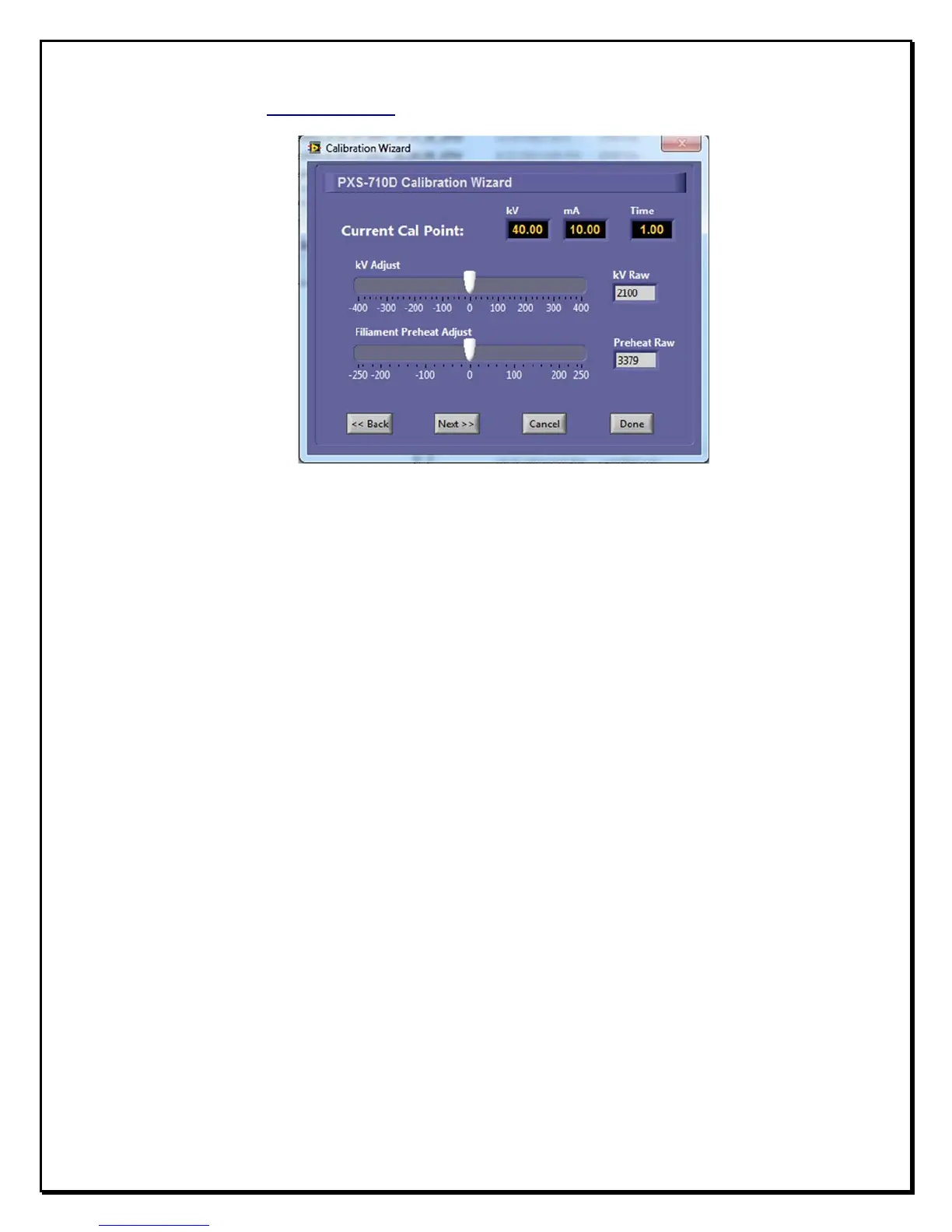
F
igure 2.6
C
alibration
W
izard
f. Make an exposure and measure the actual mA waveform on the
Oscilloscope.
g. To increase or decrease the Preheat, use the ‘Filament Preheat
adjust’ slider to adjust Preheat up or down. The number displayed
in the Preheat Raw window represents a digital code for Preheat
reference and is increased or decreased by the slider control. Adjust
the Preheat until the mA waveform is square with as little overshoot
or undershoot as possible.
h. Make an Exposure and verify the actual mA waveform on the
Oscilloscope, Repeat step g if more adjustment is required.
i. To increase or decrease the kVp, use the ‘kV adjust slider’ to
adjust kV up or down. The number displayed in the kV Raw window
represents a digital code for kVp reference and is increased or
decreased by the slider control. Adjust the kVp until the Actual kVp is
within specifications.


 To Next Page