PXS-710D Section 2
39
2.5.4
C
ONTINUED:
j. Make an Exposure and verify the actual kVp value, Repeat step i if
more adjustment is required.
k. Using the attached mAs meter, measure the mAs for the 1 sec.
exposure. Verify that the reading is 10.0 mAs (1.0 mAs +/- 5%). If
adjustment is required, adjust R102 on the Control board assembly
P/N 950132. Inspect squareness of wave-shape and repeat steps f -
g above if necessary.
l. When the calibration is completed for the 40 kVp preheat range,
depress the “NEXT” button to move to the next calibration station.
Repeat steps f – k. This process is repeated for 50, 60, and 70 kVp,
as displayed in the kV window.
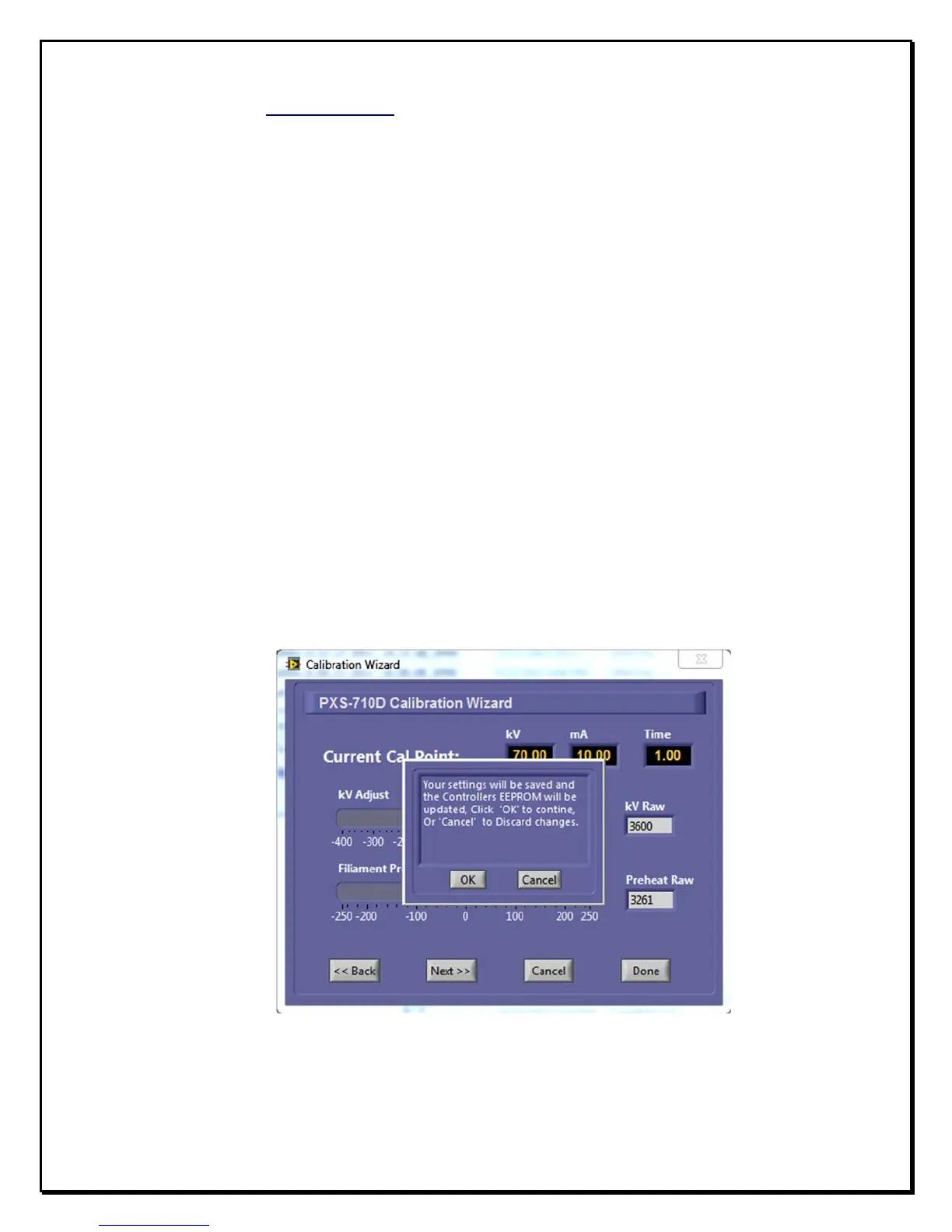
m. Once the 70 kVp station is calibrated, pressing “NEXT” results in a
confirmation dialog as in fig 2.7. Click on the ‘OK’ button to proceed.
F
igure 2.7
S
ettings
C
onfirmation


 To Next Page