ST700 Dash Display SystemMemory and Setup
© Stack
43
MEMORY AND SETUP
This chapter describes the Memory Re-
view and System Setup features of the
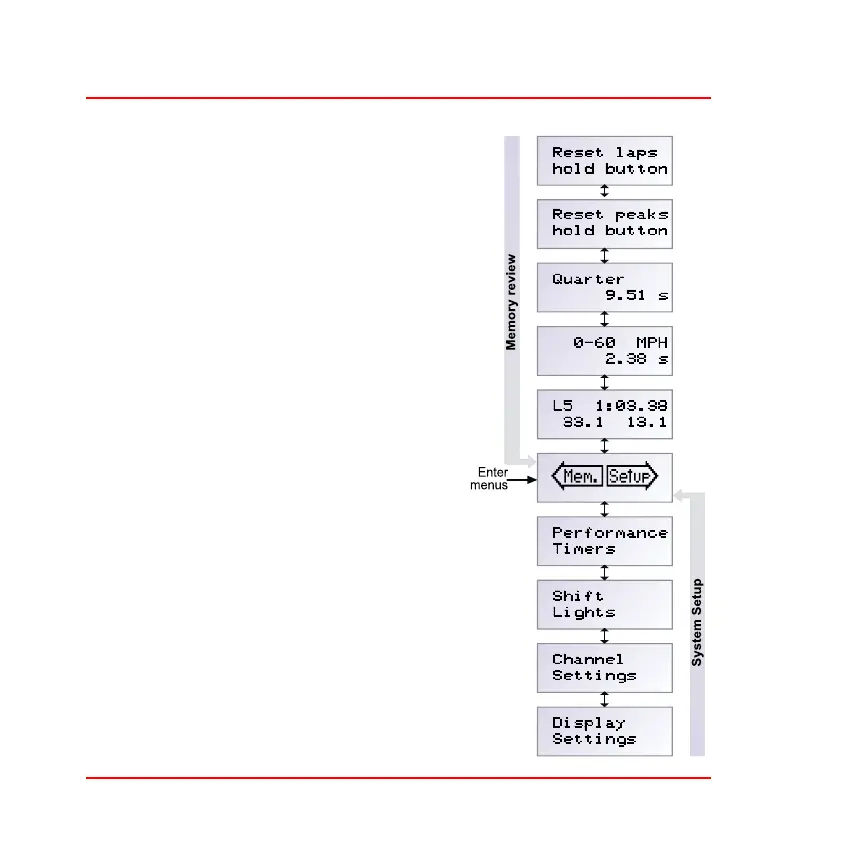
ST700 Dash Display System. The diagram
on the right shows the System Setup and
the Memory review menus, which you
may enter from the Run mode. The ST700
Dash Display System begins to operate in
the Run mode after power–on.
To switch from the Run mode to the setup
modes, press the rotary control for longer
than two seconds and then release it
when the display changes. Whatever the
engine speed, the tachometer needle will
move to a fixed position on the dial where
it is not in the way of the display.
❑ The description of the memory review
features that you may use to examine
details of the laps recorded in the sys-
tem memory starts below.
❑ Instructions to setup the ST700 Dash
Display System begin on page 47.



 To Next Page