63
EN
7 Operation with WinPC-NC
The user interface of WinPC-NC provides a menu to control the 3D probe. The buttons in this menu allow to probe edges
and to nd the center point in a contour. These functions allow for compensation of the probe tip and enable you to easily
record zero points.
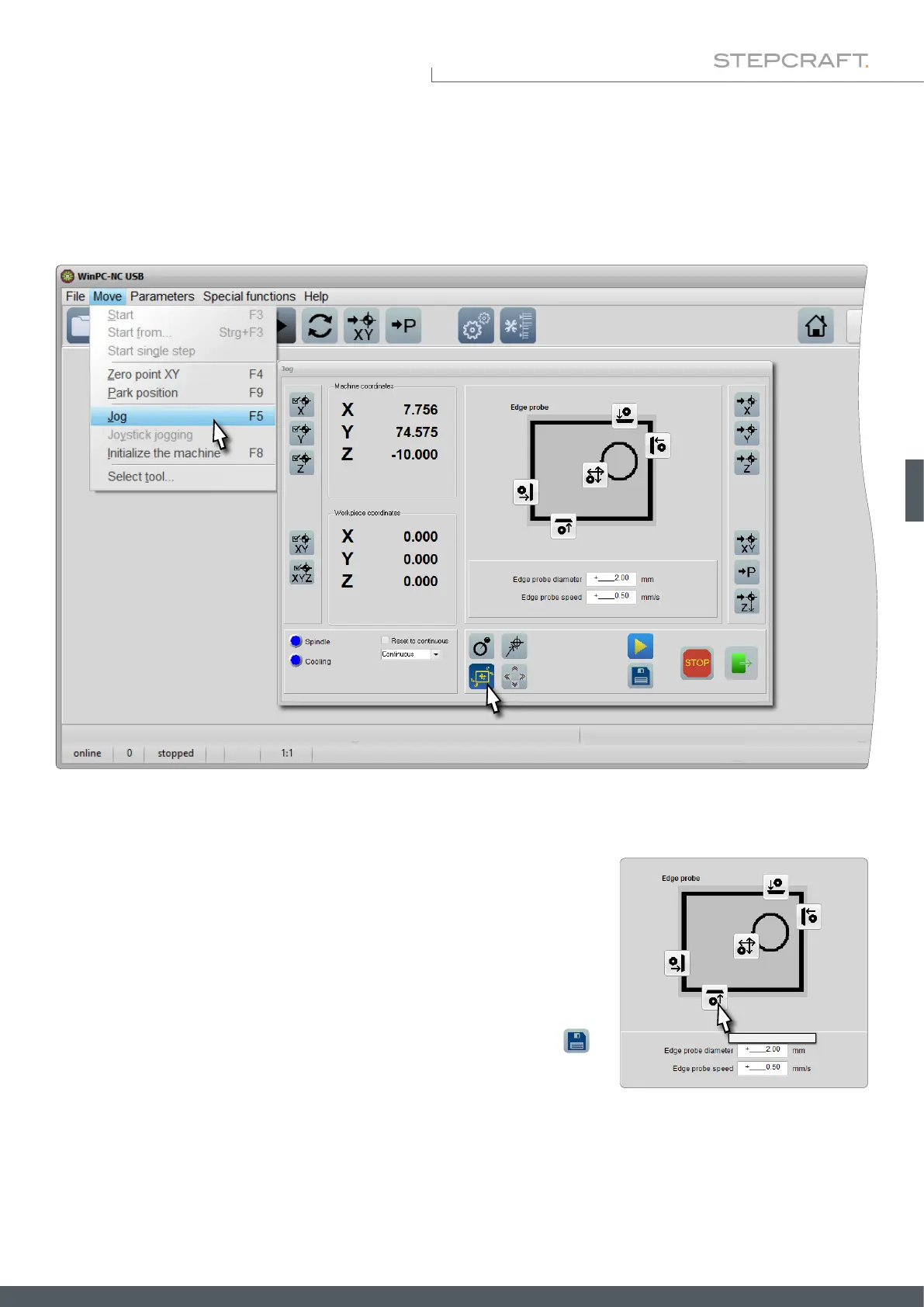
To open the menu which controls the 3D probe, start WinPC-NC, click Move – Jog or press F5 on your keyboard. Click
the Edge probe nder button.
The probe diameter of 2 mm is correctly preset for the STEPCRAFT 3D probe.
You can enter the speed of the probing process. Slow probing processes are to
be preferred to faster ones, as they are more accurate. Click on one of the four
buttons to probe the shown edge. The probe is then moved to the edge and
stopped when the sensor is triggered. The 3D probe is positioned above the
determined coordinate with the set Z-safety distance (Parameters –Coordinates
– Tool lift). Now that the position is known, you can set a zero point via the
button.
Finding lower edge



 To Next Page