11-55
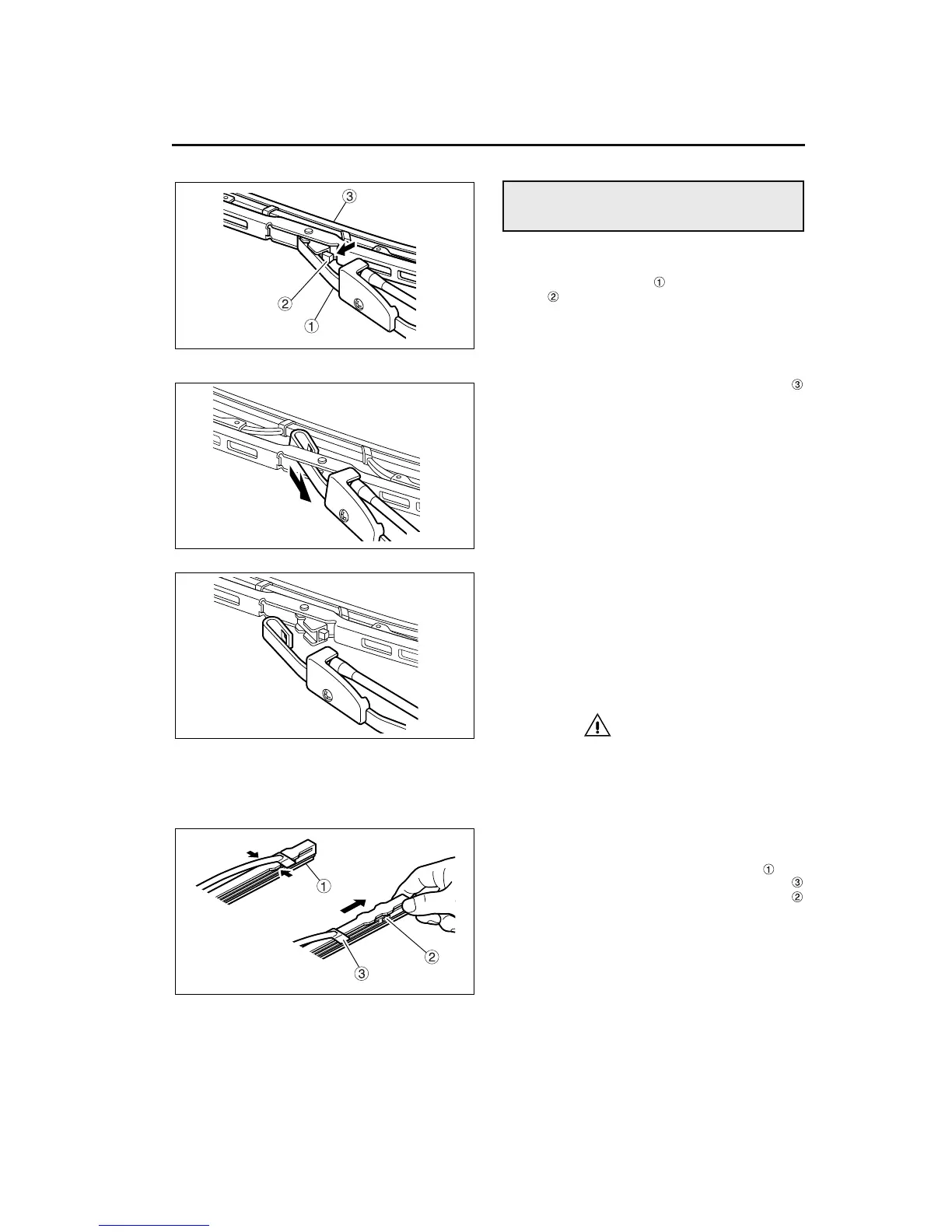
1 Replacing the wiper blade
1. Raise the wiper arm , and push the locking
clip in the direction of the arrow (see illustra-
tion).
2. With the locking clip held in, press the wiper
toward the wiper arm.
3. As the wiper blade comes free, pull it away from
the wiper arm hook.
4. Install a new wiper blade on the wiper arm. Hold
in the locking clip until the new blade snaps into
place.
5. Tug gently on the blade to make sure it is
securely installed and pivots freely on the wiper
arm.
CAUTION
Do not bring the wiper arms back into position
or operate the wipers without wiper blades. This
could scratch the windshield.
2 Replacing the rubber element
1. Raise the wiper arm and turn it over.
2. Pinch both sides of the rubber element with
your fingers. Pull the element so that the jaws
of the blade carrier release from the notches
in the tension strip.
3. Slide the rubber element out of the blade carrier.
4. Replace the old rubber element with a new one.
5. To install, insert the grooves in the rubber ele-
ment into the jaws of the carrier.
6. Slide the rubber element into the carrier until it
locks into place. Make sure the jaws fit snugly
into the notches in the tension strip.
Wiper blade replacing
Z05981
Z05982
Z05983
Z09332



 To Next Page