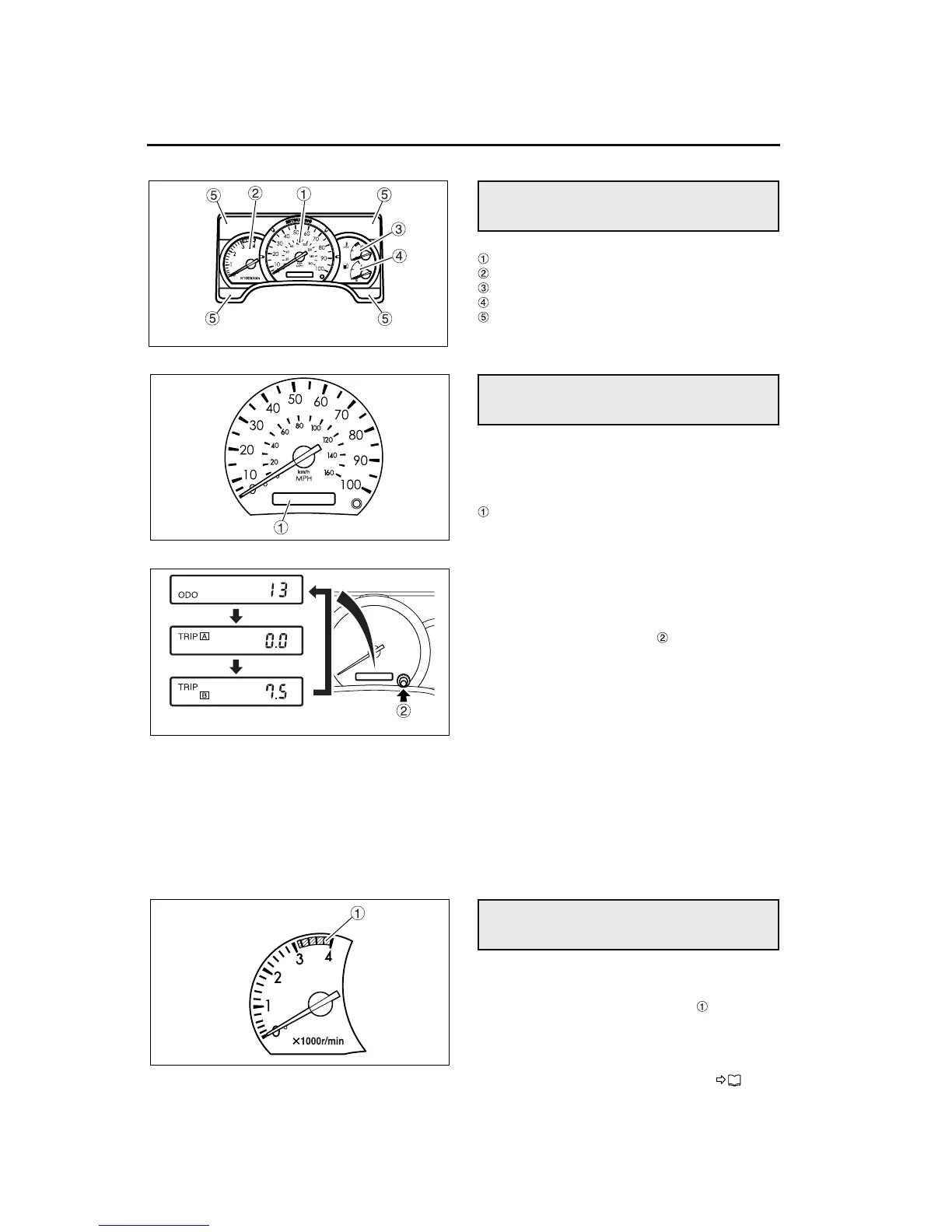
6-2 Instrument cluster gauges and lights
Speedometer
Tachometer
Coolant temperature gauge
Fuel level gauge
Warning and indicator lights
1 Speedometer
The speedometer indicates vehicle speed in miles
and kilometers per hour.
Odometer/Tripmeter
2 Odometer/tripmeter
With the ignition switch in the “ON” position, either
“ODO” (for “odometer”) or “TRIP” (for “tripmeter”) is
displayed. The display toggles between “ODO” and
“TRIP” each time the trip knob is pressed.
• ODO (odometer)
The total distance covered by the vehicle is shown
to the nearest mile.
• TRIP (tripmeter)
The distance covered by the vehicle from a selected
point to its present location is shown to the nearest
0.1 mile.
The tripmeter has two indications: TRIP “A” and
TRIP “B”, which can be set and displayed indepen-
dently of each other.
To return the current indication to zero, press the
trip knob for approximately 1 second or longer. The
indication will return to “0.0”.
• The tachometer indicates engine speed in revo-
lutions per minute.
• If the needle enters the red zone , the engine
speed is too high. Reduce the vehicle speed
sufficiently during downhill driving or downshift-
ing to keep the needle from entering this zone
and causing an overspeed condition.
P. 7 - 9
Instrument cluster layout
Speedometer
Tachometer
Z11892
Z11893
Z08790
Z13659


 To Next Page