EasyManua.ls Logo

Stone Stonebook Mini - System Map: LCD Panel Open

Default Icon
250 pages
Print Icon
To Next Page IconTo Next Page
To Previous Page IconTo Previous Page
Loading...
1 - 6 System Map: LCD Panel Open
Quick Start Guide
1
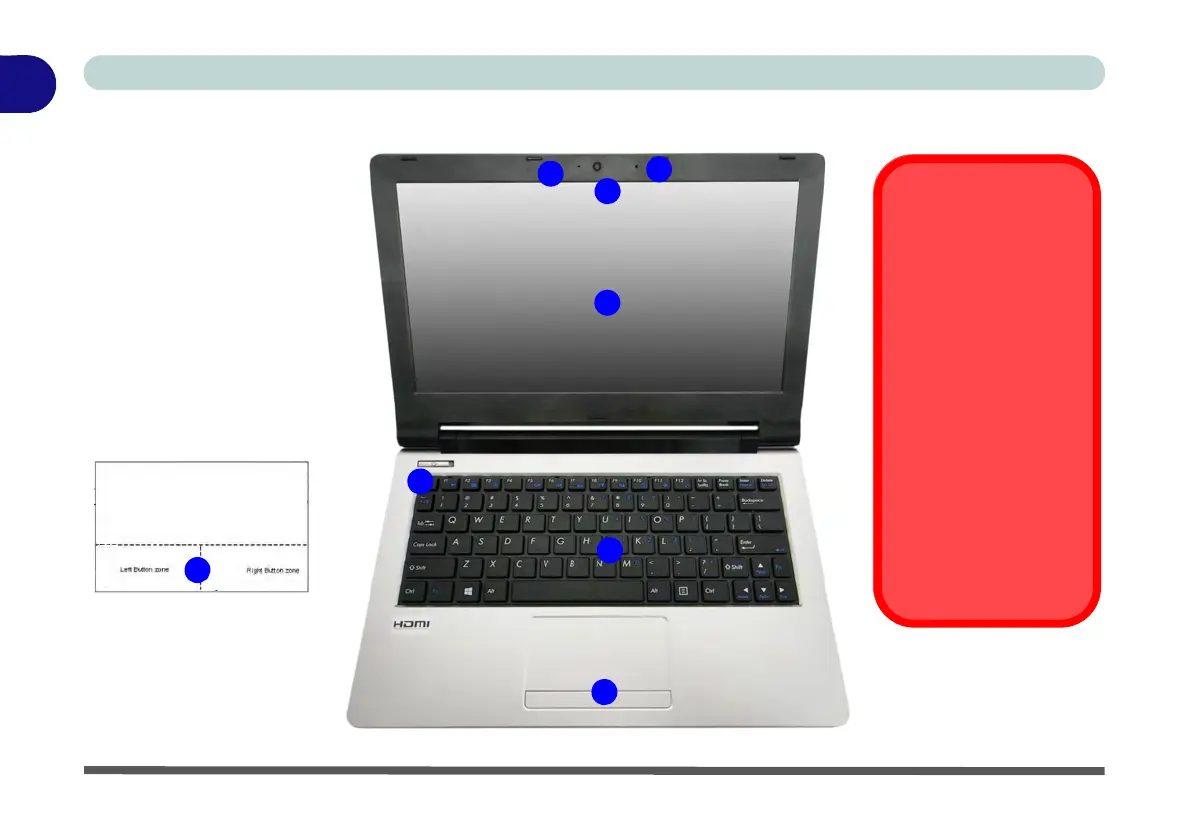
System Map: LCD Panel Open
Figure 1 - 2
LCD Panel Open
1. Built-in PC Camera
2. PC Camera LED
3. Built-In Microphone
4. LCD
5. Power Button
6. Keyboard
7. Touchpad & Buttons
7
Note that the Touchpad and
Buttons has a valid opera-
tional area indicated within
the dotted lines above.
3
5
1
7
4
6
2
Wireless Device
Operation Aboard
Aircraft
The use of any porta-
ble electronic trans-
mission devices
aboard aircraft is usu-
ally prohibited. Make
sure the WLAN &
Bluetooth module(s)
are OFF if you are us-
ing the computer
aboard aircraft by put-
ting the system in to
Airplane Mode (see
Table 1 - 3, on page 1
- 10).

Table of Contents