EasyManua.ls Logo

Stone Stonebook Mini - System Map: Front & Left Views

Default Icon
250 pages
Print Icon
To Next Page IconTo Next Page
To Previous Page IconTo Previous Page
Loading...
1 - 12 System Map: Front & Left Views
Quick Start Guide
1
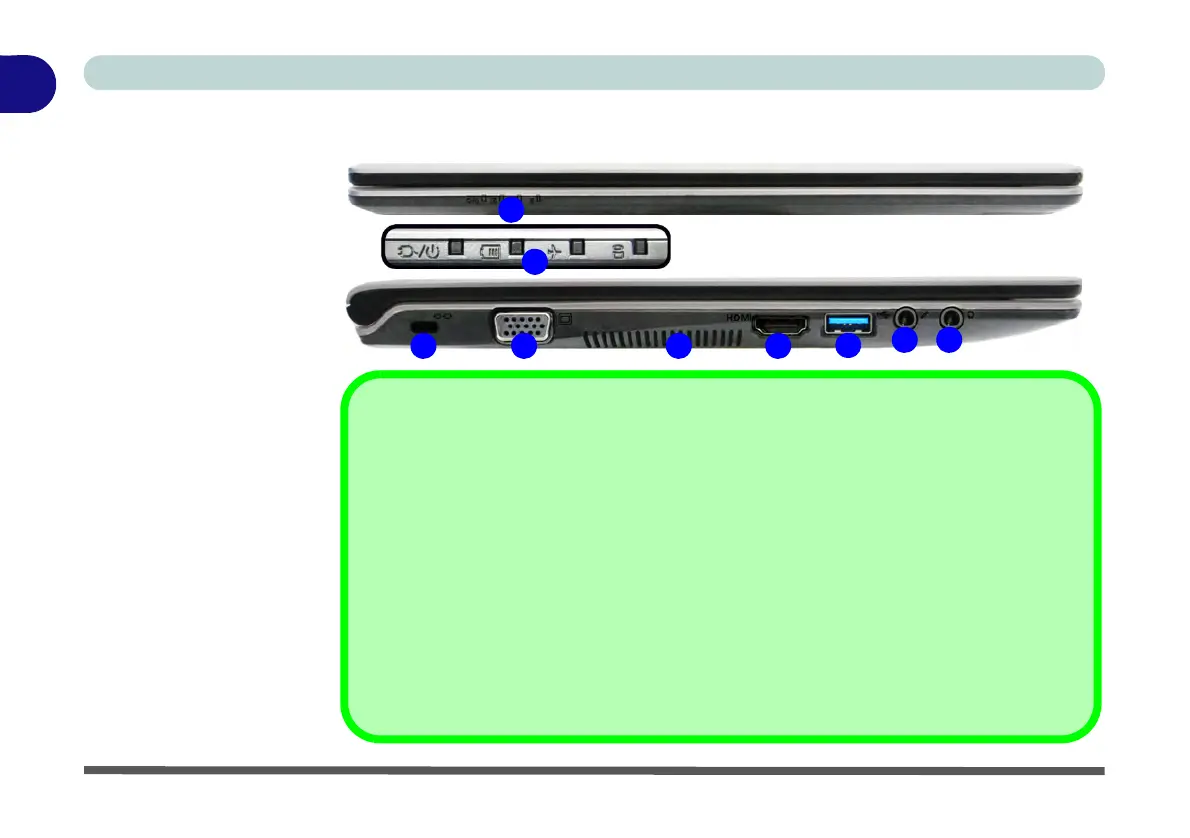
System Map: Front & Left Views
Figure 1 - 5
Front & Left Views
1. LED Indicators
2. Security Lock Slot
3. External Monitor
Port
4. Vent/Fan Intake/
Outlet
5. HDMI-Out Port
6. USB 3.0 Port
7. Microphone-In
Jack
8. Headphone-Out
Jack
USB 3.0 Port OR USB 2.0 Port
This model includes 1 * USB 3.0 port and 2 * USB 2.0 ports. The USB 3.0 port is denoted
by its blue color; the USB 2.0 ports are colored black.
Optical Device Drives
To install applications and drivers etc. you will need to attach an external optical CD/DVD
device to the USB ports.
HDMI Port
Note that the HDMI Port supports video and audio signals to attached external displays.
2
7
4
1
3
6
5
8
1

Table of Contents