1 - 8 Keyboard
Quick Start Guide
1
Keyboard
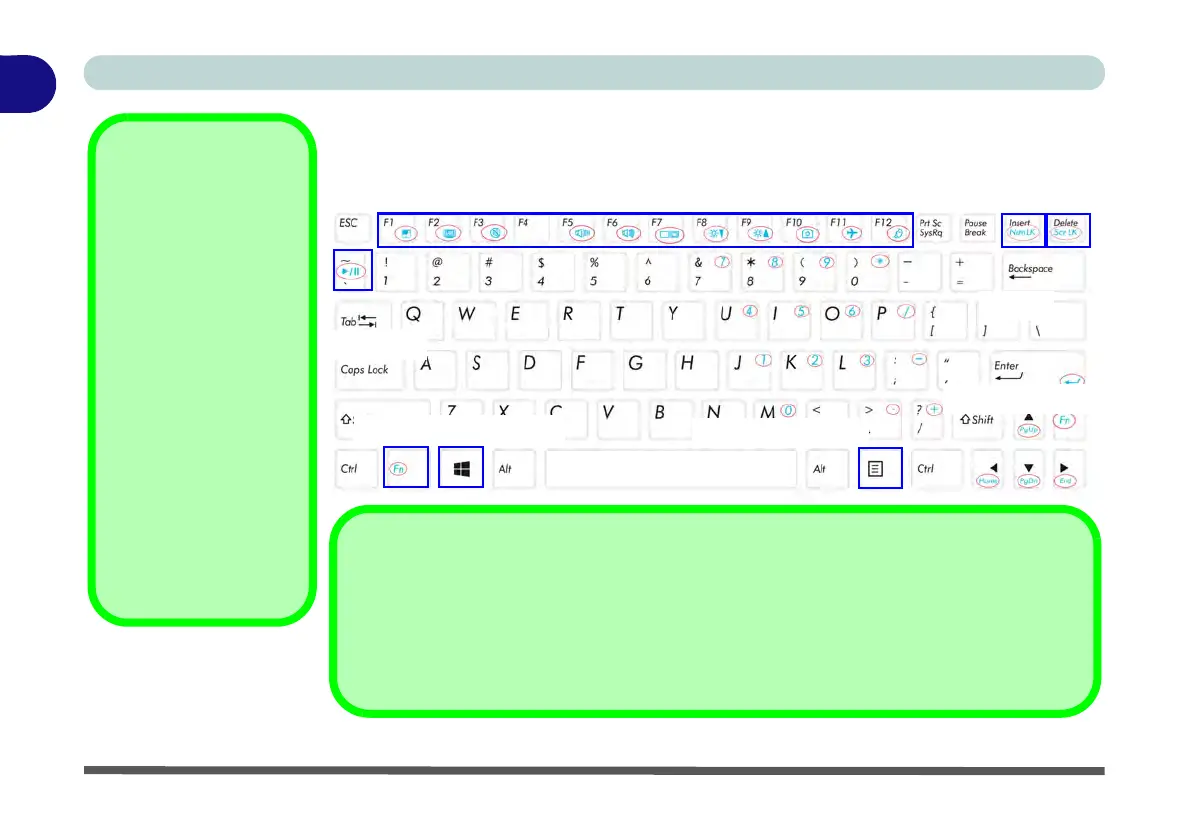
The keyboard features function keys to allow you to change operational features in-
stantly.
Figure 1 - 3 - Keyboard
Other Keyboards
If your keyboard is dam-
aged or you just want to
make a change, you can
use any standard USB
keyboard. The system will
detect and enable it auto-
matically. However spe-
cial functions/hot-keys
unique to the system’s
regular keyboard may not
work.
NumLk & Scr Lk
Hold down the Fn Key
and either Num Lk or Scr
Lk to enable number or
scroll lock, and check the
LED indicator for status.
Play/Pause
Fn Key / Windows Logo Key
Menu / Application Key
Numerical Keypad
Function Keys
Scr LkNumLk
Special Characters
Some software applications allow the number-keys to be used with Alt to produce special
characters. These special characters can only be produced by using the numeric keypad
(use the Fn key or NumLK). Regular number keys (in the upper row of the keyboard) will not
work. Make sure that Num Lk is on.



 To Next Page