EasyManua.ls Logo

Stone Stonebook Mini - System Map: Right & Rear Views

Default Icon
250 pages
Print Icon
To Next Page IconTo Next Page
To Previous Page IconTo Previous Page
Loading...
System Map: Right & Rear Views 1 - 13
Quick Start Guide
1
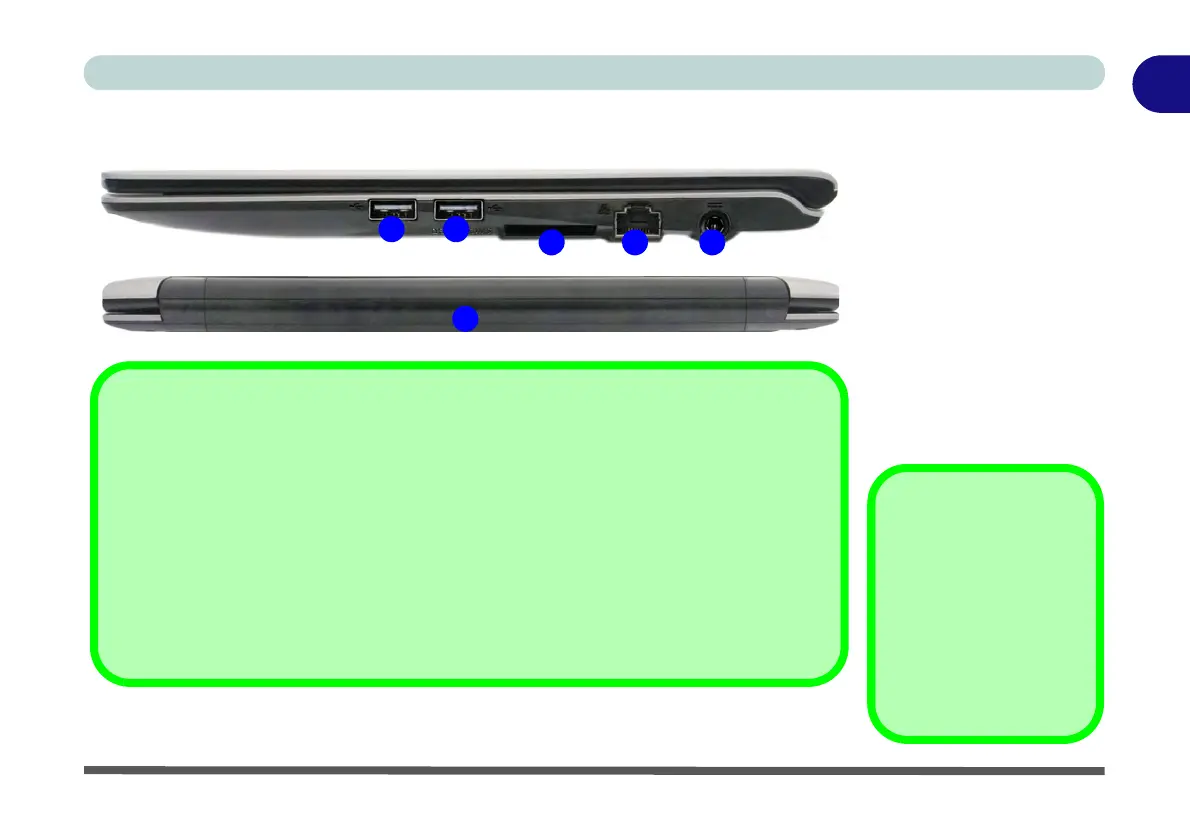
System Map: Right & Rear Views
Figure 1 - 6
Right & Rear Views
1. DC-In Jack
2. RJ-45 LAN Jack
3. Multi-in-1 Card
Reader
4. USB 2.0 Ports
5. Battery
USB 3.0 Port OR USB
2.0 Port
This model includes 1 *
USB 3.0 port and 2 *
USB 2.0 ports. The USB
3.0 port is denoted by its
blue color; the USB 2.0
ports are colored black.
4
2 1
W255EU
3
Battery Information
Always completely discharge, then fully charge, a new battery before using it. Completely
discharge and charge the battery at least once every 30 days or after about 20 partial dis-
charges. See “Battery Information” on page 3 - 14 for full instructions.
Multi-In-1 Card Reader
The card reader allows you to use the most popular digital storage card formats:
MMC (MultiMedia Card) / RS MMC
SD (Secure Digital) / Mini SD / SDHC / SDXC
5
4

Table of Contents